
CrowdStrike SaaS Security
Posture Management- Overview
- Setup
- Data & mappings
- Operations & API
- Changelog
The CrowdStrike SaaS Security Connector fetches and synchronizes security data from CrowdStrike's SaaS Security platform. It processes various objects such as alerts, violations, devices, hosts, and integrations, mapping them to the Brinqa Data Model.
Data retrieved from CrowdStrike Saas Security
| Connector Object | Required | Maps to Data Model |
|---|---|---|
| Integration | Yes | Cloud Account |
| Integrated User | Yes | Person |
| Alert | Yes | Alert |
| Alert Definition | Yes | Alert Definition |
| Violation | Yes | Violation |
| Violation Definition | Yes | Violation Definition |
| Device | Yes | Device |
| Host | Yes | Host |
| Compliance Control | Yes | - |
Model relationships
For detailed steps on how to view the data retrieved from CrowdStrike Saas Security in the Brinqa Platform, see How to view your data.
Connection settings
When setting up a data integration, select CrowdStrike Saas Security from the Connector dropdown and provide the following:
| Setting | Required | Default | Description |
|---|---|---|---|
| API URL | Yes | https://<region>.crowdstrike.com | CrowdStrike API URL |
| Client ID | Yes | (user input, Required) | CrowdStrike API client Id |
| Client secret | Yes | (user input, Required) | CrowdStrike API client secret |
| Page size | No | 5000 | The number of records to fetch for each paged request |
| Parallel requests | No | 8 | The maximum number of concurrent API requests, 1 to 32, defaulting to 8. Lower this if CrowdStrike reports rate limiting. A value of 0 or below is ignored and leaves the default in place; a value above 32 is reduced to 32. |
| Maximum retries | No | 5 | The maximum number of retry attempts before giving up a request |
Authentication
The connector authenticates using OAuth 2.0 Client Credentials flow.
Endpoint
| Method | URL |
|---|---|
POST | https://<region>.crowdstrike.com/oauth2/token |
Request Headers
| Header | Value |
|---|---|
Content-Type | application/x-www-form-urlencoded |
Request Body
grant_type=client_credentials&client_id=<clientId>&client_secret=<clientSecret>
| Parameter | Description |
|---|---|
grant_type | Always client_credentials |
client_id | OAuth2 Client ID |
client_secret | OAuth2 Client Secret |
Sample Response
{
  "access_token": "eyJhbGciOiJ...",
  "token_type": "Bearer",
  "expires_in": 1799
}
Usage
Once authenticated, all subsequent API requests include the bearer token:
Authorization: Bearer <access_token>
Sync Behavior
The connector supports incremental (delta) syncs. Each model declares a since sync token that is used to filter records during a sync; when no sync token is present (first run), the model enumerates its full result set.
- Alert — Incremental. When a sync token is present, the
sincetimestamp is passed to the alerts endpoint as thefrom_datefilter. - Alert Definition — Derived from the distinct alert types returned by the Alert sync, so it follows the same behavior as Alert.
- Integration, Integrated User, Violation, Violation Definition, Device, Host, and Compliance Control — Each accepts the
sinceparameter for record filtering; results are otherwise enumerated using the option-based filters documented per model (for examplestatus,impact,check_type, andintegration_id).
Per-model details are documented under each model's Sync Duration Parameter below.
How to obtain CrowdStrike Saas Security credentials
Generate a CrowdStrike client secret
For the CrowdStrike SaaS Security connector to use the CrowdStrike API, you must provide a client secret. CrowdStrike does not allow retrieving the client secret for an existing user, therefore, you must generate a new client secret instead. To do so, follow these steps:
-
Log in to your organization's CrowdStrike Falcon portal as an administrator.
-
From the navigation menu, click Support and resources, and then click API clients and keys.
-
Click Create API client.
The Create API client window displays.
-
Fill out the Client name, Description, and select the appropriate API scopes for the user.
-
Click Create.
Your new client ID, client secret, and recommended Base URL display. You cannot view the client secret again after this. Copy and save it to a secure location.
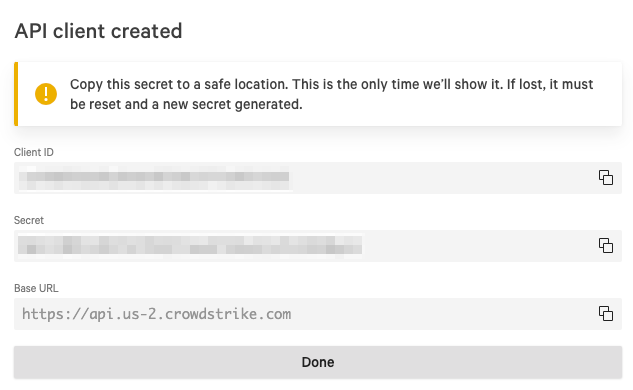
Note: If you do not have permissions to create a client secret, contact your CrowdStrike administrator. For additional information, see CrowdStrike documentation.
Attribute mappings
Expand the sections below to view the mappings between the source and the Brinqa data model attributes:
Integration
| Source Field Name | SDM Attribute |
|---|---|
| account_id | ACCOUNT_ID |
alias | ALIAS |
categories | CATEGORIES |
| created_time | SOURCE_CREATED_DATE |
enabled | ENABLED |
id | UID |
| integration_status | STATUS |
| integration_status | SOURCE_STATUS |
issues | ISSUES |
| last_run | LAST_SCANNED |
| N/A | LAST_CAPTURED |
name | NAME |
| saas_id | SAAS_ID |
| saas_name | SAAS_NAME |
Integrated User
| Source Field Name | SDM Attribute |
|---|---|
| account_id | ACCOUNT_ID |
categories | CATEGORIES |
company | COMPANY |
country | COUNTRY |
department | DEPARTMENT |
description | DESCRIPTION |
domain | DOMAIN |
emails | EMAILS |
enabled | ENABLED |
exposures | EXPOSURES |
| exposures_total | EXPOSURES_TOTAL |
| full_name | NAME |
id | UID |
integrations | INTEGRATIONS |
| integrations_total | INTEGRATIONS_TOTAL |
| login_names | LOGIN_NAMES |
| N/A | LAST_CAPTURED |
roles | ROLES |
status | SOURCE_STATUS |
status | STATUS |
| user_item_identity | USER_ITEM_IDENTITY |
Alert
| Source Field Name | SDM Attribute |
|---|---|
| account_id | ACCOUNT_ID |
| affected_diff | AFFECTED_DIFF |
id | UID |
integration.id | TARGETS |
| is_archived | IS_ARCHIVED |
| N/A | PROVIDER_STATUS |
| N/A | SOURCE_STATUS |
| N/A | LAST_CAPTURED |
| new_affected_count | NEW_AFFECTED_COUNT |
| security_check_api_link | SECURITY_CHECK_API_LINK |
source | SOURCE |
| source_id | TYPE |
timestamp | SOURCE_CREATED_DATE |
| user_who_archived | USER_WHO_ARCHIVED |
Alert Definition
| Source Field Name | SDM Attribute |
|---|---|
| alert_type | NAME |
categories | CATEGORIES |
description | DESCRIPTION |
id | UID |
| N/A | LAST_CAPTURED |
Violation
| Source Field Name | SDM Attribute |
|---|---|
| account_id | TARGETS |
| account_id | ACCOUNT_ID |
affected | AFFECTED |
| base_check_id | TYPE |
| base_check_id | BASE_CHECK_ID |
| created_by | CREATED_BY |
| creation_date | SOURCE_CREATED_DATE |
| creation_date | FIRST_FOUND |
| dismiss_expiration_date | DISMISS_EXPIRATION_DATE |
| dismiss_reason | DISMISS_REASON |
id | UID |
id | SECURITY_CHECK_ID |
| is_global | IS_GLOBAL |
| N/A | PROVIDER_STATUS |
| N/A | LAST_CAPTURED |
| saas_name | SAAS_NAME |
status | SOURCE_STATUS |
| status_last_changed_date | SOURCE_LAST_MODIFIED |
| status_reason | STATUS_REASON |
| user_who_dismissed | USER_WHO_DISMISSED |
Violation Definition
| Source Field Name | SDM Attribute |
|---|---|
| control_codes | CONTROL_CODES |
id | UID |
| N/A | LAST_CAPTURED |
| remediation_plan | DESCRIPTION |
| remediation_plan | RECOMMENDATION |
| security_check_type | NAME |
| security_domain | CATEGORIES |
severity | SOURCE_SEVERITY |
severity (normalized) | SEVERITY |
severity (scored) | SEVERITY_SCORE |
Device
| Source Field Name | SDM Attribute |
|---|---|
| account_id | ACCOUNT_ID |
categories | CATEGORIES |
email | |
| has_user_association | HAS_USER_ASSOCIATION |
id | UID |
integrations | INTEGRATIONS |
| last_seen | LAST_SEEN |
| N/A | LAST_CAPTURED |
name | NAME |
os | OS |
| os_platform | OS_PLATFORM |
| os_version | OS_VERSION |
| user_exists | USER_EXISTS |
Host
| Source Field Name | SDM Attribute |
|---|---|
| account_id | ACCOUNT_ID |
categories | CATEGORIES |
email | |
| has_user_association | HAS_USER_ASSOCIATION |
id | UID |
integrations | INTEGRATIONS |
| last_seen | LAST_SEEN |
| mac_addresses | MAC_ADDRESSES |
| N/A | LAST_CAPTURED |
name | NAME |
os | OS |
| os_platform | OS_PLATFORM |
| os_version | OS_VERSION |
| user_exists | USER_EXISTS |
Compliance Control
| Source Field Name | SDM Attribute |
|---|---|
| control_title | CONTROL_TITLE |
domain | DOMAIN |
| exposure_id | UID |
| N/A | LAST_CAPTURED |
standard | STANDARD |
Operations & API
Expand each connector object to see its operation options, delta-sync behavior, and the API it uses. See connector operation options for how to apply operation options (keys and values are case-sensitive).
Integration
Operation options
| Option | Type | Default | Description |
|---|---|---|---|
saas_id | String | — | Filter by SaaS ID |
Delta sync
Supported.
API
- Type: REST · Endpoint:
GET {baseUrl}/saas-security/entities/integrations/v3
Integrated User
Operation options
| Option | Type | Default | Description |
|---|---|---|---|
integration_id | String | — | Filter by integration ID |
email | String | — | Filter by user email |
privileged_only | String | — | Filter to return only privileged users |
Delta sync
Supported.
API
- Type: REST · Endpoint:
GET {baseUrl}/saas-security/entities/users/v3
Alert
Operation options
| Option | Type | Default | Description |
|---|---|---|---|
alert_type | String | — | Filter by alert type |
Delta sync
Supported.
API
- Type: REST · Endpoint:
GET {baseUrl}/saas-security/entities/alerts/v3 - Default filters: when a sync token is present,
from_dateis set from thesincetimestamp;typeis set when thealert_typeoption is provided
Alert Definition
Operation options
| Option | Type | Default | Description |
|---|---|---|---|
alert_type | String | — | Filter by alert type |
Delta sync
Supported.
API
- Type: REST · Endpoint:
GET {baseUrl}/saas-security/entities/alerts/v3
Violation
Operation options
| Option | Type | Default | Description |
|---|---|---|---|
status | String | — | Filter by violation status |
impact | String | — | Filter by violation impact |
check_type | String | — | Filter by check type |
integration_id | String | — | Filter by integration ID |
include_compliance | Boolean | false | Whether to include compliance control data |
Delta sync
Supported.
API
- Type: REST · Endpoint:
GET {baseUrl}/saas-security/entities/checks/v3 - Default filters:
status,impact,check_type, andintegration_idare applied when the corresponding options are provided
Violation Definition
Operation options
| Option | Type | Default | Description |
|---|---|---|---|
status | String | — | Filter by violation status |
impact | String | — | Filter by violation impact |
check_type | String | — | Filter by check type |
integration_id | String | — | Filter by integration ID |
include_compliance | Boolean | false | Whether to include compliance control data |
Delta sync
Supported.
API
- Type: REST · Endpoint:
GET {baseUrl}/saas-security/entities/checks/v3 - Default filters:
status,impact,check_type, andintegration_idare applied when the corresponding options are provided
Device
Operation options
| Option | Type | Default | Description |
|---|---|---|---|
integration_id | String | — | Filter by integration ID |
Delta sync
Supported.
API
- Type: REST · Endpoint:
GET {baseUrl}/saas-security/entities/devices/v3 - Default filters: results are filtered client-side to mobile OS platforms (
Android,iPad);integration_idis applied when the option is provided
Host
Operation options
| Option | Type | Default | Description |
|---|---|---|---|
integration_id | String | — | Filter by integration ID |
Delta sync
Supported.
API
- Type: REST · Endpoint:
GET {baseUrl}/saas-security/entities/devices/v3 - Default filters: results are filtered client-side to desktop OS platforms (
Mac,Windows);integration_idis applied when the option is provided
Compliance Control
Operation options
| Option | Type | Default | Description |
|---|---|---|---|
status | String | — | Filter by violation status |
impact | String | — | Filter by violation impact |
check_type | String | — | Filter by check type |
integration_id | String | — | Filter by integration ID |
include_compliance | Boolean | false | Whether to include compliance control data |
Delta sync
Supported.
API
- Type: REST · Endpoint:
GET {baseUrl}/saas-security/entities/compliance/v3
Changelog
The CrowdStrike Saas Security connector has undergone the following changes:
| Version | Description | Migration Steps |
|---|---|---|
| 3.3.3 | No changes in this release. | N/A |
| 3.3.1 | Improvements - Parallel requests now defaults to 8 and accepts 1 to 32. It previously defaulted to the number of processors available to the connector, capped at 4, so a connector in a small container was limited by the size of its machine rather than by what the CrowdStrike account could serve. In SaaS Security this setting affects violation and compliance-control collection only — alerts, alert definitions, devices, hosts, integrated users and integrations are collected one page after another and are unaffected. Overall request volume is unchanged either way, because every SaaS Security request is paced to roughly 100 per minute regardless of this setting. Values of 0 or below are ignored and leave the default in place; a value above 32 is reduced to 32. | N/A |
| 3.3.0 | No changes in this release. | N/A |
| 3.2.24 | Bug Fixes - Hosts and devices without a valid identifier are now skipped during synchronization, resolving a sync failure caused by host records with blank IDs. | N/A |
| 3.2.23 | No changes in this release. | N/A |
| 3.2.22 | Improvements - Connector-sourced attribute values now take precedence over non-connector data channels (manual edits, bulk imports, UI input) when the platform consolidates records, so CrowdStrike data is no longer overridden by lower-priority sources. | N/A |
| 3.2.21 | No changes in this release. | N/A |
| 3.2.20 | No changes in this release. | N/A |
| 3.2.19 | Overview The CrowdStrike SaaS Security connector integrates with CrowdStrike Falcon Shield (SaaS Security) to synchronize integrated SaaS applications and their users, security alerts, policy violations, compliance controls, and managed devices and hosts. Category: Posture Management Models | N/A |