Black Duck Coverity (REST)
Application Security- Overview
- Setup
- Data & mappings
- Operations & API
- Changelog
The Coverity REST connector integrates with Black Duck Coverity (formerly Synopsys Coverity), a static application security testing (SAST) platform, via its v2 REST API. It synchronizes code projects, streams (per-branch analysis channels), static-code defects, and defect-type definitions into the Brinqa platform.
Data retrieved from Black Duck Coverity (REST)
| Connector Object | Required | Maps to Data Model |
|---|---|---|
| Project | Yes | Code Project |
| Stream | Yes | Code Repository |
| Defect | Yes | Static Code Finding |
| Defect Type | Yes | Static Code Finding Definition |
Model relationships
For detailed steps on how to view the data retrieved from Black Duck Coverity (REST) in the Brinqa Platform, see How to view your data.
Connection settings
When setting up a data integration, select Black Duck Coverity (REST) from the Connector dropdown and provide the following:
| Setting | Required | Default | Description |
|---|---|---|---|
| Server URL | Yes | https://<server_name> | Black Duck Coverity server URL |
| Username | Yes | — | Black Duck Coverity username |
| Password | Yes | — | Black Duck Coverity user password |
| Page size | No | 100 | Maximum number of records to get per API request |
| Parallel requests | No | min(4, availableProcessors) | Maximum number of parallel API requests |
| SSL/TLS | No | false | Skip certificate verification |
| Request timeout (ms) | No | 300000 | Timeout for each API request in milliseconds. Minimum is 1 minute, maximum is 1 hour. |
Authentication
Method
HTTP Basic Authentication. Credentials are Base64-encoded as username:password and attached to every request — there is no separate authentication call.
Endpoint
No dedicated authentication endpoint; the credentials are sent on every API request.
Request Headers
| Header | Value |
|---|---|
Authorization | Basic <base64(username:password)> |
Content-Type | application/json |
Usage
The Authorization header is set on every outgoing request through setHeaders() in CoverityRestConnector and reused unchanged for the lifetime of the connector instance.
Sync Behavior
The connector supports incremental (delta) syncs. It maintains a sync token between runs and applies it as an incremental timestamp filter, so each run re-processes only the records that changed after the previous sync. The initial run retrieves the complete data set; later runs are incremental. The specific timestamp field applied to each object is documented under that object's Sync Duration Parameter.
How to obtain Black Duck Coverity (REST) credentials
Create a Black Duck Coverity user account
For the Black Duck Coverity (REST) connector to use the Coverity API, Brinqa recommends creating a dedicated user account in Black Duck Coverity with the appropriate role to retrieve data. To create the user account, follow these steps:
-
Log in to your organization's Black Duck Coverity server as an administrator.
-
Navigate to Configuration > Users & Groups.
-
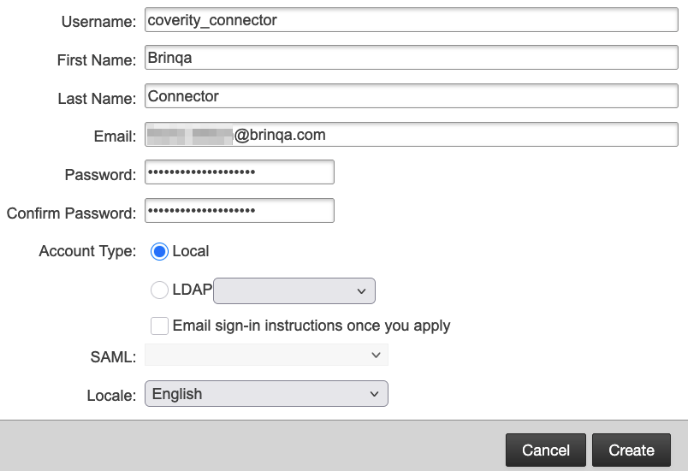
Click Add and create a new user account.
Complete the Username, First name, Last name, Email, and Password fields. Leave the remaining fields as-is.
-
Click Create.
The new user account is now created but does not yet have any assigned roles or permissions. To assign a role to the user, follow these steps:
-
In the Users & Groups section, locate the newly created user account in the list.
-
Select the account, click the Roles tab, then click Edit under the Global scope.
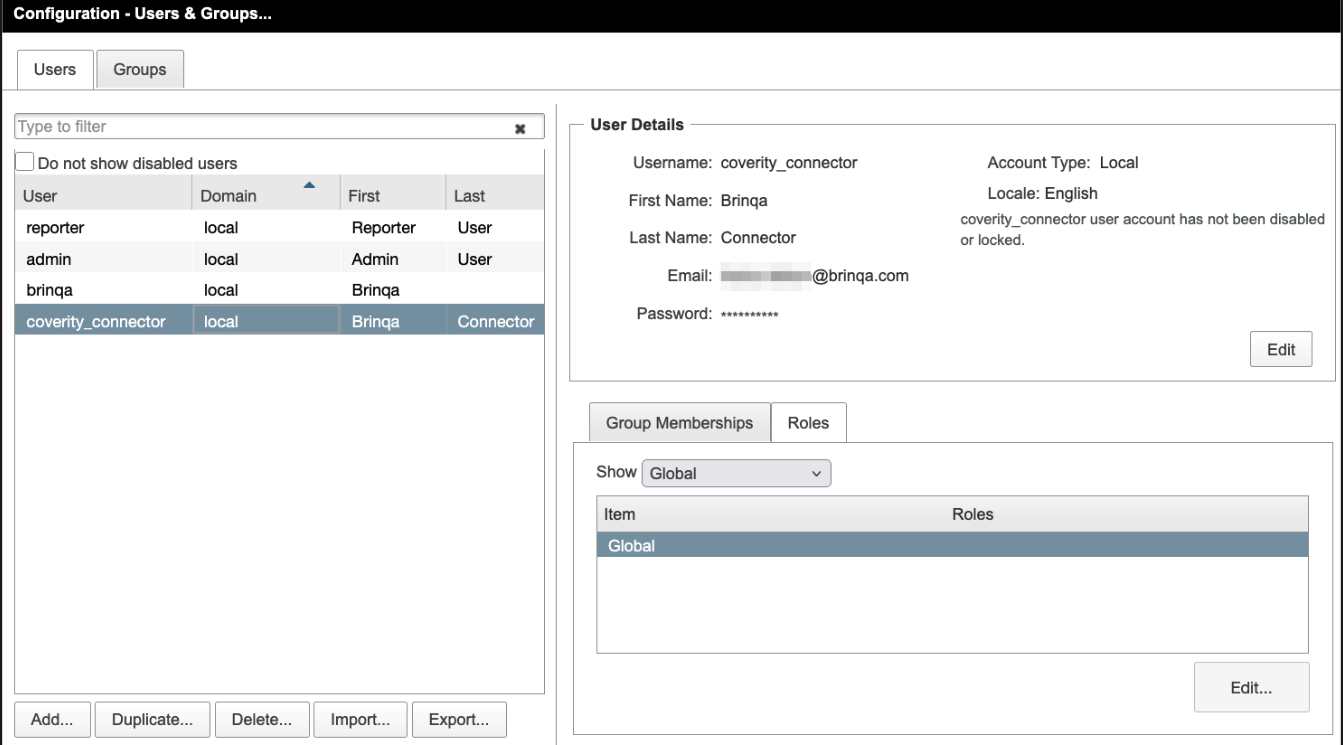
Roles assigned under the Global scope apply across all projects. If your organization enforces project-specific permissions, ensure that the user account has access to all relevant data scopes. For additional information on roles and access management, see the Coverity documentation on roles and role-based access control
-
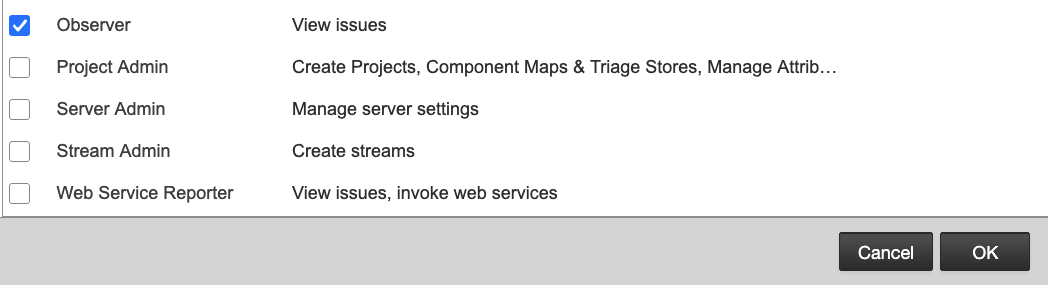
Select the Observer role from the list of available roles.
The Observer role is considered the minimum role required to access the Coverity API and retrieve data.
-
Click OK, then click Done to ensure that you save your changes.
Note: If you do not have permissions to create a new account or assign roles, contact your Black Duck Coverity administrator. For additional information, see the Black Duck Coverity documentation on configuring users and roles.
(Optional) Create a Black Duck Coverity service account
In addition to creating a new user account with the Observer role, you can also create and assign a service account to your project(s) in Black Duck Coverity. A service account is a dedicated account that is used for automated processes and integrations, such as the Black Duck Coverity (REST) connector. For additional information, see Black Duck Coverity documentation on how to create a service account and assign it to a project.
Attribute mappings
Expand the sections below to view the mappings between the source and the Brinqa data model attributes:
Project
| Source Field Name | SDM Attribute |
|---|---|
constant | CATEGORIES |
constant | STATUS |
ProjectResource.dateCreated | SOURCE_CREATED_DATE |
ProjectResource.dateModified | SOURCE_LAST_MODIFIED |
ProjectResource.description | DESCRIPTION |
ProjectResource.name (fallback: projectKey) | NAME |
ProjectResource.projectKey | UID |
Stream
| Source Field Name | SDM Attribute |
|---|---|
constant | CATEGORIES |
constant | STATUS |
ProjectResource.projectKey | PROJECTS |
StreamResource.description | DESCRIPTION |
StreamResource.language | LANGUAGES |
StreamResource.name | UID |
StreamResource.name | NAME |
StreamResource.outdated | OUTDATED |
StreamResource.primaryProjectName | PROJECT_NAME |
Defect
| Source Field Name | SDM Attribute |
|---|---|
[IssueResource.project.id] | TARGETS |
| derived from sourceCodeInfo events | EVENTS |
| derived from STATUS | STATUS_CATEGORY |
IssueResource.action | ACTION |
IssueResource.analysis (from sourceCodeInfo endpoint) | RESULTS |
IssueResource.cid | UID |
IssueResource.cid | NAME |
IssueResource.classification | CLASSIFICATION |
IssueResource.displayCategory | CATEGORIES |
IssueResource.displayComponent | COMPONENT |
IssueResource.displayFile | FILE_NAME |
IssueResource.displayFunction | FUNCTION_NAME |
IssueResource.externalReference | EXTERNAL_REFERENCE |
IssueResource.firstDetected | FIRST_FOUND |
IssueResource.firstSnapshotDate | FIRST_SNAPSHOT_DATE |
IssueResource.firstSnapshotDescription | FIRST_SNAPSHOT_DESC |
IssueResource.firstSnapshotId | FIRST_SNAPSHOT_ID |
IssueResource.firstSnapshotStream | FIRST_SNAPSHOT_STREAM |
IssueResource.firstSnapshotTarget | FIRST_SNAPSHOT_TARGET |
IssueResource.firstSnapshotVersion | FIRST_SNAPSHOT_VERSION |
IssueResource.fixTarget | FIX_TARGET |
IssueResource.getDefectTypeUid() (hash of displayType + checker) | TYPE |
IssueResource.lastDetected | LAST_FOUND |
IssueResource.lastDetectedDescription | LAST_SNAPSHOT_DESC |
IssueResource.lastDetectedId | LAST_SNAPSHOT_ID |
IssueResource.lastDetectedStream | LAST_SNAPSHOT_STREAM |
IssueResource.lastDetectedTarget | LAST_SNAPSHOT_TARGET |
IssueResource.lastDetectedVersion | LAST_SNAPSHOT_VERSION |
IssueResource.lastTriaged | LAST_TRIAGED |
IssueResource.legacy | LEGACY |
IssueResource.lineNumber | LINE_NUMBER |
IssueResource.mergeExtra | MERGE_EXTRA |
IssueResource.mergeKey | MERGE_KEY |
IssueResource.occurrenceCount | OCCURRENCES |
IssueResource.owner | OWNER |
IssueResource.ownerFullName | OWNER_NAME |
IssueResource.project.id | PROJECT_ID |
IssueResource.project.name | PROJECT_NAME |
IssueResource.severity | SOURCE_SEVERITY |
IssueResource.status (raw) | PROVIDER_STATUS |
normalized from IssueResource.severity | SEVERITY |
normalized from IssueResource.status | STATUS |
normalized from IssueResource.status | SOURCE_STATUS |
Defect Type
| Source Field Name | SDM Attribute |
|---|---|
["CWE-" + IssueResource.cwe] | CWE_IDS |
["CWE-" + IssueResource.cwe] | WEAKNESSES |
[IssueResource.displayCategory, IssueResource.displayIssueKind] | CATEGORIES |
| derived from normalized severity | SEVERITY_SCORE |
IssueResource.checker | CHECKER |
IssueResource.displayImpact | IMPACT |
IssueResource.displayImpact | SOURCE_SEVERITY |
IssueResource.displayType (fallback: UID) | NAME |
IssueResource.fileLanguage | LANGUAGES |
IssueResource.getDefectTypeUid() | UID |
| normalized from displayImpact | SEVERITY |
Operations & API
Expand each connector object to see its operation options, delta-sync behavior, and the API it uses. See connector operation options for how to apply operation options (keys and values are case-sensitive).
Project
Operation options
This object does not support any operation options.
Delta sync
Supported.
API
- Type: REST · Endpoint:
GET /api/v2/projects?queryType=bySnapshot&includeColumnLabels=false
Stream
Operation options
This object does not support any operation options.
Delta sync
Supported.
API
- Type: REST (streams are nested in
ProjectResource.streams[]) · Endpoint:GET /api/v2/projects?queryType=bySnapshot&includeColumnLabels=false
Defect
Operation options
This object does not support any operation options.
Delta sync
Supported.
API
- Type: REST
Defect Type
Operation options
This object does not support any operation options.
Delta sync
Supported.
API
- Type: REST (derived from the same
POST /api/v2/issues/searchquery asDefect)
Changelog
The Black Duck Coverity (REST) connector has undergone the following changes:
| Version | Description | Migration Steps |
|---|---|---|
| 3.2.10 | No changes in this release. | N/A |
| 3.2.9 | No changes in this release. | N/A |
| 3.2.8 | No changes in this release. | N/A |
| 3.2.7 | No changes in this release. | N/A |
| 3.2.6 | Improvements - Connector-sourced attribute values now take precedence over non-connector data channels (manual edits, bulk imports, UI input) when the platform consolidates records, so Synopsys data is no longer overridden by lower-priority sources. | N/A |
| 3.2.5 | No changes in this release. | N/A |
| 3.2.4 | No changes in this release. | N/A |
| 3.2.3 | New Features - Added "Line number" and "Merge extra" attributes to Defects, exposing the source line where the defect occurs and additional merge metadata from Coverity. | N/A |
| 3.2.2 | New Features - Added "Categories" and "Status" attributes to the Stream model, surfacing the defect categories and status associated with each Coverity stream. | N/A |
| 3.2.1 | Overview The Coverity (REST) connector integrates with Coverity (Synopsys) over its REST API to synchronize static analysis projects, streams, and the defects identified in them. Category: Application Security Models | N/A |