
Microsoft Defender for EASM
External Attack Surface Management- Overview
- Setup
- Data & mappings
- Operations & API
- Changelog
The Microsoft Defender External Attack Surface Management Connector enables integration with Microsoft Defender External Attack Surface Management (EASM). It allows your application to discover, monitor, and manage external assets, identify vulnerabilities, and receive alerts about potential threats to your organization's attack surface.
Data retrieved from Microsoft Defender for EASM
| Connector Object | Required | Maps to Data Model |
|---|---|---|
| Domain | Yes | Site |
| Host | Yes | Host |
| IPAddress | Yes | Host |
| IPBlock | Yes | Ip Range |
| SSLCertificate | Yes | Certificate |
| Page | Yes | Site |
| Asn | Yes | Network |
| Contact | Yes | Person |
| Observation | Yes | Vulnerability |
| ObservationDefinition | Yes | Vulnerability Definition |
Model relationships
For detailed steps on how to view the data retrieved from Microsoft Defender for EASM in the Brinqa Platform, see How to view your data.
Connection settings
When setting up a data integration, select Microsoft Defender for EASM from the Connector dropdown and provide the following:
| Setting | Required | Default | Description |
|---|---|---|---|
| URL | No | https://<server>/subscriptions/{subscriptionId}/resourceGroups/{resourceGroupName}/workspaces/{workspaceName} | The full API endpoint URL. This is automatically computed from the Server, Subscription ID, Resource group name, and Workspace name fields. |
| Login URL | Yes | https://login.microsoftonline.com | Microsoft Identity Platform authentication URL |
| Client ID | Yes | Default - (user input, Required) | The service principal client ID. The client ID is generated during service principal registration. |
| Client secret | Yes | Default - (user input, Required) | The service principal client secret or password. |
| Tenant ID | Yes | Default - (user input, Required) | The tenant or domain the credential is authorized for. The tenant ID is generated during service principal registration. |
| Maximum retries | No | 5 | The maximum number of retry attempts before giving up a request |
| Server | Yes | Default - (user input, Required) | Specify the EASM server endpoint, for example: centralus.easm.defender.microsoft.com |
| Subscription ID | Yes | Default - (user input, Required) | Azure Subscription ID associated with the Defender EASM resource. |
| Resource group name | Yes | Default - (user input, Required) | Azure Resource group where the Defender EASM workspace is located. |
| Workspace name | Yes | Default - (user input, Required) | Name of the Defender EASM workspace. |
| Page size | No | 100 | Number of records to fetch per API call. Default is 100 |
| Parallel requests | No | min(4, availableProcessors) | Maximum number of parallel API requests |
| Fetch connected assets | No | false | When enabled, the connector will make additional API calls to fetch connected asset relationships for each asset during sync. This provides richer relationship data but increases API usage and sync time. Default is false. |
| Connect timeout (seconds) | No | — | How long to wait for a connection to Microsoft to be established. Default is 300. |
| Read timeout (seconds) | No | — | How long to wait for Microsoft to start answering a request. Default is 120. Raise this if syncs fail with "Read timed out" on a large tenant, where some requests take longer to answer than the default allows. |
Authentication
The connector uses OAuth 2.0 client credentials flow to authenticate with Microsoft Entra ID (Azure AD).
Endpoint
| Method | URL |
|---|---|
POST | https://login.microsoftonline.com/{tenantId}/oauth2/v2.0/token |
Request Headers
| Header | Value |
|---|---|
Content-Type | application/x-www-form-urlencoded |
Request Body
| Parameter | Value |
|---|---|
grant_type | client_credentials |
client_id | your-client-id |
client_secret | your-client-secret |
scope | https://easm.defender.microsoft.com/.default |
Response Fields
| Field | Type | Description |
|---|---|---|
token_type | String | Token type (Bearer) |
expires_in | Integer | Token validity in seconds |
access_token | String | Access token for API requests |
Usage
Once authenticated, all subsequent API requests include the bearer token:
Authorization: Bearer <access_token>
Sync Behavior
The connector supports both full and incremental (delta) syncs for every model. On each sync:
- Incremental (delta) sync — When a sync-since timestamp is provided, it is appended to the asset filter as
updatedAt >= "<since>", so only assets created or modified since the last sync are retrieved. - Full sync — When no sync-since timestamp is set (for example, the first sync), the filter omits the
updatedAtclause and all assets matching the configuredstate(and optionaldiscoGroup) are pulled.
All asset models (Domain, Host, IPAddress, IPBlock, SSLCertificate, Page, Asn, Contact) follow this behavior directly. The Observation and ObservationDefinition models apply the same since filter to the underlying asset pull; the per-asset getObservations request itself always filters observationState=active.
Per-model incremental details are documented under each model's Sync Duration Parameter below.
How to obtain Microsoft Defender for EASM credentials
Register a Microsoft Azure application
You must create a new application for the Microsoft Defender External Attack Surface Management connector to authenticate with Azure AD and access the Defender EASM APIs. To register an application in your Azure AD tenant, follow these steps:
-
Log in to your Microsoft Azure Portal as an administrator.
-
Navigate to and click Microsoft Entra ID.
-
On the left-hand side of the page, click App registrations, and then click New registration.
-
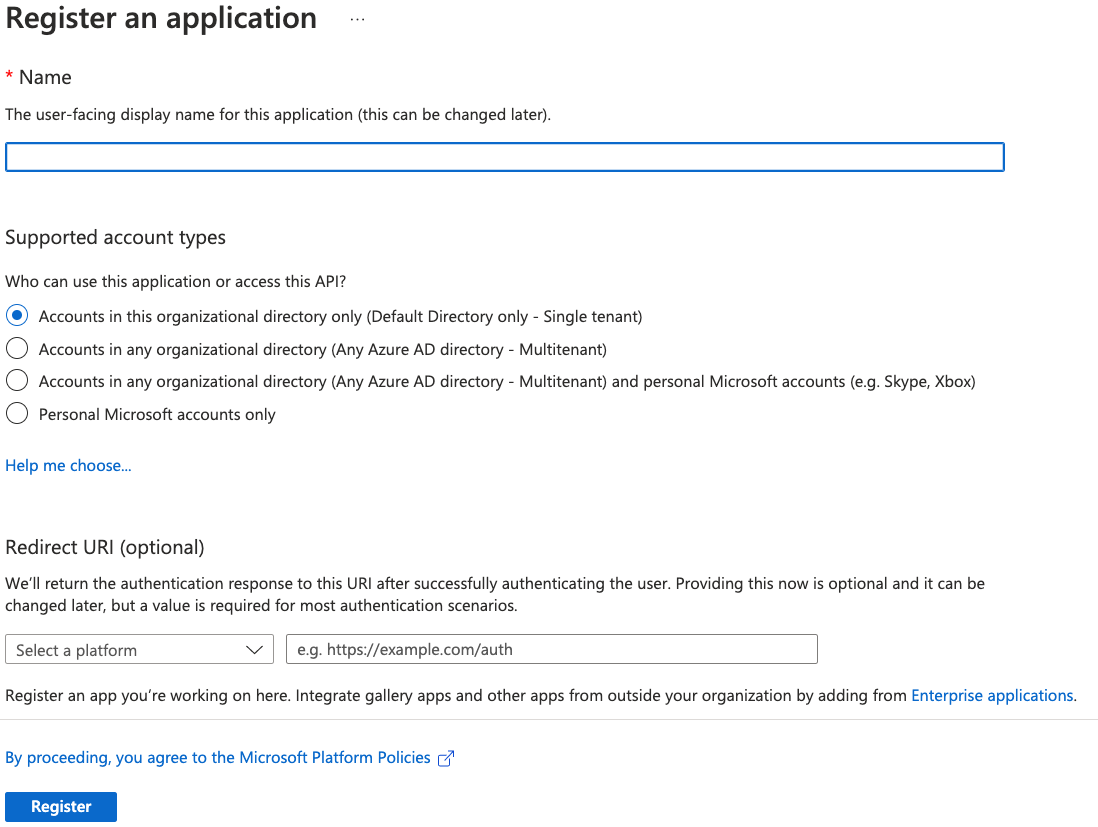
Give your new application a name, select the supported account types, and provide an optional Redirect URI. If you do not have a redirect URI, you can leave the field as is.
-
Click Register.
Note: For additional details about registering an application in Azure AD and creating a service principal, see Microsoft Azure documentation.
Obtain Microsoft Azure credentials
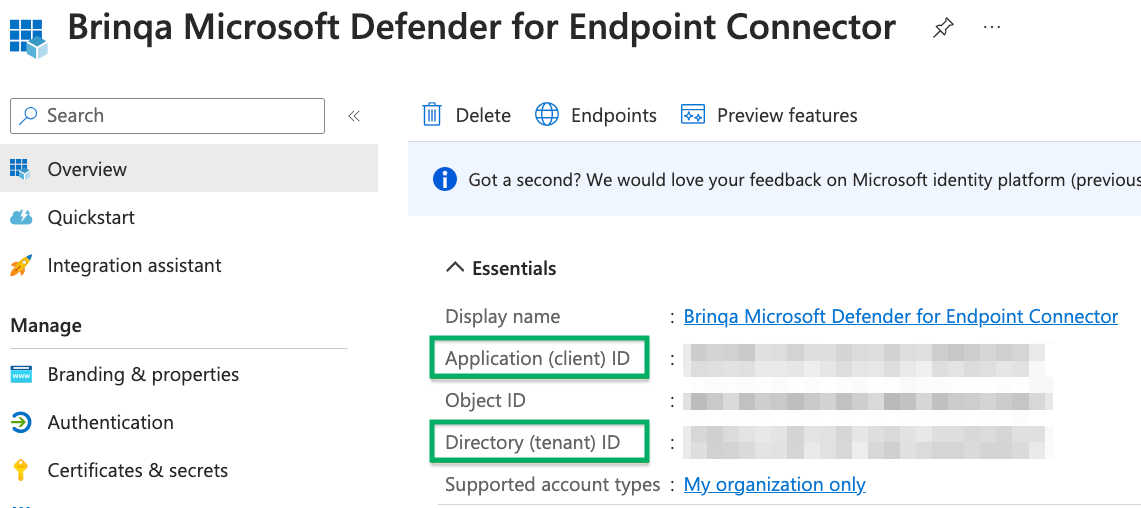
After you have created your new Microsoft Azure application, your client and tenant ID display. Copy the Application (client) ID and Directory (tenant) ID as shown below:
To obtain your client secret, follow these steps:
-
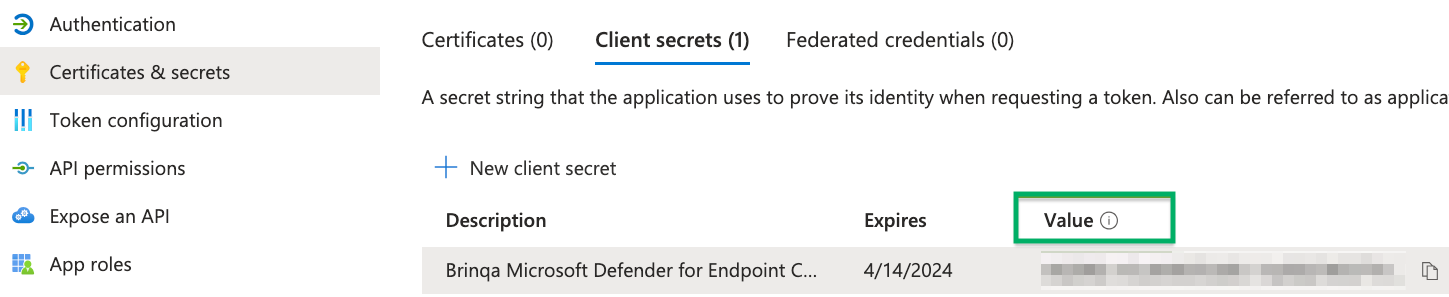
Click Certificates & secrets and then click New client secret.
-
Provide a description, set an expiry date, and then click Add.
The new client secret displays. You cannot view the client secret again. There is both a Value and Secret ID. The Value field is what is needed for authentication. Copy the Value field and save it in a secure location.
Assign permissions
After you have created your new Microsoft Azure application and obtained the authentication credentials, you must assign the required permissions for the application to access your Defender EASM data. To do so, follow these steps:
-
Navigate to API permissions > Add a permission > APIs my organization uses and search for EASM API.
-
Click Application permissions, grant the following permission, and then click Add permissions:
- EASM:
user_impersonation(or equivalent read access)
- EASM:
-
Click Grant admin consent for default directory, and then click Yes in the confirmation dialog.
Note: The Defender EASM API uses the scope https://easm.defender.microsoft.com/.default for authentication. Ensure the application has the appropriate permissions assigned. For additional information, see Microsoft EASM documentation.
Attribute mappings
Expand the sections below to view the mappings between the source and the Brinqa data model attributes:
Domain
| Source Field Name | SDM Attribute |
|---|---|
| ASSET_CATEGORY_DOMAIN | CATEGORIES |
assetResource.asset().firstSeen() | FIRST_SEEN |
assetResource.asset().lastSeen() | LAST_SEEN |
assetResource.asset().locations().city() | CITIES |
assetResource.asset().locations().country() | COUNTRIES |
assetResource.asset().locations().state() | STATES |
assetResource.createdDate() | SOURCE_CREATED_DATE |
assetResource.discoGroupName() | DISCOVERED_GROUP_NAME |
assetResource.externalId() | EXTERNAL_ID |
assetResource.labels() | TAGS |
assetResource.name() | NAME |
assetResource.state() | SOURCE_STATUS |
assetResource.state() | PROVIDER_STATUS |
assetResource.updatedDate() | SOURCE_LAST_MODIFIED |
assetResource.uuid() | UID |
domainResource.mailServers() | MAIL_SERVERS |
domainResource.nameServers() | NAME_SERVERS |
domainResource.registrantContacts() | WHOIS_EMAILS |
domainResource.registrantNames() | WHOIS_NAMES |
domainResource.registrantOrgs() | WHOIS_ORGANIZATIONS |
domainResource.registrantPhones() | WHOIS_CONTACTS |
domainResource.registrarNames() | REGISTRARS |
domainResource.whoisServers() | WHOIS_SERVERS |
storedAssetResource.getConnectedAssetList() | CONNECTED_ASSET |
| — | LAST_CAPTURED |
Host
| Source Field Name | SDM Attribute |
|---|---|
| ASSET_CATEGORY_HOST | CATEGORIES |
assetResource.asset().firstSeen() | FIRST_SEEN |
assetResource.asset().lastSeen() | LAST_SEEN |
assetResource.createdDate() | SOURCE_CREATED_DATE |
assetResource.discoGroupName() | DISCOVERED_GROUP_NAME |
assetResource.externalId() | EXTERNAL_ID |
assetResource.labels() | TAGS |
assetResource.name() | NAME |
assetResource.state() | SOURCE_STATUS |
assetResource.state() | PROVIDER_STATUS |
assetResource.updatedDate() | SOURCE_LAST_MODIFIED |
assetResource.uuid() | UID |
domainAsset.mailServers() | MAIL_SERVERS |
domainAsset.nameServers() | NAME_SERVERS |
domainAsset.registrantContacts() | WHOIS_EMAILS |
domainAsset.registrantNames() | WHOIS_NAMES |
domainAsset.registrantOrgs() | WHOIS_ORGANIZATIONS |
domainAsset.registrantPhones() | WHOIS_CONTACTS |
domainAsset.registrarNames() | REGISTRARS |
domainAsset.whoisServers() | WHOIS_SERVERS |
getCities(hostResource.location()) | CITIES |
getCountries(hostResource.location()) | COUNTRIES |
getStates(hostResource.location()) | STATES |
hostResource.asns() | ASNS |
hostResource.attributes().attributeType() | TRACKER_TYPES |
hostResource.attributes().attributeValue() | TRACKER_VALUES |
hostResource.cnames() | CNAMES |
hostResource.ipAddresses() | IP_ADDRESSES |
hostResource.ipAddresses() (filtered private) | PRIVATE_IP_ADDRESSES |
hostResource.ipAddresses() (filtered public) | PUBLIC_IP_ADDRESSES |
hostResource.ipBlocks().ipBlock() | IPBLOCKS |
hostResource.resourceUrls().resources().host() | RESOURCE_HOSTS |
hostResource.resourceUrls().resources().url() | RESOURCE_URLS |
hostResource.sslCerts().sha1() | SSLCERT_SHA1 |
hostResource.sslCerts().subjectCommonNames() | SSLCERT_SUBJECT_COMMON_NAMES |
hostResource.webComponents().name() | WEBCOMPONENT_NAMES |
hostResource.webComponents().type() | WEBCOMPONENT_CATEGORIES |
hostResource.webComponents().version() | WEBCOMPONENT_VERSIONS |
storedAssetResource.getConnectedAssetList() | CONNECTED_ASSET |
| — | LAST_CAPTURED |
IPAddress
| Source Field Name | SDM Attribute |
|---|---|
| ASSET_CATEGORY_HOST | CATEGORIES |
assetResource.asset().firstSeen() | FIRST_SEEN |
assetResource.asset().lastSeen() | LAST_SEEN |
assetResource.createdDate() | SOURCE_CREATED_DATE |
assetResource.discoGroupName() | DISCOVERED_GROUP_NAME |
assetResource.externalId() | EXTERNAL_ID |
assetResource.labels() | TAGS |
assetResource.name() | NAME |
assetResource.state() | SOURCE_STATUS |
assetResource.state() | PROVIDER_STATUS |
assetResource.updatedDate() | SOURCE_LAST_MODIFIED |
assetResource.uuid() | UID |
getCities(assetResource.asset().locations()) | CITIES |
getCountries(assetResource.asset().locations()) | COUNTRIES |
getStates(assetResource.asset().locations()) | STATES |
ipAddressResource.asns() | ASNS |
ipAddressResource.attributes().attributeType() | TRACKER_TYPES |
ipAddressResource.attributes().attributeValue() | TRACKER_VALUES |
ipAddressResource.ipAddress() | IP_ADDRESS |
ipAddressResource.ipAddress() (filtered private) | PRIVATE_IP_ADDRESSES |
ipAddressResource.ipAddress() (filtered public) | PUBLIC_IP_ADDRESSES |
ipAddressResource.ipBlocks().ipBlock() | IPBLOCKS |
ipAddressResource.netRanges() | NETWORK_RANGES |
ipAddressResource.sslCerts().sha1() | SSLCERT_SHA1 |
ipAddressResource.sslCerts().subjectCommonNames() | SSLCERT_SUBJECT_COMMON_NAMES |
ipAddressResource.webComponents().name() | WEBCOMPONENT_NAMES |
ipAddressResource.webComponents().type() | WEBCOMPONENT_CATEGORIES |
ipAddressResource.webComponents().version() | WEBCOMPONENT_VERSIONS |
storedAssetResource.getConnectedAssetList() | CONNECTED_ASSET |
| — | LAST_CAPTURED |
IPBlock
| Source Field Name | SDM Attribute |
|---|---|
| ASSET_CATEGORY_NETWORK | CATEGORIES |
assetResource.asset().firstSeen() | FIRST_SEEN |
assetResource.asset().lastSeen() | LAST_SEEN |
assetResource.createdDate() | SOURCE_CREATED_DATE |
assetResource.discoGroupName() | DISCOVERED_GROUP_NAME |
assetResource.externalId() | EXTERNAL_ID |
assetResource.labels() | TAGS |
assetResource.name() | NAME |
assetResource.state() | SOURCE_STATUS |
assetResource.state() | PROVIDER_STATUS |
assetResource.updatedDate() | SOURCE_LAST_MODIFIED |
assetResource.uuid() | UID |
getCities(ipBlockResource.location()) | CITIES |
getCountries(ipBlockResource.location()) | COUNTRIES |
getStates(ipBlockResource.location()) | STATES |
ipBlockResource.asns() | ASNS |
ipBlockResource.endIp() | END_IP |
ipBlockResource.ipBlock() | IPBLOCK |
ipBlockResource.mailServers() | MAIL_SERVERS |
ipBlockResource.nameServers() | NAME_SERVERS |
ipBlockResource.netNames() | NETWORK_NAMES |
ipBlockResource.netRanges() | NETWORK_RANGES |
ipBlockResource.registrantContacts() | WHOIS_EMAILS |
ipBlockResource.registrantNames() | WHOIS_NAMES |
ipBlockResource.registrantOrgs() | WHOIS_ORGANIZATIONS |
ipBlockResource.registrantPhones() | WHOIS_CONTACTS |
ipBlockResource.registrarNames() | REGISTRARS |
ipBlockResource.startIp() | START_IP |
ipBlockResource.whoisServers() | WHOIS_SERVERS |
storedAssetResource.getConnectedAssetList() | CONNECTED_ASSET |
| — | LAST_CAPTURED |
SSLCertificate
| Source Field Name | SDM Attribute |
|---|---|
| ASSET_CATEGORY_CERTIFICATE | CATEGORIES |
assetResource.asset().firstSeen() | FIRST_SEEN |
assetResource.asset().lastSeen() | LAST_SEEN |
assetResource.createdDate() | SOURCE_CREATED_DATE |
assetResource.discoGroupName() | DISCOVERED_GROUP_NAME |
assetResource.externalId() | EXTERNAL_ID |
assetResource.labels() | TAGS |
assetResource.name() | NAME |
assetResource.state() | SOURCE_STATUS |
assetResource.state() | PROVIDER_STATUS |
assetResource.updatedDate() | SOURCE_LAST_MODIFIED |
assetResource.uuid() | UID |
getCities(sslCertificateResource.location()) | CITIES |
getCountries(sslCertificateResource.location()) | COUNTRIES |
getStates(sslCertificateResource.location()) | STATES |
sslCertificateResource.invalidAfter() | CERTIFICATE_EXPIRED |
sslCertificateResource.invalidBefore() | CERTIFICATE_ISSUED |
sslCertificateResource.issuerAlternativeNames() | ISSUER_ALTERNATE_NAMES |
sslCertificateResource.issuerCommonNames() | ISSUER_COMMON_NAMES |
sslCertificateResource.issuerCountry() | ISSUER_COUNTRIES |
sslCertificateResource.issuerLocality() | ISSUER_LOCALITY |
sslCertificateResource.issuerOrganizationalUnits() | ISSUER_ORGANIZATION_UNITS |
sslCertificateResource.issuerOrganizations() | ISSUER_ORGANIZATION_NAMES |
sslCertificateResource.issuerState() | ISSUER_STATES |
sslCertificateResource.keyAlgorithm() | CERTIFICATE_KEY_ALGORITHM |
sslCertificateResource.keySize() | CERTIFICATE_KEY_SIZE |
sslCertificateResource.selfSigned() | SELF_SIGNED |
sslCertificateResource.serialNumber() | SERIAL_NUMBER |
sslCertificateResource.sigAlgName() | SIGNATURE_ALGORITHM |
sslCertificateResource.sigAlgOid() | SIGNATURE_ALGORITHM_OID |
sslCertificateResource.subjectAlternativeNames() | SUBJECT_ALTERNATE_NAMES |
sslCertificateResource.subjectCommonNames() | SUBJECT_COMMON_NAMES |
sslCertificateResource.subjectCountry() | SUBJECT_COUNTRIES |
sslCertificateResource.subjectLocality() | SUBJECT_LOCALITY |
sslCertificateResource.subjectOrganizationalUnits() | SUBJECT_ORGANIZATION_UNITS |
sslCertificateResource.subjectOrganizations() | SUBJECT_ORGANIZATION_NAMES |
sslCertificateResource.subjectState() | SUBJECT_STATES |
sslCertificateResource.version() | SSL_VERSION |
storedAssetResource.getConnectedAssetList() | CONNECTED_ASSET |
| — | LAST_CAPTURED |
Page
| Source Field Name | SDM Attribute |
|---|---|
| ASSET_CATEGORY_WEB_APPLICATION | CATEGORIES |
assetResource.asset().firstSeen() | FIRST_SEEN |
assetResource.asset().lastSeen() | LAST_SEEN |
assetResource.createdDate() | SOURCE_CREATED_DATE |
assetResource.discoGroupName() | DISCOVERED_GROUP_NAME |
assetResource.externalId() | EXTERNAL_ID |
assetResource.labels() | TAGS |
assetResource.name() | NAME |
assetResource.state() | SOURCE_STATUS |
assetResource.state() | PROVIDER_STATUS |
assetResource.updatedDate() | SOURCE_LAST_MODIFIED |
assetResource.uuid() | UID |
getCities(pageResource.location()) | CITIES |
getCountries(pageResource.location()) | COUNTRIES |
getStates(pageResource.location()) | STATES |
pageResource.asns() | ASNS |
pageResource.assetSecurityPolicies().description() | AFFECTED_SECURITY_POLICY_DESCRIPTIONS |
pageResource.assetSecurityPolicies().policyName() | AFFECTED_SECURITY_POLICY_NAMES |
pageResource.charsets() | CHARSETS |
pageResource.cnames() | CNAMES |
pageResource.contentTypes() | CONTENT_TYPES |
pageResource.errors() | ERRORS |
pageResource.finalIpAddresses() | FINAL_IP_ADDRESSES |
pageResource.finalResponseCodes() | FINAL_RESPONSE_CODES |
pageResource.finalUrls() | FINAL_URLS |
pageResource.frames() | FRAMEWORKS |
pageResource.httpResponseCodes() | RESPONSE_CODES |
pageResource.ipAddresses() | IP_ADDRESSES |
pageResource.ipAddresses() (filtered private) | PRIVATE_IP_ADDRESSES |
pageResource.ipAddresses() (filtered public) | PUBLIC_IP_ADDRESSES |
pageResource.ipBlocks().ipBlock() | IPBLOCKS |
pageResource.languages() | LANGUAGES |
pageResource.referrer() | REFERRER |
pageResource.responseTimes() | RESPONSE_TIMES |
pageResource.service() | SERVICE |
pageResource.siteStatus() | SITE_STATUS |
pageResource.sslCerts().sha1() | SSLCERT_SHA1 |
pageResource.sslCerts().subjectCommonNames() | SSLCERT_SUBJECT_COMMON_NAMES |
pageResource.titles() | TITLES |
pageResource.url() | URL |
pageResource.webComponents().name() | WEBCOMPONENT_NAMES |
pageResource.webComponents().type() | WEBCOMPONENT_CATEGORIES |
pageResource.webComponents().version() | WEBCOMPONENT_VERSIONS |
storedAssetResource.getConnectedAssetList() | CONNECTED_ASSET |
| — | LAST_CAPTURED |
Asn
| Source Field Name | SDM Attribute |
|---|---|
asnResource.asn() | ASN |
asnResource.asNames() | NAMES |
asnResource.countries() | COUNTRIES |
asnResource.mailServers() | MAIL_SERVERS |
asnResource.nameServers() | NAME_SERVERS |
asnResource.orgIds() | ORGANIZATION_IDS |
asnResource.orgNames() | ORGANIZATIONS |
asnResource.registrantContacts() | WHOIS_EMAILS |
asnResource.registrantNames() | WHOIS_NAMES |
asnResource.registrantOrgs() | WHOIS_ORGANIZATIONS |
asnResource.registrantPhones() | WHOIS_CONTACTS |
asnResource.registrarNames() | REGISTRARS |
asnResource.registries() | REGISTRIES |
asnResource.whoisServers() | WHOIS_SERVERS |
| ASSET_CATEGORY_NETWORK | CATEGORIES |
assetResource.asset().firstSeen() | FIRST_SEEN |
assetResource.asset().lastSeen() | LAST_SEEN |
assetResource.createdDate() | SOURCE_CREATED_DATE |
assetResource.discoGroupName() | DISCOVERED_GROUP_NAME |
assetResource.externalId() | EXTERNAL_ID |
assetResource.labels() | TAGS |
assetResource.name() | NAME |
assetResource.state() | SOURCE_STATUS |
assetResource.state() | PROVIDER_STATUS |
assetResource.updatedDate() | SOURCE_LAST_MODIFIED |
assetResource.uuid() | UID |
getCities(assetResource.asset().locations()) | CITIES |
getStates(assetResource.asset().locations()) | STATES |
storedAssetResource.getConnectedAssetList() | CONNECTED_ASSET |
| — | LAST_CAPTURED |
Contact
| Source Field Name | SDM Attribute |
|---|---|
| ASSET_CATEGORY_PERSON | CATEGORIES |
assetResource.asset().firstSeen() | FIRST_SEEN |
assetResource.asset().lastSeen() | LAST_SEEN |
assetResource.createdDate() | SOURCE_CREATED_DATE |
assetResource.discoGroupName() | DISCOVERED_GROUP_NAME |
assetResource.externalId() | EXTERNAL_ID |
assetResource.labels() | TAGS |
assetResource.name() | NAME |
assetResource.state() | SOURCE_STATUS |
assetResource.state() | PROVIDER_STATUS |
assetResource.updatedDate() | SOURCE_LAST_MODIFIED |
assetResource.uuid() | UID |
contactResource.email() | EMAILS |
contactResource.names() | NAMES |
contactResource.organizations() | ORGANIZATIONS |
getCities(assetResource.asset().locations()) | CITIES |
getCountries(assetResource.asset().locations()) | COUNTRIES |
getStates(assetResource.asset().locations()) | STATES |
storedAssetResource.getConnectedAssetList() | CONNECTED_ASSET |
| — | LAST_CAPTURED |
Observation
| Source Field Name | SDM Attribute |
|---|---|
assetResource.createdDate() | SOURCE_CREATED_DATE |
assetResource.kind() | ASSET_KIND |
assetResource.updatedDate() | LAST_ASSESSED |
assetResource.uuid() | TARGETS |
getFindingSeverityScore(normalizeFindingSeverity(observationResource.priority())) | SEVERITY_SCORE |
normalizeFindingSeverity(observationResource.priority()) | SEVERITY |
normalizeFindingStatus(observationResource.remediationState()) | SOURCE_STATUS |
normalizeFindingStatus(observationResource.remediationState()) | STATUS |
observationResource.description() | DESCRIPTION |
observationResource.name() | NAME |
observationResource.priority() | SOURCE_SEVERITY |
observationResource.remediationState() | PROVIDER_STATUS |
observationType | OBSERVATION_TYPE |
toMD5(observationResource.name() + assetId + priority + parentObservationId) | UID |
toMD5(observationResource.name() + priority + observationType) | TYPE |
| — | LAST_CAPTURED |
ObservationDefinition
| Source Field Name | SDM Attribute |
|---|---|
assetResource.labels() | TAGS |
cve.cweId() | CWE_ID |
cvss3Summary.exploitabilityScore() | CVSS_V3_EXPLOITABILITY_SCORE |
cvss3Summary.impactScore() | CVSS_V3_IMPACT_SCORE |
CWE-cve.cweId() | WEAKNESSES |
getFindingSeverityScore(normalizeFindingSeverity(observationResource.priority())) | SEVERITY_SCORE |
normalizeFindingSeverity(observationResource.priority()) | SEVERITY |
observationResource.cvssScoreV2() | CVSS_V2_BASE_SCORE |
observationResource.cvssScoreV3() | CVSS_V3_BASE_SCORE |
observationResource.description() | DESCRIPTION |
observationResource.name() | NAME |
observationResource.name() | CVE_IDS |
observationResource.name() | CVE_RECORDS |
observationResource.priority() | SOURCE_SEVERITY |
observationResource.remediationSource() | REMEDIATION_SOURCE |
observationType | CATEGORIES |
observationType | OBSERVATION_TYPE |
toMD5(observationResource.name() + priority + observationType) | UID |
| — | LAST_CAPTURED |
Operations & API
Expand each connector object to see its operation options, delta-sync behavior, and the API it uses. See connector operation options for how to apply operation options (keys and values are case-sensitive).
Domain
Operation options
| Option | Type | Default | Description |
|---|---|---|---|
state | String | confirmed | Filters assets by state; applied as state="<value>" in the API filter |
discoGroup | String | (empty) | Filters assets by discovery group; applied as and discoGroup = "<value>" in the API filter |
Delta sync
Not supported. The connector performs a full sync of Domain on every run and applies no incremental date filter.
API
- Type: REST — Defender EASM Assets API · Endpoint:
GET {baseUrl}/assets?api-version=2024-10-01-preview
Host
Operation options
| Option | Type | Default | Description |
|---|---|---|---|
state | String | confirmed | Filters assets by state; applied as state="<value>" in the API filter |
discoGroup | String | (empty) | Filters assets by discovery group; applied as and discoGroup = "<value>" in the API filter |
Delta sync
Not supported. The connector performs a full sync of Host on every run and applies no incremental date filter.
API
- Type: REST — Defender EASM Assets API · Endpoint:
GET {baseUrl}/assets?api-version=2024-10-01-preview
IPAddress
Operation options
| Option | Type | Default | Description |
|---|---|---|---|
state | String | confirmed | Filters assets by state; applied as state="<value>" in the API filter |
discoGroup | String | (empty) | Filters assets by discovery group; applied as and discoGroup = "<value>" in the API filter |
Delta sync
Not supported. The connector performs a full sync of IPAddress on every run and applies no incremental date filter.
API
- Type: REST — Defender EASM Assets API · Endpoint:
GET {baseUrl}/assets?api-version=2024-10-01-preview
IPBlock
Operation options
| Option | Type | Default | Description |
|---|---|---|---|
state | String | confirmed | Filters assets by state; applied as state="<value>" in the API filter |
discoGroup | String | (empty) | Filters assets by discovery group; applied as and discoGroup = "<value>" in the API filter |
Delta sync
Not supported. The connector performs a full sync of IPBlock on every run and applies no incremental date filter.
API
- Type: REST — Defender EASM Assets API · Endpoint:
GET {baseUrl}/assets?api-version=2024-10-01-preview
SSLCertificate
Operation options
| Option | Type | Default | Description |
|---|---|---|---|
state | String | confirmed | Filters assets by state; applied as state="<value>" in the API filter |
discoGroup | String | (empty) | Filters assets by discovery group; applied as and discoGroup = "<value>" in the API filter |
Delta sync
Not supported. The connector performs a full sync of SSLCertificate on every run and applies no incremental date filter.
API
- Type: REST — Defender EASM Assets API · Endpoint:
GET {baseUrl}/assets?api-version=2024-10-01-preview
Page
Operation options
| Option | Type | Default | Description |
|---|---|---|---|
state | String | confirmed | Filters assets by state; applied as state="<value>" in the API filter |
discoGroup | String | (empty) | Filters assets by discovery group; applied as and discoGroup = "<value>" in the API filter |
Delta sync
Not supported. The connector performs a full sync of Page on every run and applies no incremental date filter.
API
- Type: REST — Defender EASM Assets API · Endpoint:
GET {baseUrl}/assets?api-version=2024-10-01-preview
Asn
Operation options
| Option | Type | Default | Description |
|---|---|---|---|
state | String | confirmed | Filters assets by state; applied as state="<value>" in the API filter |
discoGroup | String | (empty) | Filters assets by discovery group; applied as and discoGroup = "<value>" in the API filter |
Delta sync
Not supported. The connector performs a full sync of Asn on every run and applies no incremental date filter.
API
- Type: REST — Defender EASM Assets API · Endpoint:
GET {baseUrl}/assets?api-version=2024-10-01-preview
Contact
Operation options
| Option | Type | Default | Description |
|---|---|---|---|
state | String | confirmed | Filters assets by state; applied as state="<value>" in the API filter |
discoGroup | String | (empty) | Filters assets by discovery group; applied as and discoGroup = "<value>" in the API filter |
Delta sync
Not supported. The connector performs a full sync of Contact on every run and applies no incremental date filter.
API
- Type: REST — Defender EASM Assets API · Endpoint:
GET {baseUrl}/assets?api-version=2024-10-01-preview
Observation
Operation options
| Option | Type | Default | Description |
|---|---|---|---|
state | String | confirmed | Filters the underlying asset pull by state |
discoGroup | String | (empty) | Filters the underlying asset pull by discovery group |
Delta sync
Not supported. The connector performs a full sync of Observation on every run and applies no incremental date filter.
API
- Type: REST — Defender EASM Assets + Observations API · Endpoint: for each asset kind, assets are pulled via
GET {baseUrl}/assets; observations are then fetched per asset viaPOST {baseUrl}/assets/{assetId}:getObservations?api-version=2024-10-01-preview
ObservationDefinition
Operation options
| Option | Type | Default | Description |
|---|---|---|---|
state | String | confirmed | Filters the underlying asset pull by state |
discoGroup | String | (empty) | Filters the underlying asset pull by discovery group |
Delta sync
Not supported. The connector performs a full sync of ObservationDefinition on every run and applies no incremental date filter.
API
- Type: REST — Defender EASM Assets + Observations API · Endpoint: for each asset kind, assets are pulled via
GET {baseUrl}/assets; observations are then fetched per asset viaPOST {baseUrl}/assets/{assetId}:getObservations?api-version=2024-10-01-preview
Changelog
The Microsoft Defender for EASM connector has undergone the following changes:
| Version | Description | Migration Steps |
|---|---|---|
| 3.6.7 | No changes in this release. | N/A |
| 3.6.6 | No changes in this release. | N/A |
| 3.6.5 | No changes in this release. | N/A |
| 3.6.4 | No changes in this release. | N/A |
| 3.6.3 | No changes in this release. | N/A |
| 3.6.2 | No changes in this release. | N/A |
| 3.6.1 | New Features - Request timeouts can now be configured — How long the connector waits to establish a connection to Microsoft, and how long it waits for Microsoft to start answering, were fixed at 5 minutes and 2 minutes and could not be changed. Both are now connector settings, Connect timeout (seconds) and Read timeout (seconds). The defaults are unchanged, so an existing configuration behaves exactly as it did before. Raise the read timeout if syncs fail with "Read timed out" against a tenant large enough that some requests take longer than two minutes to answer. A value outside the supported range is rejected when the configuration is saved rather than being silently ignored. Improvements - A timed-out request now reports the limit it exceeded — A request that timed out logged only "Read timed out", which did not say how long it had waited. There was no way to tell from the log whether the request was close to succeeding and a longer limit would help, or whether the endpoint was not answering at all. The timeout in effect for the request is now logged alongside the error. | N/A |
| 3.6.0 | No changes in this release. | N/A |
| 3.5.13 | No changes in this release. | N/A |
| 3.5.12 | No changes in this release. | N/A |
| 3.5.11 | Bug Fixes - Timestamps in request filters are no longer percent-encoded — Shared request handling encoded query values using form-encoding rules, which turned the colons in ISO-8601 timestamps into %3A. Microsoft endpoints that do not accept that form respond with an empty result set rather than an error, so an incremental sync could appear to succeed while importing nothing. Query values now follow RFC 3986, which leaves colons intact. This affects any request that passes a timestamp filter, which is how incremental syncs are scoped. | N/A |
| 3.5.10 | No changes in this release. | N/A |
| 3.5.9 | No changes in this release. | N/A |
| 3.5.8 | No changes in this release. | N/A |
| 3.5.7 | No changes in this release. | N/A |
| 3.5.6 | No changes in this release. | N/A |
| 3.5.5 | No changes in this release. | N/A |
| 3.5.4 | Overview Initial release of the Microsoft Defender for External Attack Surface Management (EASM) connector. Authenticates via the OAuth 2.0 client credentials flow through Microsoft Entra ID (scope https://easm.defender.microsoft.com/.default). Models New Features - Operation options — state (default confirmed) filters assets by state, and discoGroup filters by discovery group name; both apply to all asset models and transitively to Observations. - Resumable sync — Per-asset-kind isolation with local-store checkpointing resumes an interrupted sync instead of re-fetching from the API; observation fetching is parallelized and API pagination is cursor-based. | N/A |