
Okta
Identity Management- Overview
- Setup
- Data & mappings
- Operations & API
- Changelog
The Okta Connector integrates with an Okta organization (Workforce Identity Cloud) using the Okta Management API. It synchronizes identity data — Okta groups, group memberships, and users (across all configured Okta user types) — so that people, teams, and their group relationships can be modeled in Brinqa. User records are enriched with every attribute defined on the user type's base and custom profile schemas, in addition to standard lifecycle timestamps and status.
Data retrieved from Okta
| Connector Object | Required | Maps to Data Model |
|---|---|---|
| User | Yes | Person |
| Group | Yes | Team |
| Group member | Yes | (none — relationship object) |
Model relationships
For detailed steps on how to view the data retrieved from Okta in the Brinqa Platform, see How to view your data.
Connection settings
When setting up a data integration, select Okta from the Connector dropdown and provide the following:
| Setting | Required | Default | Description |
|---|---|---|---|
| Okta URL | Yes | https://<okta-server> | Okta domain URL |
| Client ID | Yes | — | Okta OAuth2 service application public identifier |
| Private key | Yes | — | Okta OAuth2 service application's client authentication private key |
| Page size | No | 100 | Maximum number of records to get per API request |
| Maximum retries | No | 5 | Maximum number of API request retries |
Authentication
The connector authenticates with Okta using OAuth 2.0 client credentials with a signed JWT client assertion (the "private key JWT" flow for OAuth service apps). The connector builds and signs a JWT with the configured RSA private key (supplied as a JWK), exchanges it at the token endpoint for a short-lived bearer access token, and reuses that token until it is near expiry.
Token Endpoint
| Method | URL |
|---|---|
| POST | {url}/oauth2/v1/token |
Request Headers
| Header | Value |
|---|---|
| Content-Type | application/x-www-form-urlencoded |
Request Body
The body is form-encoded. The client_assertion is a JWT signed with the configured private key, with iss and sub set to the client ID, aud set to the token endpoint URL, and a one-hour expiry.
grant_type=client_credentials
&scope=okta.apps.read okta.devices.read okta.domains.read okta.groups.read okta.schemas.read okta.roles.read okta.users.read okta.userTypes.read
&client_assertion_type=urn:ietf:params:oauth:client-assertion-type:jwt-bearer
&client_assertion=<signed-JWT>
Sample Response
{
  "token_type": "Bearer",
  "expires_in": 3600,
  "access_token": "eyJraWQiOiJ...<truncated>...",
  "scope": "okta.groups.read okta.schemas.read okta.users.read okta.userTypes.read"
}
Response Fields
| Field | Description |
|---|---|
| token_type | Token type returned by Okta; always Bearer. |
| expires_in | Lifetime of the access token in seconds. Used to compute the local expiry time. |
| access_token | The OAuth bearer token used to authorize subsequent API calls. |
| scope | The granted scopes for the issued token. |
Token Usage
Every subsequent request to the Okta Management API sends the token in the Authorization header as Bearer {access_token}, along with Accept: application/json. The token is cached and reused until it is within 5 seconds of its computed expiry, at which point a new token is requested automatically.
Sync Behavior
The connector supports incremental (delta) syncs. It maintains a sync token between runs and applies it as an incremental timestamp filter, so each run re-processes only the records that changed after the previous sync. The initial run retrieves the complete data set; later runs are incremental. The specific timestamp field applied to each object is documented under that object's Sync Duration Parameter.
How to obtain Okta credentials
Create an OIDC app
Before you can generate Okta API credentials, you must create an OIDC app (OpenID Connect) for Brinqa and grant the necessary permissions. To do so, follow these steps:
-
Login to your organization's Okta Administrator Console.
-
Navigate to Applications > Applications and click Create App Integration.
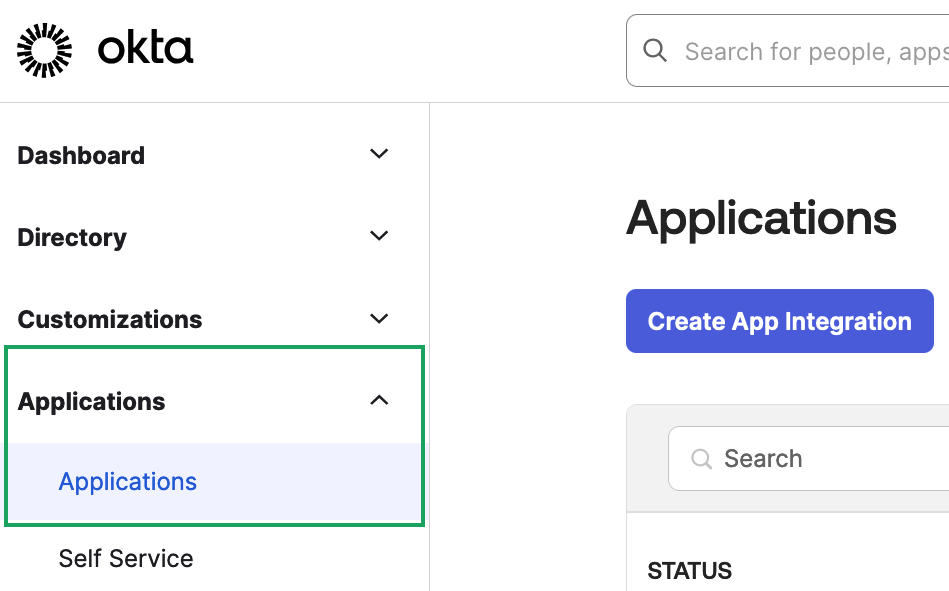
The "Create a new app integration" window appears.
-
Select API Services and then click Next.
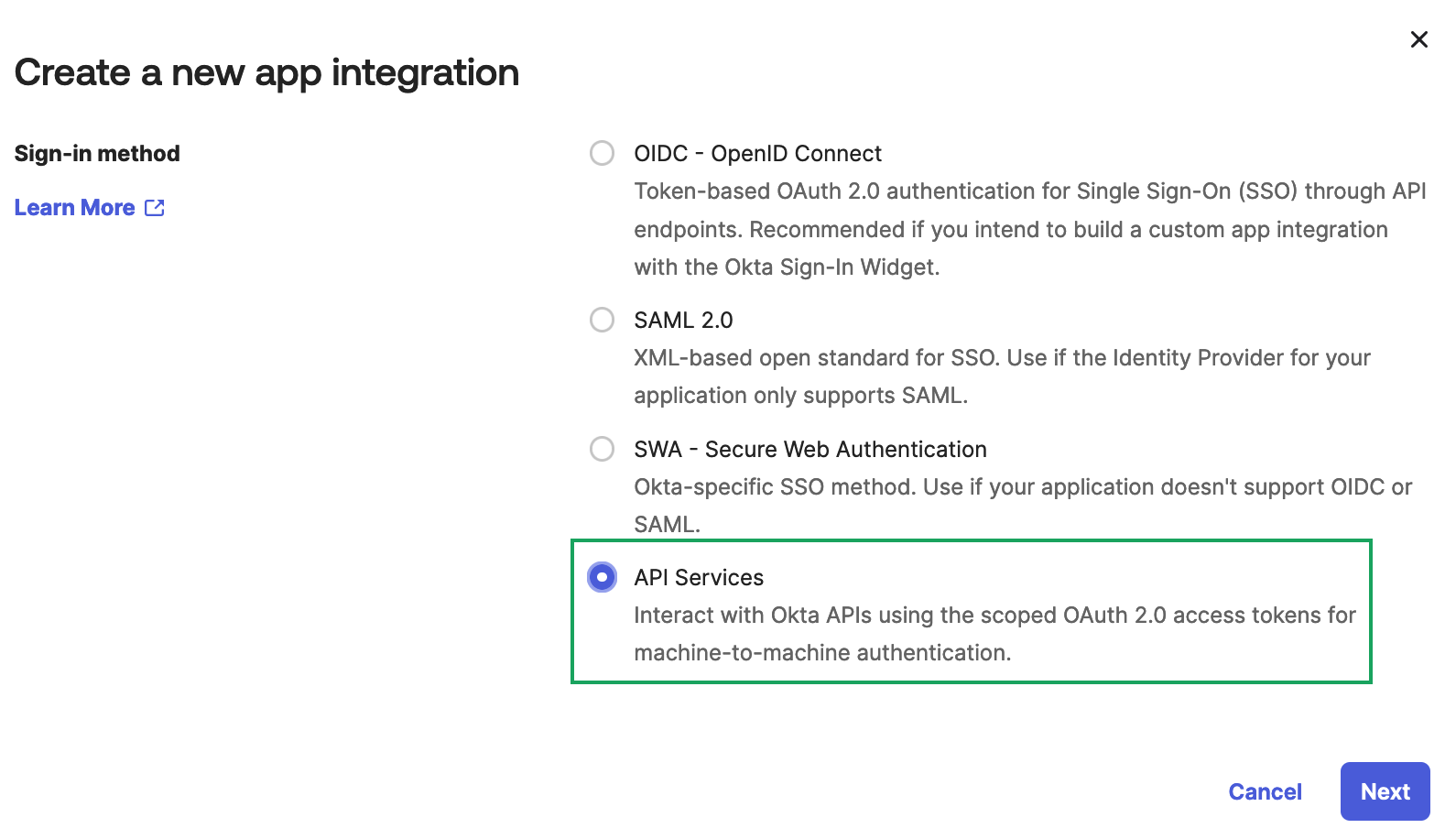
-
Give the new API Services App integration a name and then click Save.
The page refreshes and the new application page displays.
-
Click the Okta API Scopes tab and grant access to the following scopes:
okta.apps.readokta.devices.readokta.domains.readokta.groups.readokta.roles.readokta.schemas.readokta.userTypes.readokta.users.read
Note: If you do not have permissions to create an OIDC app, contact your Okta administrator. For additional information, see Okta documentation.
Generate Okta API credentials
Once you've created your OIDC app for Brinqa, you can now obtain your Okta API credentials. To do so, follow these steps:
-
While still on the application settings page of the OIDC app you have created for Brinqa, click the General tab.
-
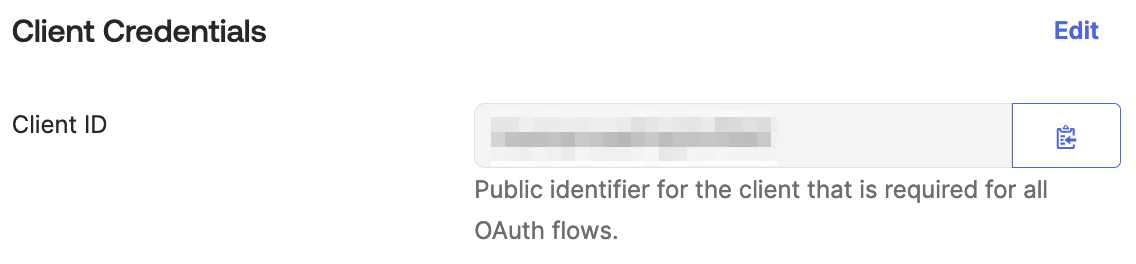
The Client ID needed for authentication displays in the Client Credentials section.
-
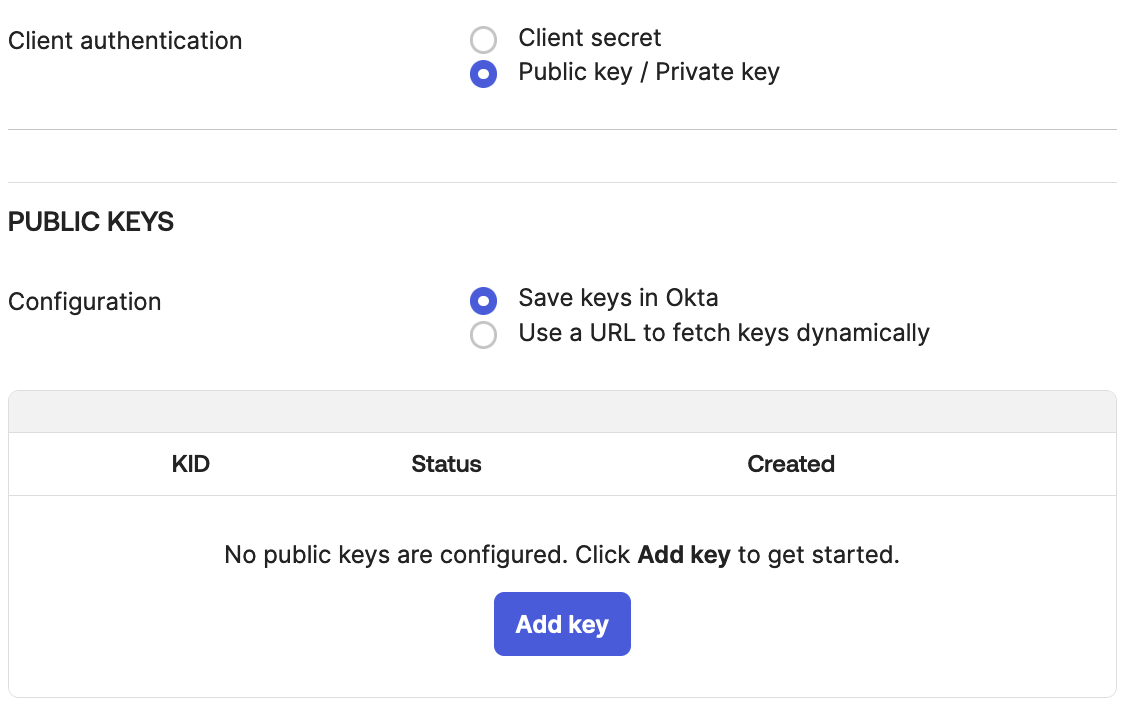
Click Edit, and in Client authentication, select Public key / Private key.
-
Click Add Key and then click Generate new key. This generates a public key and private key. You can download the private key as a JSON or PEM file. You can also copy it to your clipboard to save in a secure location.
-
Click Done.
Note: If you do not have permissions to create an access key, contact your Okta administrator. For additional information, see Okta documentation.
Attribute mappings
Expand the sections below to view the mappings between the source and the Brinqa data model attributes:
User
| Source Field Name | SDM Attribute |
|---|---|
(static) | CATEGORIES |
UserResource.activated | ACTIVATED |
UserResource.created | SOURCE_CREATED_DATE |
UserResource.id | UID |
UserResource.lastLogin | LAST_LOGIN |
UserResource.lastUpdated | SOURCE_LAST_MODIFIED |
UserResource.passwordChanged | PASSWORD_CHANGED |
UserResource.profile.email | NAME |
UserResource.profile.email | |
UserResource.profile.{field} | (profile attributes) |
UserResource.status | STATUS |
UserResource.status | SOURCE_STATUS |
UserResource.statusChanged | STATUS_CHANGED |
UserType.displayName | USER_TYPE |
Group
| Source Field Name | SDM Attribute |
|---|---|
GroupResource.created | SOURCE_CREATED_DATE |
GroupResource.id | UID |
GroupResource.lastMembershipUpdated | LAST_MEMBERSHIP_UPDATED |
GroupResource.lastUpdated | SOURCE_LAST_MODIFIED |
GroupResource.objectClass | OC |
GroupResource.profile.description | DESCRIPTION |
GroupResource.profile.name | NAME |
GroupResource.type | GROUP_TYPE |
Group member
| Source Field Name | SDM Attribute |
|---|---|
GroupResource.id | GROUP_ID |
GroupResource.id + UserResource.id | UID |
UserResource.id | USER_ID |
Operations & API
Expand each connector object to see its operation options, delta-sync behavior, and the API it uses. See connector operation options for how to apply operation options (keys and values are case-sensitive).
User
Operation options
This object does not support any operation options.
Delta sync
Supported.
API
- Type: REST endpoint · Endpoint:
GET /api/v1/users - Default filters:
search=type.id eq "{id}"(scoped to the user type), withand lastUpdated gt "{since}"appended on incremental syncs
Group
Operation options
This object does not support any operation options.
Delta sync
Supported.
API
- Type: REST endpoint · Endpoint:
GET /api/v1/groups - Default filters: none on full sync; on incremental syncs
filter=lastUpdated gt "{since}" or lastMembershipUpdated gt "{since}"
Group member
Operation options
| Option | Type | Default | Description |
|---|---|---|---|
includedGroupIds | Comma-separated list of group IDs. When set, membership is synced only for the specified groups; otherwise all groups are enumerated. | — |
Delta sync
Supported.
API
- Type: REST endpoint · Endpoint:
GET /api/v1/groups/{groupId}/users - Default filters: when enumerating groups on an incremental sync (and
includedGroupIdsis not set),filter=lastUpdated gt "{since}" or lastMembershipUpdated gt "{since}"
Changelog
The Okta connector has undergone the following changes:
| Version | Description | Migration Steps |
|---|---|---|
| 3.0.2 | New Features Group Membership Filtering - Added an includedGroupIds option that lets you sync group membership for only a specific set of groups. Provide a comma-separated list of group IDs to limit membership collection to those groups; when left unset, membership is synced for all groups as before. | N/A |
| 3.0.1 | New Features Configurable Request Retries - Added a Maximum retries setting that controls how many times the connector will retry a failed Okta API request before giving up, giving you control over resilience during transient outages. Improvements Rate Limit Handling - The connector now respects Okta's rate-limit responses, honoring Retry-After and rate-limit reset headers to automatically back off and retry requests. This reduces failed syncs and dropped data when Okta throttles traffic. Dependency Upgrades - Upgraded internal framework and model libraries to the latest stable versions for improved reliability, security patches, and alignment with the rest of the connector platform. | N/A |
| 3.0.0 | Overview The Okta connector integrates with Okta to synchronize users, groups, and group memberships into Brinqa, providing visibility into your identity directory and its membership relationships. Category: Identity Management Models | N/A |