
ServiceNow API
IT Service Management- Overview
- Setup
- Data & mappings
- Operations & API
- Changelog
The ServiceNow API connector integrates with ServiceNow custom API endpoints described by an OpenAPI 3.x specification. Unlike the standard ServiceNow connector, which syncs a fixed set of predefined tables, this connector discovers its models at runtime from a specification you supply — so one connector covers any scoped application or proprietary endpoint set, without code changes.
Because the models come from your specification, the object set is different for every integration. The sections below describe how a specification becomes models, what kinds of model it can produce, how attributes and record identity are resolved, and the settings available where an inference needs correcting.
How models are discovered
The connector parses the specification, groups its endpoints by the resource each one acts on, and registers one model per resource — so the endpoints that read, create, update and delete the same records become a single model rather than one model each.
Grouping reduces a path to the noun it is about: templated segments are dropped, trailing action segments (create, update, delete, query, list, search, and so on) are stripped, and the final segment is singularized. All of these describe one resource and produce one User model:
GET    /api/x/user            POST  /api/x/user/create
POST   /api/x/user            GET   /api/x/user/query
PATCH  /api/x/user/{sys_id}   POST  /api/x/user/update
DELETE /api/x/user/{sys_id}   POST  /api/x/user/delete
The last literal segment is never stripped, so a resource genuinely named list or search survives, and matching is exact — watchlist and getRequestList are resources, not actions.
Within a resource, roles are claimed in order — list, then create, then update, then delete. Claiming removes an endpoint from the pool, so one endpoint fills at most one role, and the first matching rule wins:
| Role | Rules, in order |
|---|---|
| List | listEndpoint setting · GET on */query/list · POST on */query/list · a GET with no path template whose response is a record collection · a GET opted in by recordsPath |
| Create | createEndpoint setting · POST whose last path segment is create, insert, new or add · POST at the collection with no path template · PUT with no template, where nothing else could be the update |
| Update | updateEndpoint setting · PATCH · PUT · POST whose last path segment is update, edit, modify, upsert, save, set or patch · POST at a templated path |
| Delete | deleteEndpoint setting · DELETE · POST whose last path segment is delete, remove or destroy |
PATCH is preferred over PUT for updates: the connector sends only the attributes the platform supplied, which is patch semantics. Create and update additionally require a request body a write can be built from — either one declaring mappable fields, or a raw payload body the connector can send as file content. A body that is absent, or nothing but an array of objects, is neither, and cannot serve as a create or update however its path is named. Delete has no such requirement, but it must be able to say which record it acts on.
An endpoint that fills no role is not modelled. Discovery logs it with the reason, and it can be brought in by naming it in modelOverrides. The full mapping — every resource, every endpoint, and what became of each — is written to the connector log at discovery and again during Test Connection.
Model kinds
A resource produces one of three kinds of model, and the model's title says which.
Record model. The resource offers a list endpoint, so the model reads. It also writes through whichever of create, update and delete were found. This is the ordinary case.
Push-only model. The resource offers no list endpoint — only POST /api/x/ticket/create and PUT /api/x/ticket/{sys_id}, say. Its title reads Ticket (push only). Such a model writes and never reads: a sync of it always reports zero records, and reports success, making no HTTP call at all. That is deliberate. The platform syncs a model immediately after pushing to it, to reconcile the ids it was handed, and failing there would mark a push that genuinely reached ServiceNow as a failure.
Prefer a model that reads where one is available. If the resource is readable through a GET that role inference did not recognize as a list, name it and the model appears with both sides and no push-only label:
modelOverrides = {"Ticket":{"listEndpoint":"GET /api/x/ticket/search"}}
A resource offering only a delete is still not modelled: with no list, create or update it has no records to show and no attributes to declare, so there would be nothing to aim the delete at.
Two things to plan for before mapping a push-only model. The identity its create response returns is the only record of the push — nothing revisits it, so that id has to be one that exists in ServiceNow. And the record the platform stores is a permanent stub carrying the pushed identity and none of the attributes the push mapped, so a file's name, size or URL is visible only at the source. For the same reason, do not configure a data lifecycle policy on a push-only model's source data model: a purge removes the pushed dataset but not the push metadata behind it, so the platform goes on treating later pushes to those records as updates while showing nothing for them.
File content model. Some endpoints take a file rather than a record: the request body is the content itself and everything else travels in the query string. An attachment endpoint is the usual example. The connector infers this from the specification — a request body that declares no application/json media type and whose schema has no properties can only be written as a raw payload. Such a model's title reads (file content), and most also have no list endpoint, so the full title is typically Attachment (push only,file content).
A file content model is written like this:
| Attribute | Where it goes |
|---|---|
file_content | The request body. Multi-valued — each value becomes one line, joined with a newline and sent UTF-8 encoded |
| every other mapped attribute | A query parameter of that endpoint |
Query parameters are mappable attributes here and only here. A parameter normally describes what an endpoint accepts rather than what a record contains, but in this mode the body is the payload, so the query string is the only place a file name or a parent record number can travel. Two are withheld: the parameter carrying the record id, which the connector sets itself, and anything already sent as a fixed parameter. A required parameter left unmapped fails the write naming it, before anything is sent — and so does a missing file_content, since a mapping that produced nothing was not asking to store an empty file.
Binary files are not supported. The payload is built from platform text attributes, so it is text. A specification listing application/pdf does not make a PDF push possible; text media types (text/plain, application/xml, and application/octet-stream carrying text) are what this mode can actually send.
Because the platform treats every push after a record's first as an update, a create that sends a raw body also serves the update role automatically, with no configuration — another push means another file, which is what such an endpoint is for. A record pushed on five runs leaves five files, and the identity the platform holds stays the one the first create returned. Set operations to ["create"] to have a second push fail instead. A JSON create is never reused this way, since repeating it would create a duplicate record; naming both create and update in operations opts that case in explicitly.
Child-sourced records. Where a model's own list endpoint cannot be called — a required query parameter with no value to supply — its records are read from a parent record's embedded array instead. Such a model is read-only by default: its records are keyed by whatever the parent's array carries, which need not be the identifier its own write endpoint expects, so an inferred write could address the wrong record. Naming an endpoint with createEndpoint / updateEndpoint / deleteEndpoint, paired with uidField so the two agree on identity, re-enables writes.
Item-sourced records. Some list endpoints cannot be enumerated at all: they answer per record of another resource, and calling one without that value returns nothing useful, or everything. An attachment list taking an incident number is the usual example. Where no parent embeds such records, itemSource binds the model to a source model instead — the sync enumerates the source, calls this model's own list endpoint once per value read from each source record, and stamps every emitted record with the value it was read under:
{"Attachment": {"itemSource": {"model": "Incidents", "sourceField": "number"}}}
This is declared, never inferred. A list endpoint accepting a parameter that happens to name another model's field is not evidence that anyone wants one request per record of a table that may hold millions.
Unlike a child-sourced model, an item-sourced one keeps its write endpoints: it reads its own endpoint and keys records by its own fields, so an inferred write addresses the record it means to. The cost is request count — one call per source record — and the rules that follow from that are under Item-sourced models.
Attribute discovery
The first time a model's schema is needed, the connector issues a small probe — GET <list endpoint>?start=0&count=10 — and uses the response to infer per-attribute types across the sampled records:
| Sampled JSON values for a key | Inferred attribute type |
|---|---|
| All booleans | Boolean |
| All integers | Long |
| Numeric mix of integers and floats | Double |
Strings matching yyyy-MM-dd HH:mm:ss or ISO-8601 | Instant |
| Other strings | String |
| Nested objects | expanded — one attribute per nested value |
| Arrays | multi-valued, element type inferred recursively |
| A key seen as both an array and a scalar | multi-valued — one observed array settles it |
| Mixed kinds across records | String, as a safe fallback |
| Key present but every value null | String, and the key is still included |
A model's attributes are the union of the record schema in the specification, the probe, and the create and update request bodies. Query parameters are not attributes — a parameter says what an endpoint accepts, not what its records carry, and nothing could consume such an attribute. A parameter that happens to name a real column still appears, discovered from the records themselves and typed from them.
Where the probe returns no records, or could not be reached, the schema falls back to UID, NAME and LAST_CAPTURED plus whatever the request bodies declare. A probe that succeeds and returns zero records is cached — an empty collection is an answer. A probe that failed is not, so the model recovers on its own once the endpoint does.
Nested objects. A record field that is an object becomes one attribute per value inside it, named with a dot. Given
{ "number": "PRB0042",
  "vendor1": { "name": "Vendor 1", "ticket": "12378" } }
the model carries vendor1.name and vendor1.ticket; the container itself is not an attribute. Nesting is followed to ten levels, and each leaf is typed like any other field. These are the same names a request body uses, so a field that is both read and written is a single attribute carrying both flags.
Only arrays are not expanded, including arrays of objects: an array is one multi-valued attribute and its elements are never expanded. Every object does expand, a {"display_value": "Jane Doe", "value": "user-sysid-9001"} reference pair included — that yields owner.display_value and owner.value, keeping the sys_id rather than discarding it.
So describe what the API actually returns. The specification is taken at its word, and where it disagrees with its API the attributes it declared are the ones left empty. A field declared an object that the API answers with a single value leaves its declared leaves empty; a field declared a single value that the API answers with an object leaves that attribute empty while the object's leaves arrive under their own dotted names. Either way the data is not lost, but it is not under the name the specification promised.
Cardinality. Whether an attribute holds one value or several is fixed when the model is built, and records are held to it. The specification decides where it declares the field — an array property is multi-valued, anything else is single-valued — and the probe decides only for fields the specification leaves undocumented. At sync time, a field arriving as an array under a single-valued attribute is unwrapped if it carries one value, and fails the sync if it carries several, naming the model, the field, the record and the values. Several values are fatal because every alternative syncs a record contradicting the model it was declared against. The remedy is always the specification: declare the field as an array with an items type and resync.
Attribute naming
A few attribute names are reserved by the Brinqa platform for its own use on every data model. A discovered source field whose name collides with one of them, case-insensitively, is emitted under a source_-prefixed name so the value is preserved rather than dropped:
| Reserved source field | Published as | Why it is reserved |
|---|---|---|
active | source_active | The platform's own record flag |
type | source_type | Platform system field name — an attribute colliding with it breaks model registration |
model | source_model | As above |
version | source_version | As above |
All four are ordinary ServiceNow column names, so a specification is more likely to hit one than not. The renamed attribute is the name to use everywhere on the platform — field mappings, queries and reports all target source_type, never type. The rename is reversed when a write is built, so the API still receives the field it declared. If the rename lands on a name another source field already holds, the model decides which one wins, in the order the specification declares them, and the losing field is absent from the model and from records alike.
A field only a request body accepts still has to be declared, because the platform can only send attributes that belong to the model. Left unmarked it would sit indistinguishably among the readable ones, so it is emitted under a push_ prefix — a state field the API accepts but never returns becomes the push_state attribute, titled Push - State. The prefix answers one question: whether a value comes back. It is stripped again when the request is built, and it is applied before the reserved-name check, so a write-only active becomes push_active rather than push_source_active.
The names do change if a later schema build discovers the read side — push_state becomes state once records are seen carrying it. That is worth knowing before building field mappings against a model whose list endpoint was unreachable at setup: the mapping targets are provisional until the model has been built from a successful probe. A push-only model skips the prefix entirely, since every attribute there is write-only and marking them all says nothing.
Record identity
Each record's UID is taken from the first present of a prioritized list: the ServiceNow surrogate keys sys_id, number, id, then generic surrogate ids uuid, guid, key, then common natural-identity fields user_name, username, login, email, sys_name. A flat user list keyed by user_name therefore syncs with no configuration. An x-brinqa-uid hint in the specification, or a uidField override, always takes precedence. A record carrying none of these is skipped and logged.
A model that also creates or updates records needs one identity every operation agrees on, because the UID a create returns is stored as the record's external id and matched against synced records. If a create reported a sys_id while a sync keyed the same record by number, the platform would hold two records for one — silently, with nothing failing. So for a model with write endpoints the UID is the first identity field the list endpoint provides that the create and update endpoints can also handle: the list supplies the candidates and their priority, the create must be able to report the value back, and the update must be able to carry it. A candidate is skipped only on positive evidence that an endpoint cannot handle it. DELETE gets no vote — if it cannot carry the chosen identity, the delete is dropped rather than constraining the whole model.
This narrowing is not cosmetic. On a Problem API whose list returns both sys_id and number but whose update body requires number, candidate order alone would pick sys_id and every update would be rejected by ServiceNow. The resolved identity is logged per model as identity=<field> when the schema is built.
What a create can report and an update can carry is only ever recognized among the surrogate keys — sys_id, number, id, uuid, guid, key. A natural-identity field such as user_name is never counted as one a write endpoint handles, so a model whose list keys records naturally while its create or update declares a surrogate key resolves no identity and does not load, even where the create response plainly returns the natural field too. Setting uidField does not lift this — createUidField below does, where the create is the side that cannot report the field. Otherwise the resolution is to drop the write, which leaves the model reading exactly as before:
{"Users": {"createEndpoint": "none", "updateEndpoint": "none"}}
Where a write response reports the identity under another name. One resource may list records under sys_id and answer a create with attachment_id — the same identifier, a different name. createUidField and updateUidField name the field each response reports the identity under, and only that: records are still keyed by uidField, so a create and a later sync of the same record agree.
{"Attachment": {"uidField": "sys_id", "createUidField": "attachment_id"}}
Both require uidField alongside them, and are refused without it. The setting asserts that two specific names carry one value, so both have to be named: left to attach to whatever identity inference happened to land on, a wrong pairing leaves the platform holding a second record for every one created — silently, with nothing failing. Nothing in the specification can verify the assertion. What is checked is the name itself: where the create or update response is described, an alias it does not declare is refused when the schema is built, so Test Connection reports it and no push reaches a misspelled name. A response the specification does not describe at all is silence rather than a refusal and is allowed through, that being the case the setting most often exists to rescue.
createUidField settles the create side of the agreement, so it also lifts a veto cast there — including the surrogate-key rule above. A create that returns user_name while declaring a surrogate key is vetoed only because a natural-identity field is never counted among the names a write endpoint handles; {"uidField": "user_name", "createUidField": "user_name"} says the response does carry it, and the model loads with its writes intact. Note what that example asserts: the create reports the same value under a name the connector would not have looked for. It is not a licence to pair two different identifiers — createUidField: "sys_id" on a model keyed by user_name is exactly the silent duplication this setting is fenced against.
The update side is unaffected: updateUidField governs how the update's response is read, not whether the endpoint can carry the identity to the record, which is still a path template, uidBodyField or uidQueryParam.
How far each response is searched. The declared response shape is tried first, then the conventional result envelope. A create that neither reaches falls back to searching the whole response for the identity field by name, shallowest match first — the record exists by then, and no safe value is left to return. An update does that only where updateUidField is set. Without the alias it keeps the Uid it was called with, which identifies the record whatever the response says: a response reporting no identity of its own but nesting a reference to another record — {"status": "updated", "caller": {"sys_id": "…"}} — would otherwise re-key the record to the caller's id, logged but not refused. Naming the field is the assertion that makes the search worth running.
If no candidate survives, the model does not load — reporting an id that no sync will reproduce is worse than refusing. The error names what each side can handle:
| Situation | Resolution |
|---|---|
| No candidate is both reportable by create and carryable by update | Set uidField to a field all of them handle, or drop a write |
| The create endpoint declares no response schema, so nothing can be verified | Set uidField to confirm what the response returns, or drop a write |
An explicit uidField or x-brinqa-uid names a field the create response cannot report | Name a field the create response returns — or, where it returns the same value under another name, set createUidField to that name |
| The list keys records by a natural-identity field while a write endpoint offers a surrogate key | Where the create response does return that same field, name it with createUidField; otherwise drop the write, leaving a read-only model |
One case does not fail the integration: on a push-only model whose create response declares fields but none that can serve as an identity, and where nothing named one, the model is left out of the schema and Test Connection passes. The connector log names the model and the fields the response does declare; setting uidField to one of them brings it back. An identity that was asked for and cannot be honored is always reported rather than dropped — a typo'd uidField must not look like a model the connector chose not to support.
Record identity is derived, not fixed, and it can move without any deliberate change: when a create or update endpoint is added, removed or re-declared; when the list record schema gains or loses an identity field; when an x-brinqa-uid hint or uidField changes; when createUidField is adopted, which settles the create side and so lets an earlier candidate win; when recordsPath or listEndpoint makes a different object "the record"; when a path rename merges or splits resources; or when the API simply starts returning a different field with no specification change at all.
Model overrides
modelOverrides is a JSON object keyed by model name — the name discovery assigned the resource, as it appears in the discovery summary in the connector log. Every field is optional; each one, when set, replaces what the connector would otherwise infer from the specification.
{
  "Problem": {
    "recordsPath": "result.records",
    "uidField": "number",
    "createEndpoint": "POST /api/example/problem/create",
    "sinceParam": "sys_updated_on_greaterthan"
  },
  "ProblemPtask": {
    "enabled": false
  }
}
For worked examples — what a specification looks like when each of these is needed, and the symptom it produces — see the model override reference in the setup guide.
Model selection
| Field | Type | Default | Description |
|---|---|---|---|
enabled | Boolean | true | Set false to skip the model entirely — it is not discovered and never registered |
Endpoint selection. Each endpoint field takes an endpoint as "METHOD /path", exactly the token discovery prints in its mapping summary and in the error an unsupported operation throws, so it can be pasted back verbatim. The method may be omitted, in which case the role's default method applies — GET to list, POST to create or update, DELETE to delete. That is a default, not a wildcard: a path the resource serves under some other method has to name it. The value "none" leaves the role unmapped rather than inferred. A pin can only select among the endpoints of the same resource; naming anything else is an error listing the endpoints the resource actually has.
| Field | Type | Default method | Description |
|---|---|---|---|
listEndpoint | String | GET | The endpoint records are read from. Use it when a resource offers several plausible collection endpoints and inference picks the wrong one, or when a resource that only writes has a GET inference did not recognize as its list — without one the model is push-only |
createEndpoint | String | POST | The endpoint records are created through. For a resource with more than one create-shaped POST, or a create verb the connector does not recognize |
updateEndpoint | String | POST | The endpoint records are updated through |
deleteEndpoint | String | DELETE | The endpoint records are deleted through |
operations | String[] | - | Allow-list over create, update and delete, case-insensitive; an operation not named is dropped even where an endpoint was found. Naming update where only a create endpoint exists reuses it for updates too, for an upsert endpoint — with create alongside it to keep both, or alone to expose the endpoint purely as an upsert. A raw-body create is reused for updates without this; ["create"] opts that back out |
File content writes. All three are only consulted for a model whose writes send a raw body. Setting contentType or contentField on a model whose writes are JSON is an error, not a no-op.
| Field | Type | Default | Description |
|---|---|---|---|
binaryMode | Boolean | inferred from the request body | true forces a write to be sent as a raw body where the specification documents a JSON one; false suppresses the mode, returning the endpoint to being rejected for declaring no mappable properties |
contentType | String | the first media type the request body declares — parameters stripped, a wildcard such as */* ignored — else application/octet-stream | The Content-Type header. One static value per model — where the API also takes the content type as a query parameter, map that parameter to the same value. Parameters are allowed, as in text/plain; charset=utf-8, except a charset naming anything but UTF-8: the payload is built from text attributes and sent UTF-8 encoded, so another charset would misdescribe the bytes. A value that cannot be sent is reported when the integration is set up, not at push time |
contentField | String | file_content | The attribute the payload is taken from. Its values are joined one per line and sent UTF-8 encoded |
Record addressing on update and delete. An update or delete needs the record's id to reach the request. The id is always the model's single resolved identity — it is never re-derived per endpoint — and what the connector resolves here is only how that one value travels, in this order: uidBodyField, then uidQueryParam, then a {...} path template, then a request-body field named for the identity, then a query parameter of that name. Configuration deliberately precedes the spec-derived routes, since it exists for a specification that documents no id route at all. An endpoint with no id route is refused rather than sent unaddressed: an update is reported unsupported and a delete is dropped from the model. Only one path template is supported — the id is substituted into the first {...} and any others are left alone, which is logged as a warning.
| Field | Type | Default | Description |
|---|---|---|---|
uidBodyField | String | - | Request-body field to stamp the record UID into, for an endpoint whose path carries no id template. An error on a DELETE, which carries no body |
uidQueryParam | String | - | Query parameter carrying the record UID, for an endpoint that addresses records through the query string. Needed when an endpoint declares several plausible id parameters and inference cannot tell them apart |
Records and identity
| Field | Type | Default | Description |
|---|---|---|---|
recordsPath | String | inferred from the response schema | Dotted path to the record array in the list response, such as result.records. Setting it also opts a GET in as a list endpoint that inference would not have recognized |
uidField | String | first present of the prioritized identity fields — sys_id, number, id, … | Record field to use as the connector UID. Takes precedence over an x-brinqa-uid hint, which is read from the list response's record schema — or, on a push-only model, the create response's. It must name a field the list response provides and the create response returns and the update endpoint can carry |
createUidField | String | the model's resolved identity field | Field the create response reports the record identity under, where that endpoint names it something other than uidField — as in a model listed by sys_id whose create answers with attachment_id. Records stay keyed by uidField; only the response is read by this name. Requires uidField, since the setting asserts that two specific names carry one value |
updateUidField | String | the model's resolved identity field | The same for the update response. Separate because the two responses are separate declarations — an endpoint that creates under attachment_id may well update under sys_id. Also requires uidField. It governs how the response is read, not how the id reaches the endpoint; that is uidBodyField / uidQueryParam |
nameField | String | first present of number, name, short_description | Record field to use as the connector NAME. Takes precedence over an x-brinqa-name hint |
updatedField | String | sys_updated_on, sys_updated, updated_on, updated_at | Record field holding the last-updated timestamp, compared against the sync token for client-side incremental sync |
recordTimeZone | String | the connector's recordTimeZone, itself UTC | Time zone this model's zone-less record timestamps are expressed in, for an endpoint that renders them differently from the rest. Only for that case — the zone is a property of the instance and the integration user, so setting it per model and forgetting one leaves that model skewed with nothing to show for it. Applies to reads and writes alike. Distinct from sinceTimeZone, which formats the outbound sinceParam value rather than reading a returned one |
Pagination and filtering
| Field | Type | Default | Description |
|---|---|---|---|
pageParam | String | auto-detected | Query parameter carrying a page number, for an API that paginates by page rather than record offset. When set, the connector sends <pageParam>=1,2,3… instead of an offset |
pageStartIndex | Integer | 1 | First page number for page-based pagination |
sinceParam | String | - | Query parameter for server-side incremental filtering by timestamp, such as sys_updated_on_greaterthan. When set, the connector sends the sync token formatted yyyy-MM-dd HH:mm:ss so the API returns only changed records, instead of filtering client-side |
sinceTimeZone | String | recordTimeZone | Time zone the outbound incremental window is formatted in — the sinceParam value, and the gs.dateGenerate arguments of an encoded query. Falls back to recordTimeZone rather than to a zone of its own, so the server filters on the same clock the connector reads returned timestamps with — when the two disagreed, the records caught between them were dropped. Ignored where neither filter is in play. A value that is not a zone id is a configuration error, since a mistyped zone would silently shift the incremental window by hours |
requiredParams | Map<String,String> | - | Values to supply for otherwise-unsatisfiable required query parameters, such as {"parent": "PRB0001000"}. These satisfy the required-parameter check and are sent on every request for the model. For a parameter needing a different value per call, see itemSource |
The parameter carrying an encoded query is not configured here: it is detected from the specification, exactly as start, count and page are. Filtering by one is a per-sync concern and is expressed through the encodedQuery and encodedQueryParam operation options — see Encoded queries.
Item sourcing. itemSource binds this model's list endpoint to another model's records, so it is called once per source record with that record's value in a query parameter. It is a JSON object with its own keys, and the structural binding is all that lives here — which source records are read is a per-sync concern, expressed through the source.-prefixed operation options.
{
  "Attachment": {
    "uidField": "sys_id",
    "createUidField": "attachment_id",
    "itemSource": {"model": "Incidents", "sourceField": "number"}
  }
}
| Field | Type | Required | Default | Description |
|---|---|---|---|---|
model | String | Yes | - | The connector's name for the source model, as the discovery summary prints it — a model name, never a path. It must be discovered, enabled, backed by a list endpoint, and neither child-sourced nor item-sourced itself: a source has to be enumerable on its own |
sourceField | String | Yes | - | Field on each source record the driver value is read from, such as number. A source record carrying no value there is skipped and counted rather than called with an empty parameter, which most endpoints read as "unscoped" and answer with the whole collection |
param | String | No | sourceField | Query parameter on this model's list endpoint the value is sent as. Held apart from the field because the names need not agree — a source may expose a value as sys_id where the dependent endpoint calls it incident_sys_id. Must be one the endpoint declares |
linkField | String | No | param | Attribute each emitted record carries the driver value under, linking it back to the source record. Optional in configuration only: such a response routinely carries the link on its envelope rather than on the records, which is not what the records are read out of |
A binding the connector cannot honor leaves that model out of the schema rather than failing the integration, and Test Connection reports it: a source that was not discovered, one disabled by enabled: false, one that is itself child- or item-sourced, or a param the list endpoint does not declare. A block that cannot name what it binds — a missing model or sourceField, or a model naming this model itself — is a configuration error wherever it is read.
Every field above is validated when models are discovered, and a setting the connector cannot apply fails rather than being ignored — an unrecognized key, an endpoint naming something the resource does not have, an unknown value in operations, uidBodyField on a DELETE, an invalid time zone, a contentType that cannot be sent as a header, or a uidField the write endpoints cannot agree on. An entry in modelOverrides exists to correct an inference, so quietly falling back to that inference is the one outcome it was written to prevent.
Field transformations
fieldTransformations is a per-sync operation option, applied to each record after standard attribute mapping. Pass a JSON string serializing a map keyed by the target attribute name; iteration order is preserved.
@type | Fields | Behavior |
|---|---|---|
upperCase | – | Upper-cases the source string |
lowerCase | – | Lower-cases the source string |
regex | pattern, replace | Replaces matches of pattern with replace, or with an empty string if omitted |
concat | delimiter, fields | Joins the named source fields with delimiter; null source fields are skipped |
chain | field, transformation | Reads field from the source record and applies the nested transformation to that value |
format | pattern, fields | Applies a Java MessageFormat pattern over the named source fields |
upperCase, lowerCase and regex read the source value at the target attribute name — use them to overwrite a field in place. concat, chain and format read the original record and never see another transformation's output, so reordering the JSON does not change their input.
{
  "category": { "@type": "upperCase" },
  "label": {
    "@type": "concat",
    "delimiter": "-",
    "fields": ["country_code", "number"]
  },
  "short_description_normalized": {
    "@type": "chain",
    "field": "short_description",
    "transformation": {
      "@type": "regex",
      "pattern": "\\s+",
      "replace": "_"
    }
  }
}
For a record carrying country_code US, number PRB0001000, category Database and short_description DB pool exhausted, this upper-cases category in place, adds label as US-PRB0001000, and adds short_description_normalized as DB_pool_exhausted.
A transformation that fails — most often a format or regex applied to a field of a different type than the pattern expects — fails the sync, naming the model, the target attribute and the reason. A transformation is configuration, so a failure is corrected and resynced rather than skipped: skipping would leave the target either absent or still holding the value the transformation was configured to replace, and neither is distinguishable from a sync that worked. That is distinct from a transformation with nothing to do — one whose source field the record does not carry, or whose input is not of a type it applies to — which produces no value, leaves its target as it was, and does not stop the sync. A malformed pattern is reported earlier still, when the option is parsed, before any record is read.
Encoded queries
A ServiceNow encoded query is the ^-separated filter syntax carried by sysparm_query and its scripted-API equivalents — active=true^priority<=2. Where the list endpoint declares a parameter for one, the connector sends a query through it, so the API returns only the records the sync wants rather than the whole collection.
The parameter is detected from the specification, exactly as start, count and page are:
| Situation | Result |
|---|---|
The list operation declares sysparm_query, encoded_query or sysparm_encoded_query | Active, through that parameter |
| It declares none of them | Inactive — the incremental filter stays client-side |
The encodedQueryParam option names a parameter | That name, whatever was detected |
The encodedQueryParam option is none | Off for that sync |
Both knobs are operation options, set per sync on the integration like fieldTransformations, not in modelOverrides — a filter scopes a sync rather than correcting an inference.
| Option | Type | Description |
|---|---|---|
encodedQuery | String | The query to filter by, such as active=true^priority<=2. Optional — without one the parameter carries the sync window alone |
encodedQueryParam | String | Overrides the detected parameter name; none disables the encoded query for that sync |
What is sent. On an incremental sync the connector ANDs its own window onto whatever you supplied, so a delta run asks for exactly the records it would otherwise have read and discarded:
| Active | encodedQuery | Sync token | Sent |
|---|---|---|---|
| No | anything | any | nothing |
| Yes | unset | none | nothing |
| Yes | unset | present | sys_updated_on>=javascript:gs.dateGenerate('2026-04-01','12:00:00') |
| Yes | active=true | none | active=true |
| Yes | active=true | present | active=true^sys_updated_on>=javascript:gs.dateGenerate(…) |
| Yes | …^sys_updated_on>=… | present | your value verbatim — a window you wrote on that field is not second-guessed |
The window constrains one column: modelOverrides.<Model>.updatedField where it is set, and sys_updated_on otherwise. gs.dateGenerate reads its arguments in the ServiceNow time zone of the integration user, which is the zone sinceTimeZone already formats in, so one setting still moves both halves of the incremental filter.
Against sinceParam. The two are alternative ways to filter server-side, and whichever was written deliberately keeps the sync. sinceParam wins over a parameter the connector merely detected — an inference does not displace a setting someone wrote — and encodedQueryParam wins over sinceParam. Both outcomes are logged, naming the filter that went unused and, in the first case, the option that switches it.
^NQ queries. ^NQ starts a new query rather than adding a condition, so active=true^NQpriority=1 is (active=true) OR (priority=1). The window is ANDed onto each branch — active=true^<window>^NQpriority=1^<window> — since each is evaluated on its own. A branch that wrote its own clause on the updated field keeps it while its neighbours are still windowed; only a query whose every branch does is left alone.
Limits. The schema probe sends no query: it infers attribute types from a sample, and a filter matching nothing would drain it. A child-sourced model sends none either, its request going to the parent model's endpoint. And the client-side comparison still runs behind the server filter, so an endpoint that documents the parameter without honoring it costs a slow sync rather than a wrong one.
Item-sourced models
A model bound with itemSource reads its own list endpoint once per record of a source model, and carries the driver value on each record it emits. The binding is in Model overrides; what follows is how such a sync behaves.
The source is enumerated during this model's sync, over HTTP, every time — never cached, shared between syncs, or read from what an earlier sync left behind. So the model syncs identically whether the source ran an hour ago, is running concurrently, or has never run.
Filters for the enumeration go under a source. prefix on the same sync's operation options; the model's own unprefixed options stay with the per-item calls, since a filter written for attachments names fields incidents do not have. An unprefixed key is dropped from the enumeration rather than passed through.
| Option | Applies to |
|---|---|
encodedQuery | The per-item calls |
encodedQueryParam | The per-item calls |
source.encodedQuery | The source enumeration |
source.encodedQueryParam | The source enumeration |
source.applySyncToken | The source enumeration — false by default, true windows it by the sync token |
Anything else under source. fails the sync, naming the keys that are recognized: a misspelled filter would otherwise leave the source enumerated in full, which looks like a working sync returning far more than was asked for. So does any source. key at all on a model with no itemSource — the prefix names a half of the sync that is not running there, and the error says to drop the prefix or configure the binding. source.fieldTransformations parses but is never read — source records are inspected for a driver value and never emitted — so it warns instead.
The one filter the connector cannot see is one set as the source model's own encodedQuery option: nothing can read another model's operation options. The end-of-sync line prints the filter the fan-out actually applied, so (no filter) beside a model you believe you filtered is the signal to move it to source.encodedQuery.
Delta sync. The incremental window is applied to the records, not to the enumeration:
| Where | Windowed? | Why |
|---|---|---|
| The source enumeration | No, unless source.applySyncToken: true | An attachment added to an incident does not change the incident. Windowing by default would not delay that attachment but lose it — the token advances regardless, so no later sync returns to it |
| The per-item calls | Yes, where the endpoint supports it | An encoded-query parameter or sinceParam on this model's own endpoint windows the dependent records themselves |
| The emitted records | Yes, unchanged | The ordinary client-side comparison. A record with no parseable timestamp is emitted, which is what makes an attachment list — carrying no timestamp of its own — work at all |
The consequence to plan for is request count: a delta sync of an item-sourced model makes as many requests as a full one, and only emits fewer. source.applySyncToken: true trades that back, and is an assertion that a change to a dependent record does bump its source record — the same unverifiable kind as createUidField, and being wrong about it costs records that never arrive.
Two source records naming one value cost one call. A record returned under two driver values is emitted once, under the first — so a dependent record that belongs to several source records carries the first driver value it was seen under, not all of them. Each sync logs the values enumerated, the requests made and the filter applied; a sync that enumerates no values at all warns rather than reporting an ordinary empty sync, since zero records retires live data under a lifecycle policy.
Sync Behavior
The connector supports incremental (delta) sync. The first run has no sync token, so every record is read; each subsequent run applies a since filter derived from the previous run, so only records changed in the interval are processed.
The filter is applied in one of three ways, per model. By default it is client-side, comparing each record's last-updated field against the sync token; which field that is resolved per model, as modelOverrides.<Model>.updatedField where it is set and otherwise the first of sys_updated_on, sys_updated, updated_on or updated_at the records carry. Where a model configures a server-side filter parameter with modelOverrides.<Model>.sinceParam, the connector sends the token to the API instead. And where the list endpoint declares a parameter carrying a ServiceNow encoded query, the connector sends the window through it with no configuration at all — see Encoded queries, which also covers which of the two server-side filters wins where both are available. Under either server-side filter the client-side comparison still runs behind it.
That comparison is between a timestamp the API returned and a token in UTC, so the two have to be on the same clock. ServiceNow's datetime format carries no offset, and the API renders it in the ServiceNow time zone of the integration user — which is UTC only if that user is set to UTC. Where it is not, set recordTimeZone to the zone the instance renders in. Otherwise every record timestamp is read as UTC, lands hours early, and records changed since the last sync test as older than the token and are skipped. Each sync logs how many records the token held back alongside how many it emitted, so a count far above expectations points at this setting. A timestamp that carries an offset of its own, or a trailing Z, is unaffected.
Data retrieved from ServiceNow API
| Connector Object | Required | Maps to Data Model |
|---|---|---|
| Record model | Yes | Record model |
| Push-only model | Yes | Push-only model |
| File content model | Yes | File content model |
Model relationships
For detailed steps on how to view the data retrieved from ServiceNow API in the Brinqa Platform, see How to view your data.
After changing the OpenAPI specification, the upstream ServiceNow API, or a model's uidField, purge the integration's data and run a beginning-of-time sync.
The connector cannot detect that identity moved between runs — there is no connector-side state to compare against — so this is guidance rather than something it enforces. Records synced under the old identity are never matched again: they linger while the same records reappear as new, and an incremental sync only adds new-identity records alongside the stale ones. A model that has never synced needs nothing, and a read-only model is unaffected by changes to its write endpoints.
Connection settings
When setting up a data integration, select ServiceNow API from the Connector dropdown and provide the following:
| Setting | Required | Default | Description |
|---|---|---|---|
| ServiceNow URL | Yes | https://<TENANT>.service-now.com | ServiceNow instance URL (e.g. https://mytenant.service-now.com) |
| User name | Yes | — | User with access to read records via the custom API endpoints. |
| Password | Yes | — | User password. |
| Client ID | No | — | (Optional) OAuth client ID. Without it, Basic auth is used. |
| Client secret | No | — | (Optional) Client secret for OAuth application. |
| OpenAPI Specification | Yes | — | The OpenAPI 3.x JSON specification content describing the custom ServiceNow API endpoints. |
| Model overrides | No | — | (Optional) Per-model JSON overrides. See the Model overrides section for this connector at https://docs.brinqa.com/ |
| Page size | No | 100 | The maximum number of results to return per page. |
| Maximum retries | No | 5 | The maximum number of retry attempts before giving up a request. |
| Default record time zone | No | UTC | (Optional) Time zone for record timestamps that carry no offset, normally the ServiceNow time zone of the integration user. An IANA zone id, e.g. UTC or America/Chicago. Defaults to UTC. |
Authentication
The connector supports two authentication methods:
Basic Authentication
Used when Client ID and Client Secret are not provided.
| Header | Value |
|---|---|
Authorization | Basic <base64(username:password)> |
OAuth 2.0 Password Grant
Used when Client ID and Client Secret are provided.
Endpoint
| Method | URL |
|---|---|
POST | https://<TENANT>.service-now.com/oauth_token.do |
Request Headers
| Header | Value |
|---|---|
Content-Type | application/x-www-form-urlencoded |
Request Body
grant_type=password&client_id=<clientId>&client_secret=<clientSecret>&username=<username>&password=<password>
Sample Response
{
  "access_token": "HLZ6xZCgGwfOG2Z3PDE3...",
  "refresh_token": "M3zT2Q9Te8wlMue0sy-LX4...",
  "scope": "useraccount",
  "token_type": "Bearer",
  "expires_in": 1799
}
Response Fields
| Field | Type | Description |
|---|---|---|
access_token | String | Bearer token used to authorize subsequent API requests |
refresh_token | String | Token used to obtain a new access token |
scope | String | Scope granted to the token |
token_type | String | Token type (Bearer) |
expires_in | Integer | Access token lifetime, in seconds |
Usage
Once authenticated, all subsequent API requests include the bearer token:
Authorization: Bearer <access_token>
How to obtain ServiceNow API credentials
Create a ServiceNow user
For the ServiceNow connector to access the ServiceNow API, you must create a user account. To create a new ServiceNow user, follow these steps:
-
Log in to your organization's ServiceNow server as an administrator.
-
Navigate to All > User Administration > Users.
-
Click New.
-
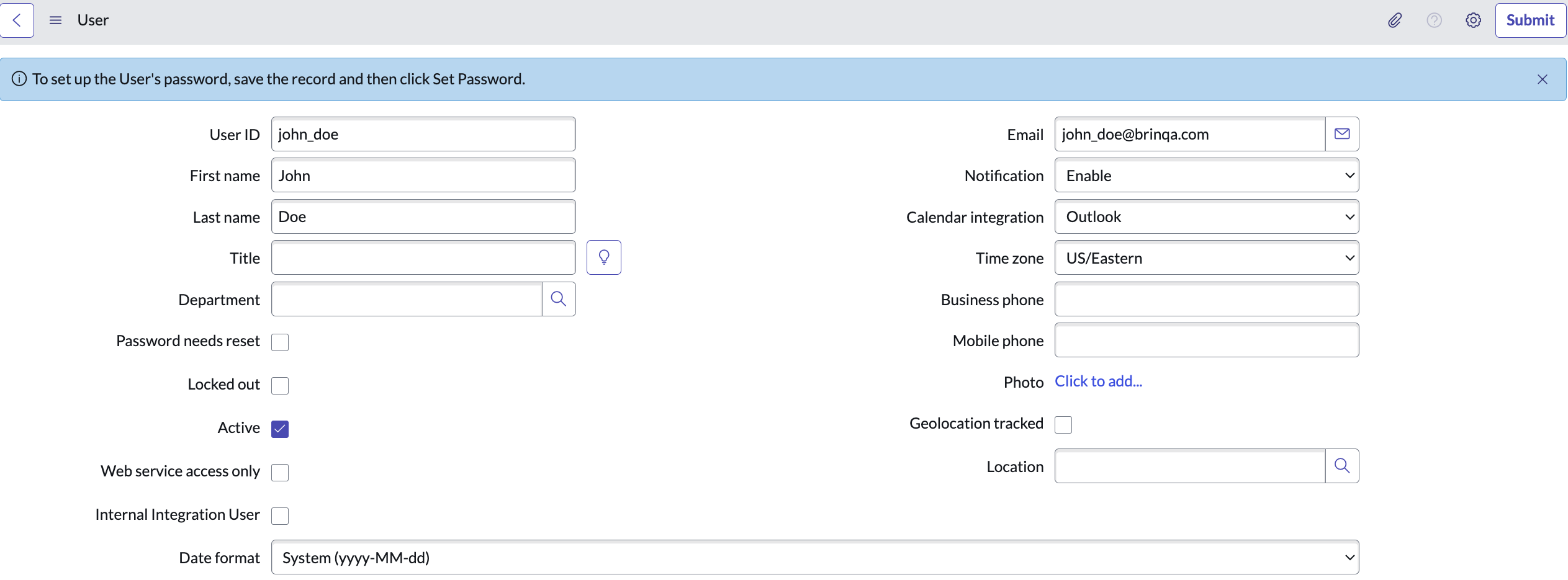
Provide a User ID, First name, and Last name for the new user, and ensure you select Active as well. Complete the other fields as desired.
-
Click Submit.
-
Locate the new user in the Users table, and click the user ID.
-
Click Set Password and generate a new password for the user. Take note of this password and provide it to the user accessing the account.
-
Click Close in the "Set Password" dialog, and then click Update.
Copy the User ID and the Password into the corresponding fields in the integration configuration.
Note: If you do not have the permissions to create a new user, contact your ServiceNow administrator. For additional information, see ServiceNow documentation.
Assign the required roles and permissions
After you have created the ServiceNow user, you can assign the necessary roles to the user so that they have the proper permissions to retrieve data from the ServiceNow API. To assign roles to the user, follow these steps:
-
Locate the new user in the Users table and click the user ID.
-
Locate the Roles section on the page and click Edit.
-
Under Collection, select the desired roles, and then click Add.
The user account must have the following roles to successfully access your ServiceNow API:
itilsnc_platform_rest_api_access
-
Click Save.
Note: If you do not have the permissions to assign roles to users, contact your ServiceNow administrator. For additional information, see ServiceNow documentation about how to assign roles, create a new role, and base system roles.
(Optional) Obtain the client ID and client secret for OAuth2 authentication
The ServiceNow connector supports OAuth2 authentication using the Password grant type. If you want to use OAuth2 authentication, you must provide a client ID and client secret in addition to the ServiceNow username and password. To obtain the credentials, follow these steps:
-
Log in to your organization's ServiceNow server as an administrator.
-
Navigate to All > System OAuth > Application Registry.
-
Click New.
-
Click Create an OAuth API endpoint for external clients. A new page appears.
-
Provide a name for the OAuth2 client application, fill in the Client Secret field, and select Active. You can also leave the Client Secret field blank if you want the system to auto-generate one. Leave the other fields as is.
-
Click Submit.
You are taken back to the Application Registries page.
-
Click the name of the new OAuth2 client in the table.
-
Click Toggle Password Visibility next to the Client Secret field to reveal the secret.
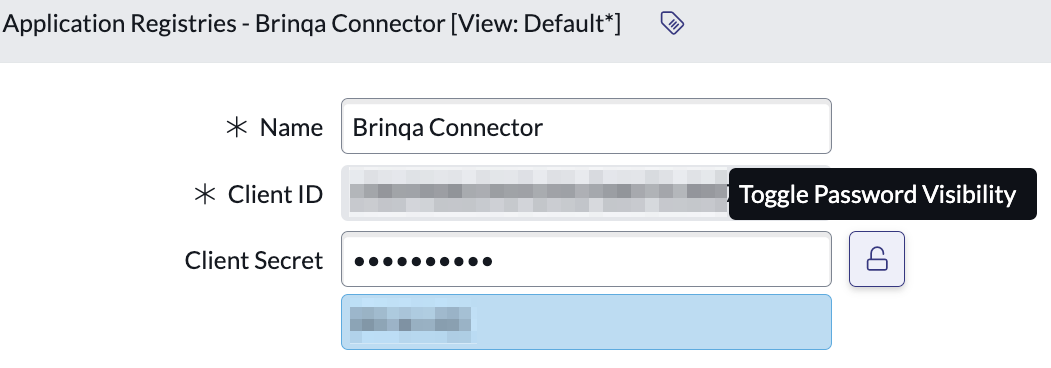
Copy the Client ID and Client Secret values and paste them into the Client ID and Client secret fields in the connector configuration. Although you can return to this page to view the Client ID and Client secret, you should handle them with care by ensuring that they are stored in a secure location.
Note: If you do not have the permissions to create the credentials for OAuth2 authentication, contact your ServiceNow administrator. For additional information, see ServiceNow documentation.
Get OpenAPI specification from ServiceNow
For the connector to autogenerate the models it will sync and push data to, you will need to provide an OpenAPI specification. The specification can be defined and downloaded from ServiceNow. To define, download, set, and configure the OpenAPI specification please follow the steps below.
Define schema in ServiceNow
ServiceNow allows users to create the request schema, response schema, and query parameters for their scripted REST APIs in ServiceNow. To create the specification your ServiceNow user account will need the web_service_admin role.
For each resource you wish the connector to consume:
-
Define response and request schemas
-
Define the query parameters exposed by your resource
-
Set the API resource query parameters
Download OpenAPI specification from ServiceNow API Explorer
Once the response schema, request schema, and query parameters are defined for your scripted REST API you can download the OpenAPI specification directly from the REST API Explorer in ServiceNow.
-
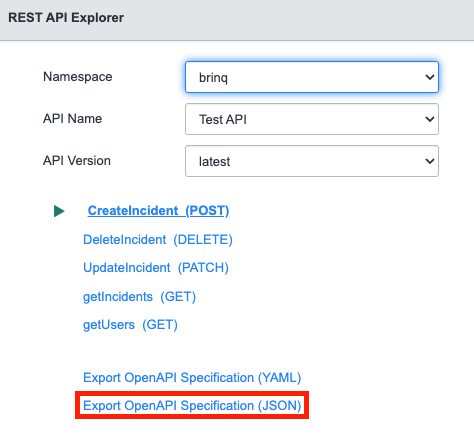
Go to All > System Web Services > REST > REST API Explorer
-
Select the Namespace, API Name, and API Version for your API
-
Click on Export OpenAPI Specification (JSON) to download the OpenAPI specification
Add OpenAPI specification and configure connector
Once you have the OpenAPI specification you can add it to the connector configuration to create the integration.
-
Copy and paste the contents of the OpenAPI specification downloaded from ServiceNow into the OpenAPI Specification field in the connector configuration.
-
Depending on your OpenAPI specification you might need to configure model overrides. See the model override reference below for possible issues and their solution.
-
After adding your OpenAPI Specification and Model overrides continue with connector creation as normal
How the connector reports an incorrect inference
The connector works out each model's list, create, update and delete endpoints from the specification. Where that inference is wrong, it tells you what it considered rather than failing silently.
Invoking an unsupported operation throws an error naming every endpoint discovery considered, what became of each, and the modelOverrides snippet that would enable it:
Model ProblemPtask does not support update: it is child-sourced (records come from a parent's
embedded array), and write endpoints are not attached to child-sourced models by default.
Resource api/example/problem/ptask — endpoints considered:
  POST /api/example/problem/ptask/update  -> would be update, but skipped: this model is child-sourced
  POST /api/example/problem/ptask/create  -> rejected: request body declares no mappable properties
To use it anyway, pin the endpoint:
  modelOverrides = {"ProblemPtask":{"updateEndpoint":"POST /api/example/problem/ptask/update"}}
That error is the mapping summary for the operation you attempted. The full summary — every resource, every endpoint, and what became of each — is written to the connector log at discovery and again during Test Connection. It is not shown in the platform UI, so reading it means retrieving the connector agent log.
modelOverrides itself is validated when models are discovered, and a setting the connector cannot apply fails there rather than being ignored — an entry exists to correct an inference, and falling back to that inference is the one outcome it was written to prevent. These fail:
| Configuration problem | Why it is fatal |
|---|---|
An unrecognized key, such as uidFeild | The setting would have no effect at all |
listEndpoint / createEndpoint / updateEndpoint / deleteEndpoint naming an endpoint the resource does not have | The role would fall back to the inferred endpoint — so the operation still works, against the endpoint you rejected. A pin can only reach endpoints of its own resource |
operations containing something other than create, update or delete | The operation would be dropped, which looks identical to no endpoint being found |
uidBodyField on a DELETE endpoint | A DELETE carries no body, so the record id would travel by some other route, or none |
A uidField the create endpoint cannot report back | A create would report an id no sync reproduces, leaving the platform holding two records for one |
createUidField or updateUidField without the uidField it aliases | The alias would attach to whatever identity inference happened to land on, asserting an equivalence nobody stated — and a wrong one duplicates every created record silently |
An itemSource that cannot name what it binds — a missing model or sourceField, or a model naming the model itself | Nothing identifies the source, so the binding has no meaning to fall back from |
Most of these are settled while the configuration is read or while models are discovered, so they surface on the first operation of any kind. The two that depend on a model's resolved record identity — a uidField the create cannot report, and an alias naming a field the response does not declare — are only knowable once that model's schema has been built, so they surface the first time that particular model is used. All are equally fatal to the model; the difference is only when you see them.
Model override reference
Each row below is a specification shape the connector cannot resolve on its own, the symptom it produces, and the override that corrects it. For what every modelOverrides field does, see Model overrides in this connector's overview.
| # | Spec issue | What the spec looks like | Symptom | Override | Sample |
|---|---|---|---|---|---|
| 1 | Records nested under a wrapper the connector doesn't recognize | GET /api/x/problem returns {"data":{"items":[…]}} | The GET isn't recognized as a list, so the resource is not modelled at all | recordsPath | {"Problem":{"recordsPath":"data.items"}} |
| 2 | Resource has write endpoints, but its GET isn't recognized as a list | POST /api/x/ticket/create and GET /api/x/ticket/search, whose response the spec leaves undescribed | Model is never created; the endpoints appear as unused in the discovery summary | listEndpoint | {"Ticket":{"listEndpoint":"GET /api/x/ticket/search"}} |
| 3 | Several endpoints of one resource qualify as its list | GET /api/x/user/list and GET /api/x/user/search, both returning record collections | Ties break on fewest path segments, then alphabetically, so /list wins; records come from the wrong endpoint | listEndpoint | {"User":{"listEndpoint":"GET /api/x/user/search"}} |
| 4 | More than one create-shaped POST on the resource | POST /api/x/user and POST /api/x/user/create, where the plain collection POST is the real create | A create verb in the path wins, so creates are sent to /create | createEndpoint | {"User":{"createEndpoint":"POST /api/x/user"}} |
| 5 | A POST at an item path that performs an action rather than an update | POST /api/x/problem/{sys_id} that reopens the record | A POST on a path carrying an {id} template is read as the update, so every update triggers the action | updateEndpoint | {"Problem":{"updateEndpoint":"none"}} |
| 6 | A single endpoint handles both create and update | POST /api/x/problem/create is the resource's only write, and the API treats it as an upsert | Update is reported as unsupported — an endpoint is only ever given one role | operations — only a create widens into an update, never the reverse | {"Problem":{"operations":["create","update"]}} |
| 7 | Update endpoint takes the record id in the request body, and the spec does not declare it | POST /api/x/user/update with no {id} in the path and an undocumented body — a body that declares sys_id is found on its own | Update is reported as unsupported: the endpoint declares no way to identify the record | uidBodyField — name the identity field itself | {"User":{"uidBodyField":"sys_id"}} |
| 8 | Delete identifies the record through the query string, and the spec does not declare the parameter | DELETE /api/x/user with no {id} in the path and no declared sys_id parameter | The delete is dropped from the model: it declares no way to identify the record | uidQueryParam | {"User":{"uidQueryParam":"sys_id"}} |
| 9 | The write endpoints declare several id fields, but the API honors only one | list returns sys_id and number, and the update body declares both, but ServiceNow accepts only the record number (for example PRB0001000) | Candidate order picks sys_id, so updates are rejected by ServiceNow. Where the body declares number alone, the connector narrows to it unaided | uidField | {"Problem":{"uidField":"number"}} |
| 10 | Create endpoint defines no response schema | POST /api/x/incident/create documents a response with no schema | The model loads, but a create fails after the record was created — nothing in the response identifies it for future syncs | uidField, or disable the write | {"Incident":{"uidField":"number"}} |
| 11 | Records are keyed by a business identifier while the write endpoints use a system id | GET /user returns user_name and email; POST /user responds with sys_id | Model does not load; setting uidField alone does not resolve it | disable the write endpoints — but where the create response also returns user_name, name it with createUidField instead and the writes survive; see row 12 | {"User":{"createEndpoint":"none","updateEndpoint":"none","deleteEndpoint":"none"}} |
| 12 | The create or update response reports the record id under a different name from the list | GET /incident/attachment/list returns sys_id; POST /incident/attachment/add responds {"result":{"attachment_id":…}} | Model does not load, or keys records by what the write reported while the list disagrees | createUidField / updateUidField, always alongside uidField. Only where the two names carry the same value — two different identifiers leave the platform holding a second record for every one created | {"Attachment":{"uidField":"sys_id","createUidField":"attachment_id"}} |
| 13 | No recognized id field in the records | records carry only ticket_ref | Records are skipped; if the resource also reads and writes, the model refuses to load | uidField | {"Ticket":{"uidField":"ticket_ref"}} |
| 14 | A write-only resource whose create reports an id under an unrecognized name | POST /api/x/attachment/add, no list anywhere, responding {"result":{"message":…,"attachment_id":…}} | The model is missing from the platform's list. Test Connection still passes, and the connector log names the model and the fields its response declares | uidField, or declare x-brinqa-uid on the create response schema. Where the resource also has a list endpoint, this is row 12 instead — uidField names what the list keys by, createUidField what the create reports | {"Attachment":{"uidField":"attachment_id"}} |
| 15 | Records have no number, name or short_description | records carry title instead | The record NAME is left empty | nameField | {"Ticket":{"nameField":"title"}} |
| 16 | Last-updated field has an unconventional name | records carry last_modified rather than sys_updated_on | Incremental sync cannot narrow the window; every sync behaves as a full sync | updatedField | {"Ticket":{"updatedField":"last_modified"}} |
| 17 | The API filters by timestamp through a parameter whose name carries the operator | query parameter sys_updated_on_greaterthan | The full data set is retrieved and filtered by the connector instead of the API | sinceParam — add sinceTimeZone only where the API expects the filter in a different zone from the one it renders timestamps in; it otherwise follows recordTimeZone. Not needed where the list declares sysparm_query, encoded_query or sysparm_encoded_query — the connector detects those and sends the window server-side unaided | {"Problem":{"sinceParam":"sys_updated_on_greaterthan"}} |
| 18 | The API pages by page number under a parameter the connector does not recognize | the list takes a 0-based pageIndex; page, pageNumber, page_number and pageNo are detected without configuration | An offset is sent instead and ignored, so the sync repeats the first page or stops early | pageParam and pageStartIndex | {"Problem":{"pageParam":"pageIndex","pageStartIndex":0}} |
| 19 | The list endpoint requires a query parameter the connector cannot supply, and one fixed value serves every call | GET /api/x/problem/ptask requires parent | The model is deferred: it cannot sync standalone, and appears only if a parent's response embeds its records | requiredParams. Where the value must differ per call, see row 20 | {"ProblemPtask":{"requiredParams":{"parent":"PRB0001000"}}} |
| 20 | The list endpoint needs a different value per call, supplied by another model's records | GET /incident/attachment/list?number=<incident number>, with no parent embedding the attachments | The model is deferred and never appears — or, where the parameter is declared optional, it syncs once with no value and returns nothing useful | itemSource. One request per source record: a delta sync costs as many requests as a full one. Filter the enumeration with the source.encodedQuery operation option, not encodedQuery | {"Attachment":{"uidField":"sys_id","createUidField":"attachment_id","itemSource":{"model":"Incidents","sourceField":"number"}}} |
| 21 | Records read from a parent record's embedded list also need to be written | POST /api/x/problem/ptask/update exists, but the records come from the Problem response | Write endpoints are not attached to these models by default | name the endpoint and the id field | {"ProblemPtask":{"updateEndpoint":"POST /api/x/problem/ptask/update","uidField":"sys_id"}} |
| 22 | The specification exposes resources you do not want to sync | any endpoint group with no use in Brinqa | Unwanted object classes and extra requests to ServiceNow | enabled | {"ProblemPtask":{"enabled":false}} |
| 23 | A file endpoint whose request body declares a wildcard media type, or one the API does not accept | POST /api/x/attachment/add with a request body keyed */*, where the API requires text/plain | The push is sent as Content-Type: application/octet-stream — a wildcard names no type, so it is not sent verbatim — and the API rejects it or stores the file under the wrong type | contentType — where the API also takes the content type as a query parameter, map that parameter to the same value | {"Attachment":{"contentType":"text/plain; charset=utf-8"}} |
| 24 | A configured contentType that cannot be sent as a header | {"Attachment":{"contentType":"text/plain; charset=iso-8859-1"}}, or a value naming two media types | Test Connection fails naming the model and the setting; no model loads until it is corrected | use one media type, and either charset=utf-8 or no charset at all | {"Attachment":{"contentType":"text/plain; charset=utf-8"}} |
Attribute mappings
Expand the sections below to view the mappings between the source and the Brinqa data model attributes:
Record model
| Source Field Name | SDM Attribute |
|---|---|
| Every field only a create or update body accepts | One push_-prefixed attribute per write-only field |
| Every field the list response returns | One attribute per response field |
| Every object field the response returns | One attribute per nested value, named parent.child |
| Set by the connector when the record is read | LAST_CAPTURED |
| The driver value the record was read under | The itemSource.linkField attribute, where bound |
| The resolved identity field, normally sys_id | UID |
| The resolved name field, normally number | NAME |
Push-only model
| Source Field Name | SDM Attribute |
|---|---|
| Every field the create or update body accepts | One attribute per write-side field |
| Set by the connector | LAST_CAPTURED |
| The identity the create response reports | UID |
| The resolved name field where the response carries one | NAME |
File content model
| Source Field Name | SDM Attribute |
|---|---|
| Every query parameter the write endpoint declares | One attribute per query parameter |
| The identity the create response reports | UID |
| The request body itself | file_content |
| The resolved name field where the response carries one | NAME |
Operations & API
Expand each connector object to see its operation options, delta-sync behavior, and the API it uses. See connector operation options for how to apply operation options (keys and values are case-sensitive).
Record model
Operation options
| Option | Type | Default | Description |
|---|---|---|---|
fieldTransformations | String | — | JSON map keyed by target attribute name, applied to each record after attribute mapping. See Field transformations in the overview |
encodedQuery | String | — | A ServiceNow encoded query to filter this sync by, such as active=true^priority<=2. Sent only where the list endpoint carries one; on a delta sync the incremental window is ANDed onto it |
encodedQueryParam | String | detected from the specification | Query parameter the encoded query is sent through, overriding sysparm_query / encoded_query / sysparm_encoded_query as detected; none disables the mechanism for the sync |
source.encodedQuery | String | — | Only on an item-sourced model: the encoded query filtering the source enumeration, as distinct from the per-item calls. See Item-sourced models |
source.encodedQueryParam | String | detected from the specification | The same, for the source model's own query parameter |
source.applySyncToken | Boolean | false | Only on an item-sourced model: true windows the source enumeration by the sync token. Off by default, because a dependent record can change without its source record changing |
Delta sync
Supported. The connector performs an incremental (delta) sync via the since sync token, filtering on updatedField.
API
- Type: REST · Endpoint: the resource's list endpoint, as discovered — for example
GET /api/x/problem/query/list - Default filters: None
- The field the incremental filter compares against is resolved per model, not fixed:
modelOverrides.<Model>.updatedFieldwhere it is set, otherwise the first ofsys_updated_on,sys_updated,updated_onorupdated_atthe records carry. SettingmodelOverrides.<Model>.sinceParammoves the filtering to the API instead, and the connector sends the token rather than comparing timestamps itself. Where the list endpoint declares a parameter carrying an encoded query, the window is sent through that with no configuration at all. - Record timestamps from ServiceNow carry no UTC offset, and the API renders them in the ServiceNow time zone of the integration user. Where that user is not set to UTC, set the connector's
recordTimeZoneto the zone the instance renders in — otherwise records changed since the last sync test as older than the sync token and are skipped. - Pagination is offset-based by default, using
startandcount. An API that pages by page number instead is configured withmodelOverrides.<Model>.pageParamandpageStartIndex. - Where this model's own list endpoint cannot be called — a required query parameter with no value to supply — its records are read from a parent record's embedded array instead. The model is then child-sourced and read-only by default.
- Where no parent embeds those records,
modelOverrides.<Model>.itemSourcebinds the model to a source model instead: its own endpoint is called once per source record, with that record's value in a query parameter. Such a model keeps its write endpoints, unlike a child-sourced one. Plan for the request count — a delta sync makes as many requests as a full one, and only emits fewer. See Item-sourced models in the overview.
Push-only model
Operation options
This object does not support any operation options.
Delta sync
Not supported. The connector performs a full sync of Push-only model on every run and applies no incremental date filter.
API
- Type: REST · Endpoint: the resource's create endpoint, as discovered — for example
POST /api/x/ticket/create - Default filters: None
- A sync of a push-only model makes no HTTP call at all. It reports zero records and reports success, rather than performing any kind of read. That is deliberate: the platform syncs a model immediately after pushing to it, and failing there would mark a push that genuinely reached ServiceNow as a failure.
- The identity the create response returns is stored as the record's external id and nothing revisits it, so it must be an identifier that exists at the source. Where the create response carries no recognized identity, set
modelOverrides.<Model>.uidFieldto one of the fields it does return, or declarex-brinqa-uidon the create response schema. - The record the platform stores is a permanent stub: it carries the pushed identity and the linkage back to the record that was pushed, and none of the attributes the push mapped.
- Do not configure a data lifecycle policy on a push-only model's source data model. A purge removes the pushed dataset but not the push metadata behind it, so later pushes to those records are still routed as updates while the platform shows nothing for them.
- Where the resource is readable through a
GETthat inference did not recognize as a list, naming it withmodelOverrides.<Model>.listEndpointturns this into a record model with both sides.
File content model
Operation options
This object does not support any operation options.
Delta sync
Not supported. The connector performs a full sync of File content model on every run and applies no incremental date filter.
API
- Type: REST · Endpoint: the resource's raw-body write endpoint, as discovered — for example
POST /api/x/incident/attachment/add - Default filters: None
- File content is a write mode, not a read mode. Where the resource also offers a list endpoint, the model reads and syncs incrementally exactly as a record model does; the delta-sync verdict above describes the common case, in which the resource offers no list.
- Binary files are not supported. The payload is built from platform text attributes, so it is text. A specification listing
application/pdfdoes not make a PDF push possible — text media types such astext/plain,application/xmlandapplication/octet-streamcarrying text are what this mode can send. - A required query parameter left unmapped fails the write naming it, before anything is sent — and so does a missing
file_content. - Because the platform treats every push after a record's first as an update, a raw-body create also serves the update role automatically. Another push writes another file, and the identity the platform holds stays the one the first create returned. Set
modelOverrides.<Model>.operationsto["create"]to have a second push fail instead. - The
Content-Typeheader is one static value per model, taken from the request body's first declared media type and overridable withmodelOverrides.<Model>.contentType. Where the API also takes the content type as a query parameter, map that parameter to the same value.
Changelog
The ServiceNow API connector has undergone the following changes:
| Version | Description | Migration Steps |
|---|---|---|
| 3.3.0 | New Features - A sync can now ask ServiceNow for only the records it wants, using an encoded query. The only ways to narrow what a sync pulled were requiredParams, which pins one value for every call, and sinceParam, which can send nothing but <name>=<timestamp> — so the comparison operator had to be baked into the parameter name, as in sys_updated_on_greaterthan, and an API that did not happen to declare such a parameter could not be filtered at all. Where the list endpoint declares sysparm_query, encoded_query or sysparm_encoded_query, the connector now sends a ServiceNow encoded query through it, with nothing to configure: on an incremental sync it asks for the records changed since the last run — sys_updated_on>=javascript:gs.dateGenerate('2026-10-06','00:00:00') — rather than reading the whole collection and discarding most of it. The records a sync emits are unchanged; far fewer cross the wire. Two per-sync operation options shape it. encodedQuery supplies a filter of your own, such as active=true^priority<=2, onto which the incremental window is ANDed; encodedQueryParam names the parameter to send it through where the specification declares one the connector does not recognize, or none to switch the mechanism off for that sync. A query that already constrains the updated field keeps its own clause — a window you wrote deliberately is not narrowed by a derived one, judged per ^NQ branch, each of which is its own query and is windowed on its own. The window constrains modelOverrides.<Model>.updatedField where it is set and sys_updated_on otherwise, formatted in sinceTimeZone, which still falls back to recordTimeZone so both halves of the incremental filter stay on one clock. Where a model also configures sinceParam, whichever was written deliberately keeps the sync: sinceParam wins over a parameter the connector merely detected, encodedQueryParam wins over sinceParam, and either outcome is logged naming the filter left unused. The client-side comparison still runs behind it, so an endpoint that documents the parameter without honoring it costs a slow sync rather than a wrong one. See Encoded queries in the README. - A create or update response that reports the record id under a different name is now usable. The same identifier is sometimes listed as sys_id and returned from a write as attachment_id. The connector resolves one identity per model and reads a write response by that one name, so such a model either keyed records by what the write reported — leaving the list side disagreeing — or refused to load, and the only resolutions were to drop the write with createEndpoint: "none" or to disable the model. modelOverrides gains createUidField and updateUidField, naming the field each response reports the identity under. Records stay keyed by uidField, and only the response is read by the other name, so a create and a later sync of the same record agree. Both require uidField alongside them: the setting asserts that two specific names carry one value, which nothing in the specification can verify — left to attach to whatever identity inference happened to land on, a wrong pairing would leave the platform holding a second record for every one created, silently and with nothing failing. Where the specification describes the response, a name it does not declare is refused at Test Connection, naming the fields it does declare; a response the specification describes not at all is allowed through, that being the case the setting most often exists to rescue. A response neither the declared shape nor the result envelope reaches is searched by name as a last resort — for a create always, since by then the record exists and no safe value is left, and for an update only under updateUidField. Without that alias an update keeps the id it was called with: a response carrying no identity of its own but nesting a reference to another record would otherwise re-key the record to the referenced one. See Record identity in the README. - A list endpoint that can only be called with a value from another model's records can now be synced. Some endpoints cannot be enumerated at all — an attachment list that answers per incident number returns nothing useful, or everything, when called without one. Such a resource was previously read from a parent record's embedded array where one happened to carry it, and otherwise not modelled. modelOverrides.<Model>.itemSource now binds a model to a source model: the sync enumerates the source, calls this model's own list endpoint once per value read from each source record, and stamps every record it emits with the value it was read under, so each one can be mapped back to the record it belongs to. Four keys — model and sourceField name the binding, param the query parameter the value is sent as where the two endpoints call it differently, and linkField the attribute each record carries it under. The source is enumerated over HTTP during this model's own sync, every time and from nothing an earlier sync left behind, so the result is the same whether the source model ran an hour ago, is running concurrently, or has never run. Filters for the enumeration are written as source.-prefixed operation options on the same sync — source.encodedQuery, source.encodedQueryParam, source.applySyncToken — while the model's own unprefixed options stay with the per-item calls, a filter written for attachments naming fields incidents do not have. An unrecognized source. key fails the sync naming the ones that are recognized, since a misspelled filter would otherwise enumerate the source in full and look like a working sync; so does any source. key on a model that has no itemSource at all, where the prefix names a half of the sync that is not running. Unlike a child-sourced model, an item-sourced one keeps its write endpoints: it reads its own endpoint and keys records by its own fields. See Item-sourced records in the README. Improvements - The incremental window of an item-sourced model is applied to the records, not to the enumeration, and the cost of that is reported rather than hidden. An attachment added to an incident does not change the incident, so windowing the enumeration would not merely delay that attachment — the sync token advances regardless, so no later incremental sync would return to it. The consequence to plan for is request count: a delta sync of such a model makes as many requests as a full one, and only emits fewer. Each sync logs how many driver values were enumerated, how many requests the fan-out made, and the filter it actually applied, so a model someone believes they have filtered shows (no filter) rather than quietly reading everything. source.applySyncToken: true opts into windowing the enumeration where a change to a dependent record does bump its source record. - A list endpoint that declares its encoded-query parameter as required is no longer held back from being a model of its own. A required query parameter the connector has no value for means the endpoint cannot be called, so its resource is deferred — read from a parent record's embedded array where one carries its records, and otherwise not modelled at all. The connector now supplies sysparm_query and its equivalents itself, so a specification marking one required no longer counts against the endpoint. - A sync of an item-sourced model that enumerates no driver values at all reports a warning naming the source model and the filter applied, rather than reporting zero records as an ordinary empty sync. Zero records retires live data under a lifecycle policy, which is too consequential to leave to the emitted count alone. Bug Fixes - The list of models the connector exposes could not be read across a remote schema call. objectClassInfoTypes returned a view onto the connector's own model map rather than a set of its own, and that view is an inner class the platform's serializer cannot reconstruct on the receiving side. A copy is returned instead, which also keeps the model map out of reach of its callers. | • Models whose list endpoint declares an encoded-query parameter as required: such an endpoint could not previously be called, so the model was either read from a parent record's embedded array — child-sourced, read-only, and keyed by whatever that array carried — or not registered at all. It now reads its own endpoint as an ordinary record model, which resolves identity from its own list response and re-enables its write endpoints, so the field its records are keyed by may change. Records held under the previous identity are never matched again: they linger while the same records reappear as new. A model that was not registered at all is new and needs nothing. — Action: after upgrading, check the discovery summary in the connector log; where a model moved from child-sourced to standalone, purge the integration's data and run a beginning-of-time sync. |
| 3.2.0 | New Features - A record field that is a nested object is now readable. Such a field was published as a single attribute that was always empty: the connector offered the object's own name and had nowhere to put the values inside it, so they never left ServiceNow. Each of those values is now an attribute of its own, named for the path to it with a dot — a field holding a name and an email becomes two attributes, <field>.name and <field>.email — however deeply the object nests, and typed exactly as a top-level field is: from the record schema where the OpenAPI specification declares one, and from the sampled records otherwise. The container is no longer published; with its contents lifted out there is nothing left for it to hold. These are the same names the connector already used for the fields a create or update sends, so a field that is both read and written is now one attribute rather than an empty one on the read side and a push_-prefixed one on the write side. One shape is deliberately unchanged: a field that is a list stays one multi-valued attribute, whatever its entries contain. Every object expands, the display_value/value pair ServiceNow returns for a resolved reference field included — such a field becomes <field>.display_value and <field>.value, keeping the sys_id alongside the label rather than discarding it. Nesting is followed ten levels deep. See Nested objects in the README. - The time zone record timestamps are read in is now configurable. ServiceNow's datetime format carries no offset, and the API renders it in the ServiceNow time zone of the integration user — which is UTC only if that user is set to UTC. A new recordTimeZone connector setting names the zone the instance actually renders in, as an IANA zone id such as America/Chicago; it defaults to UTC, so an integration that does not set it behaves exactly as before. It applies to every timestamp a model reads and to every timestamp a write sends, so a value survives the round trip. A timestamp that carries an offset of its own, or a trailing Z, keeps it and is unaffected — the setting is a fallback for values that say nothing about their own zone, not an override of ones that do. modelOverrides gains recordTimeZone for the rare endpoint that renders differently from the rest of the instance, though the zone is a property of the instance and the integration user rather than of a model, so the connector-level setting is the one to reach for: setting it per model and forgetting one leaves that model skewed with nothing to show for it. A value that is not a zone id is an error naming it, at either level, reported at Test Connection. Improvements - A sync now reports how many records the incremental filter held back, alongside how many it emitted. Holding back a record older than the sync token is the filter working correctly, but it was previously silent — so a sync that returned almost nothing was indistinguishable from a period in which almost nothing had changed, and a misconfiguration that aged every record past the token drained the sync to nothing while reporting success. The count is now logged with the emitted count and names recordTimeZone as the setting to check when it is far above expectations. This reports the drops; it does not change which records are dropped. Bug Fixes - Records changed since the last sync could be skipped indefinitely, and the sync still reported success. The incremental filter compares a record's last-updated timestamp against a sync token in true UTC, so wherever those timestamps were read hours early, a record survived only if it had been changed at least that many hours after the previous sync ran. On any cadence tighter than the skew, records changed between two syncs were dropped — and the token still advanced, so they were never reconsidered. Nothing counted or logged the drops. Reading timestamps in the configured zone puts both sides of the comparison on the same clock. - The two halves of the incremental filter used different time zones. For a model with a server-side filter ( sinceParam), the connector formatted the outgoing token in sinceTimeZone — defaulting to America/New_York — while reading the timestamps that came back as UTC. The server was asked for one window and the returned records were judged against another, four to five hours apart, and the records caught between them were dropped. sinceTimeZone now falls back to recordTimeZone instead of to a zone of its own, so one setting moves both halves together. Naming sinceTimeZone explicitly still overrides it for an API that expects its filter in a different zone from the one it renders in. | • Models with a nested object field: the container attribute is no longer published — a model that offered the object's own name now offers one attribute per value inside it, named <field>.<value>. Any mapping, report or query naming the container resolves to nothing, though it was an attribute that never held a value. Where a create or update also accepted one of those nested values, its attribute loses the push_ prefix now that the read side publishes it too. Writes send the correct field either way. Record identity is unchanged, so no purge is needed — re-reading a record overwrites the one already held. — Action: repoint any mapping from a container name, and from push_ names that are now readable, onto the new dotted attributes, then run a beginning-of-time sync so the newly readable values are filled in for records already held. • Models with a nested object field: a value inside such an object was invisible until now, so nothing held it to the rule that an attribute declared to hold one value must not arrive carrying several. A nested field that arrives with several values now fails the sync, naming the model, the field and the record, exactly as a top-level field already does. — Action: where a nested field can carry several values, declare it as an array ( "type": "array" with an items type) in the OpenAPI specification before upgrading. • All models: an integration reading from an instance that does not render timestamps in UTC has been storing every date attribute hours early, and has been skipping records changed between two syncs — the sync token advanced past them, so no later incremental sync returns to them. Setting recordTimeZone corrects what a sync reads from now on, but it neither revisits the records already missed nor repairs the values already stored. Record identity is unchanged by this release, so re-reading a record overwrites the one already held rather than creating a second copy, and no purge is needed. — Action: set recordTimeZone to the ServiceNow time zone of the integration user, then run a beginning-of-time sync so every record is re-read and every stored timestamp is rewritten in the corrected zone. • Models with sinceParam configured: the server-side filter is now formatted in recordTimeZone (UTC unless set) rather than America/New_York, so the window requested from the API moves by four to five hours on upgrade. — Action: the same beginning-of-time sync covers it; set sinceTimeZone explicitly only where the API expects its filter in a different zone from the one it renders timestamps in. |
| 3.1.0 | New Features - Records can now be created, updated and deleted, not only read. The connector groups the endpoints in your OpenAPI specification by the resource each one acts on and registers a single model per resource, working out which endpoint serves its list, create, update and delete. A resource read at GET /user and written at POST /user, PATCH /user/{id} and DELETE /user/{id} — or one using verb paths such as GET /user/query, POST /user/create, POST /user/update and POST /user/delete — becomes a single User model supporting all four operations. A model read from a parent record's embedded array — ProblemPtask, for example — is left read-only, since its records are keyed by values the parent supplies, which need not match what its own write endpoint expects; createEndpoint / updateEndpoint / deleteEndpoint attach one explicitly. - A resource that only writes is registered as a push-only model. Some endpoints exist purely to receive — an attachment upload has nothing to hand back — so a resource with no list endpoint is modelled rather than skipped, and labelled for it: its title reads Ticket (push only). A sync of such a model reports zero records and reports success, making no HTTP call, because the platform syncs a model immediately after pushing to it and an error there would mark the push itself as failed. Nothing is ever read back, so the identity the create response returns is the only record of what was pushed: the connector takes that identity from an x-brinqa-uid hint on the create response where the specification declares one, and otherwise from the surrogate keys the response carries. A model that yields neither is left out of the schema rather than loaded — a push it could not report an identity for would be untraceable — while the rest of the integration sets up and validates as usual; the connector log names the model and the fields its response does declare. Naming one with modelOverrides.<Model>.uidField brings it back, and a uidField or x-brinqa-uid that the create response cannot honor fails Test Connection rather than being ignored. Two things to plan for before mapping one — the record the platform keeps for a push holds the pushed identity and none of the mapped attributes, so a file's name or size is visible only at the source; and a data lifecycle policy should not be configured on such a model, since purging its records leaves later pushes still routed as updates against records the platform no longer shows. Where the resource is readable through a GET the inference did not recognize, modelOverrides.<Model>.listEndpoint names it and the model has both sides. A resource offering only a delete is still not modelled. - A write endpoint that takes a file is now usable. An endpoint whose request body is a raw payload rather than a JSON record — application/octet-stream, text/plain, declared as {"type":"string","format":"binary"} — used to be rejected for declaring no mappable properties, which left its whole resource with no role, no model name, and no configuration key through which anything could be corrected. Such an endpoint is now recognized from the specification, with no configuration, and its model titled (file content). The payload comes from a multi-valued file_content attribute, one value per line, sent UTF-8 encoded; every other mapped attribute travels as a query parameter, which in this mode is the only place a file name or a parent record number can go. modelOverrides gains binaryMode to correct the inference either way, plus contentType and contentField — a contentType may carry parameters, as in text/plain; charset=utf-8. Binary files such as PDFs are not supported: the payload is built from platform text attributes. Repeat pushes are handled without configuration: the platform treats every push after a record's first as an update, so a file endpoint's create serves the update role too and each later push writes another file — set operations to ["create"] to have a second push fail instead. The identity the platform recorded stays that of the first push, which is the file it can point back to. - One attribute set covering both reading and writing. A model's attributes are the union of what its list endpoint returns and what its create and update request bodies accept, each marked readable, createable and updateable as applicable. A field appearing on both sides is one attribute rather than a readable copy plus a separate writable one. A field the API accepts on a write but never returns is named with a push_ prefix, so it is clear which attributes you can expect values back in. Each write sends only the fields that operation's own endpoint accepts. - Endpoint and record-addressing configuration. modelOverrides gains listEndpoint, createEndpoint, updateEndpoint and deleteEndpoint to name the endpoint serving each operation — or "none" to leave one unmapped — plus operations to restrict which write operations are exposed, and uidBodyField / uidQueryParam to name the field carrying the record id on endpoints with no {id} in the path. Improvements - A modelOverrides setting the connector cannot apply now fails with an error naming it, instead of being ignored. An entry there exists to correct an inference, so quietly falling back to that inference is the one outcome it was written to prevent — and it was invisible, since the operation kept working against the endpoint you had rejected. This covers an unrecognized key, an endpoint name matching nothing on the resource, an unknown value in operations, uidBodyField on a DELETE endpoint, and a contentType that cannot be sent as a header — one naming a second media type, or a charset other than the UTF-8 the payload is actually encoded in. Each error names the setting, what was configured, and what the resource actually offers. - Attempting an unsupported operation now returns an error listing the endpoints considered for it, what became of each, and the modelOverrides setting that would enable it, so an incorrect inference can be corrected without trial and error. The full endpoint mapping for every resource is written to the connector log at discovery and during Test Connection. - Model order is now stable across runs, so the display priority each model receives no longer changes between syncs. - A list endpoint that could not be reached while a model's attributes were being determined no longer leaves that model on a reduced attribute set until the connector restarts. The attempt is repeated on the next operation, so a model recovers on its own once the endpoint does. An endpoint that answers with no records is a different case and is taken at its word. - A fieldTransformations value the connector cannot read now fails with an error naming the option, instead of being ignored. A transformation exists to reshape the values a sync emits, so ignoring a broken one shipped untransformed data that looked entirely plausible — the same reasoning already applied to modelOverrides. The error reports where the value stopped parsing and which transformation types are recognized. - A rejected or unreachable OAuth token request is now reported as it occurs, instead of being reported as though no credentials were configured. An incorrect client secret, an expired grant and a network outage were previously indistinguishable, and surfaced only as authorization failures later in the sync. Test Connection now names the cause instead of reporting a downstream failure. - The Model overrides help text is now a pointer rather than a reference. At 2,600 characters it was cut off by the configuration form long before anything useful, so the detail it held was unreadable where it was shown. The supported keys are documented at https://docs.brinqa.com/, and in this repository's README and setup guides. Bug Fixes - A list endpoint answering with a damaged response — a truncated payload, or an error page in place of records — reported a successful sync with no records. Nothing distinguished that from the resource genuinely having become empty, so under a lifecycle strategy the records already held were retired. Such a response now fails the sync, naming the endpoint, and the records already held are left untouched. - A field transformation that failed was skipped, and the sync still reported success — leaving the record either without that attribute, or still holding the raw value the transformation was configured to replace. Neither is distinguishable from a sync that worked, so records that did not reflect the configured transformation accumulated with nothing to indicate it. A transformation is configuration, so a failure now fails the sync, naming the model, the target attribute and the reason. A transformation with nothing to do — no source value, or a value of a type it does not apply to — is a separate case and still simply produces nothing. - A field returning several values under an attribute declared to hold one was synced with all of them anyway, so a record contradicted the model it was declared against — an assigned_to declared as a single value arrived carrying three, and the platform consolidated a value the schema said could not be there. Cardinality is now settled in one place and records are held to it. A field the schema probe sees as an array in even one record is published multi-valued, instead of being collapsed to a single value because other records happened to hold a scalar. An array carrying one value is unwrapped, that being a serialization detail rather than a disagreement. Several values under a single-valued attribute now fail the sync, naming the model, the field, the record and the values: dropping or joining them would sync a record that looks entirely plausible, and only the specification can settle what a field can carry. The same applies to a fieldTransformations result, a transformation being configuration too. Where the specification declares a field single-valued and the probe sample already contradicts it, this is reported when the schema is built rather than partway into a sync. - A sinceTimeZone the connector could not read was silently replaced with the default, shifting the incremental sync window by hours — so an incremental sync quietly missed records, or re-fetched ones it already had, while reporting success. A value that is not a zone id is now an error naming it, reported at Test Connection rather than discovered from a gap in the data. - Records read from a parent record's embedded list could be emitted twice under the same identifier in a single sync. - Where two source columns wanted the same attribute name, records could carry the wrong one's value. A column named active is published as source_active because the platform reserves the original, and a source that already has its own source_active leaves two columns competing for it. Which one won was decided once for the model and again for each record, by different orderings, so a record could put one column's value under the attribute declared for the other — including where their types differ. The model's choice is now the only one, so the attribute always holds the column it was declared for, and the column that loses is absent from records as well as from the model. - A model whose source has a type, model or version column could not be registered. The platform reserves these three names alongside active, and an attribute colliding with one breaks model registration — yet all four are ordinary ServiceNow column names. Each is now published under the source_ prefix, exactly as active already was: a source type column becomes the source_type attribute. The original name is restored when a write is built, so the API still receives type. - A record column that a list endpoint also accepts as a filter was typed as text, whatever it actually held, because the parameter was registered before the records were examined and stopped their types being read. Such a column is now typed from the records — a numeric column as a number, a timestamp as a date. - A timestamp carrying a UTC offset was dropped from the record entirely, so an attribute the API had supplied a value for arrived empty and nothing reported it. Only a timestamp ending in Z, or in ServiceNow's own unzoned form, could be read. An offset-bearing value — 2024-01-01T10:00:00+05:00 — is now read and converted to UTC, as is an ISO timestamp carrying no zone at all. - A field returned as a reference — a display_value and value pair rather than a plain value — could abort a whole sync where the specification declared that field as a number, a timestamp or a boolean. The pair was unwrapped to text without regard to the declared type, so the record contradicted the model it was declared against and the platform rejected it. Most common where the API is queried with sysparm_display_value=all, which returns every field in that form. The unwrapped value is now read as the type the specification declares. - Composed schemas ( allOf) no longer discard their x-brinqa-uid / x-brinqa-name identity hints, so a record entity assembled from several schemas now honors them. | • All models: record identifiers are derived from the specification and from what the API returns, and this release changes how they are derived — a model with a create or update endpoint may now key records by a different field than before. Records held under the previous identifier will never be matched again and will accumulate alongside newly synced copies. This also applies after any later change to the OpenAPI specification or the upstream ServiceNow API; see Changing the spec or the API can change the UID in the README. — Action: purge the integration's data and run a full sync. • All models: a list endpoint's query parameters are no longer registered as attributes. A parameter describes what the endpoint accepts, not what a record contains, so these attributes could never hold a value — with one exception: a parameter that also names a real record column. That column remains an attribute, now discovered from the records, and its type may change as a result (most often text to number or date), since the parameter previously fixed it as text. — Action: purge the integration's data and run a full sync; review any report or query referencing an attribute named after a query parameter. • Models whose operations disagree on a record identifier: these no longer load, rather than reporting an identifier no sync reproduces. The error names what each endpoint can handle. — Action: set uidField to a field all of them handle, or set createEndpoint / updateEndpoint to "none", which leaves a working read-only model. • Models keyed by a natural identity that also write: whether a create can report an identifier back, and whether an update can carry one, is only ever recognized among the surrogate keys sys_id, number, id, uuid, guid and key. A model whose list keys records by a natural-identity field — user_name, username, login, email or sys_name — while its create or update endpoint offers a surrogate key therefore resolves no identity and does not load. uidField cannot resolve this case, since the named field is still not one the write side is recognized as handling. — Action: set createEndpoint / updateEndpoint to "none", which restores the model as read-only, keyed exactly as it was before. See Agreement is checked against the surrogate keys only in the README. • Models with a field that can carry several values: such a field arriving under an attribute declared to hold one now fails the sync instead of being synced with all of its values. Where the specification leaves a field undocumented, its cardinality is inferred from at most ten sampled records, so a field that can carry several values but happened to be sampled holding one is published single-valued and fails the sync when a later record carries several. — Action: declare any field that can carry several values as an array in the OpenAPI specification before upgrading. • Models with a type, model or version column: these columns are now published as source_type, source_model and source_version, so anything targeting the plain name resolves to nothing. — Action: repoint field mappings, queries and reports at the prefixed name, and purge the integration's data and run a full sync if the model had already synced the column. • Models with fieldTransformations configured: a transformation that fails now fails the sync instead of being skipped, so a sync will not complete until the transformation is corrected. The most common cause is a format or regex pattern applied to a field of a different type than it expects. Records synced before upgrading have been landing without that transformation applied — either missing the attribute or carrying its raw value. — Action: review configured transformations against the attribute types in the model's schema before upgrading, then resync once they are corrected. • Models with a sinceTimeZone override: a value that is not an IANA zone id is now an error rather than a silent fall back to the default, so no model loads until it is corrected. An existing integration with a mistyped zone has been running with its incremental window shifted by hours, which may have skipped records. — Action: correct the value before upgrading, and run a full sync if incremental syncs may have missed records. • fieldTransformations configuration: a value the connector cannot read is now an error rather than being ignored, so a sync configured with one fails instead of running untransformed. Anything already running with a broken value has been emitting raw values, not transformed ones. — Action: review any configured fieldTransformations before upgrading, and expect a first run after upgrading to report one that was never taking effect. • modelOverrides configuration: a setting the connector cannot apply is now an error, and no model loads until it is corrected — an unrecognized key, an endpoint name matching nothing on its resource, an unknown value in operations, or uidBodyField on a DELETE endpoint. Any of these was previously ignored, so an existing configuration containing one has not been doing what it appears to. — Action: review existing modelOverrides against the supported keys in this connector's Model overrides reference before upgrading, and expect a first run after upgrading to report anything that was never taking effect. |
| 3.0.0 | Overview The ServiceNow API connector integrates with ServiceNow custom (scoped-application) REST API endpoints to synchronize records described by a client-provided OpenAPI 3.x specification. A syncable model is discovered automatically for each list endpoint in the specification, so a single connector instance can be configured for any custom endpoint set without code changes. Category: IT Service Management Models | N/A |