Attribution Agent
The Attribution Agent is an AI-powered inference capability that populates ownership and classification attributes — such as Remediation Owner, Business Owner, and Application Owner — when those values are missing or inconsistent across your data sources. Instead of requiring customers to model ownership entirely through clusters, the Attribution Agent contributes predicted values directly into the attribute consolidation hierarchy alongside existing sources like ServiceNow, Active Directory, or manual entry.
The Attribution Agent is available on Brinqa 12.x and is hidden by default. Contact your Brinqa account team to enable it for your instance.
How it works
The Attribution Agent analyzes contextual information about each record to infer the most likely ownership value. The inference engine considers:
- Asset metadata (hostname, business unit, subnet, operating system, tags)
- Vulnerability metadata (severity, source scanner, affected application)
- Existing ownership mappings (from ServiceNow, Active Directory, HRIS)
- Historical resolution patterns (who has previously remediated similar findings)
For each record, the engine produces:
- A predicted value — for example,
Remediation Owner = "InfraOps Team" - A confidence score — a number between 0 and 1 representing the model's statistical certainty that the prediction is correct
The predicted value does not replace data from higher-precedence sources. Instead, the Attribution Agent appears as a new source in the consolidation hierarchy for the attribute. You choose where to rank it relative to manual entry, CMDB sources, and other integrations.
Configuration
The Attribution Agent is set up one attribute at a time from the data model's AI attribution agent tab. You choose the attribute you want predicted, pick the attributes the agent learns from, and then train it.
-
In Administration
 , open Data models and select the model you want to work with — for example, Host. Open the AI attribution agent tab. Any attributes already managed by the agent are listed here with their training status, accuracy, and whether they are active.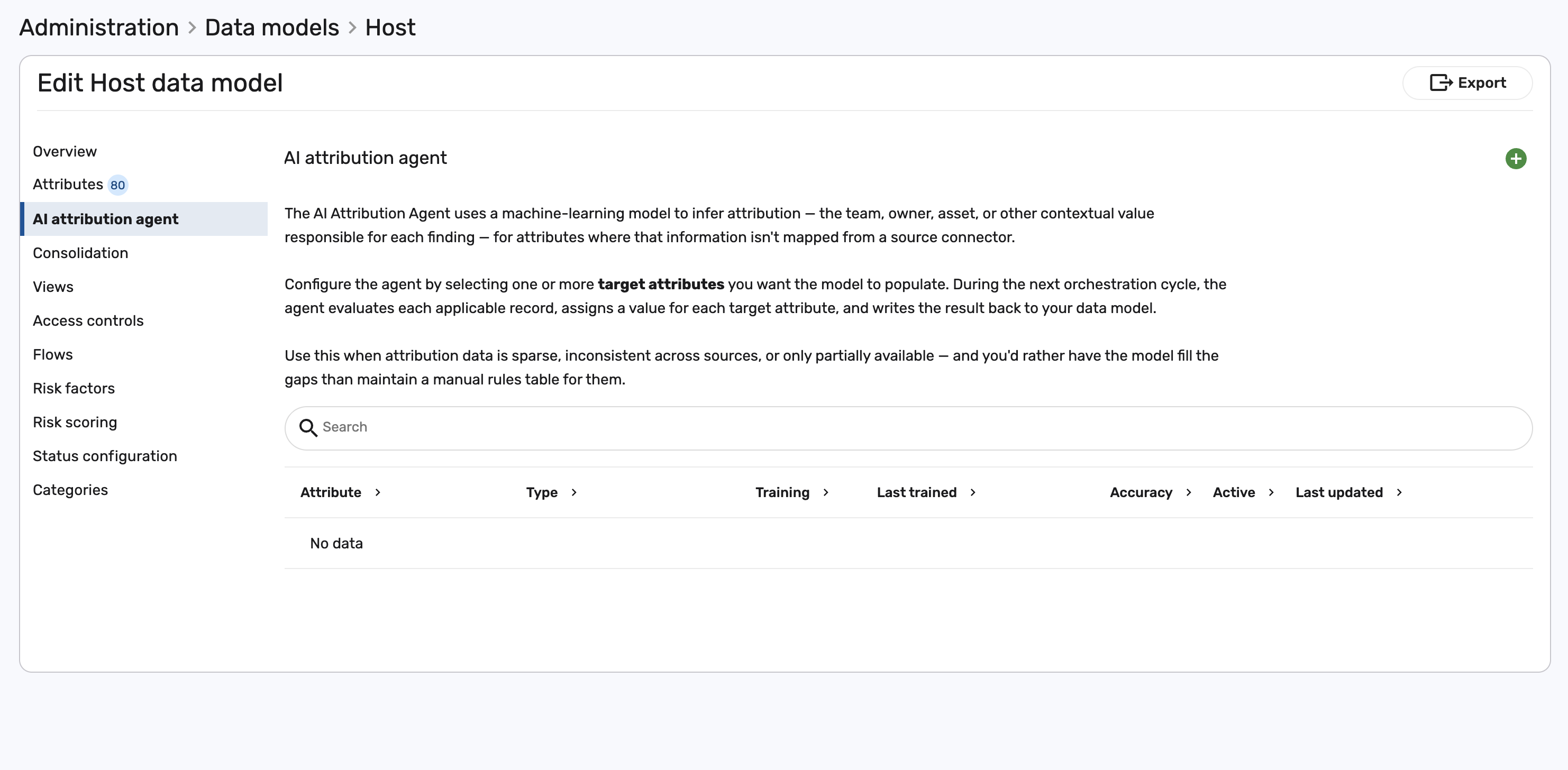
-
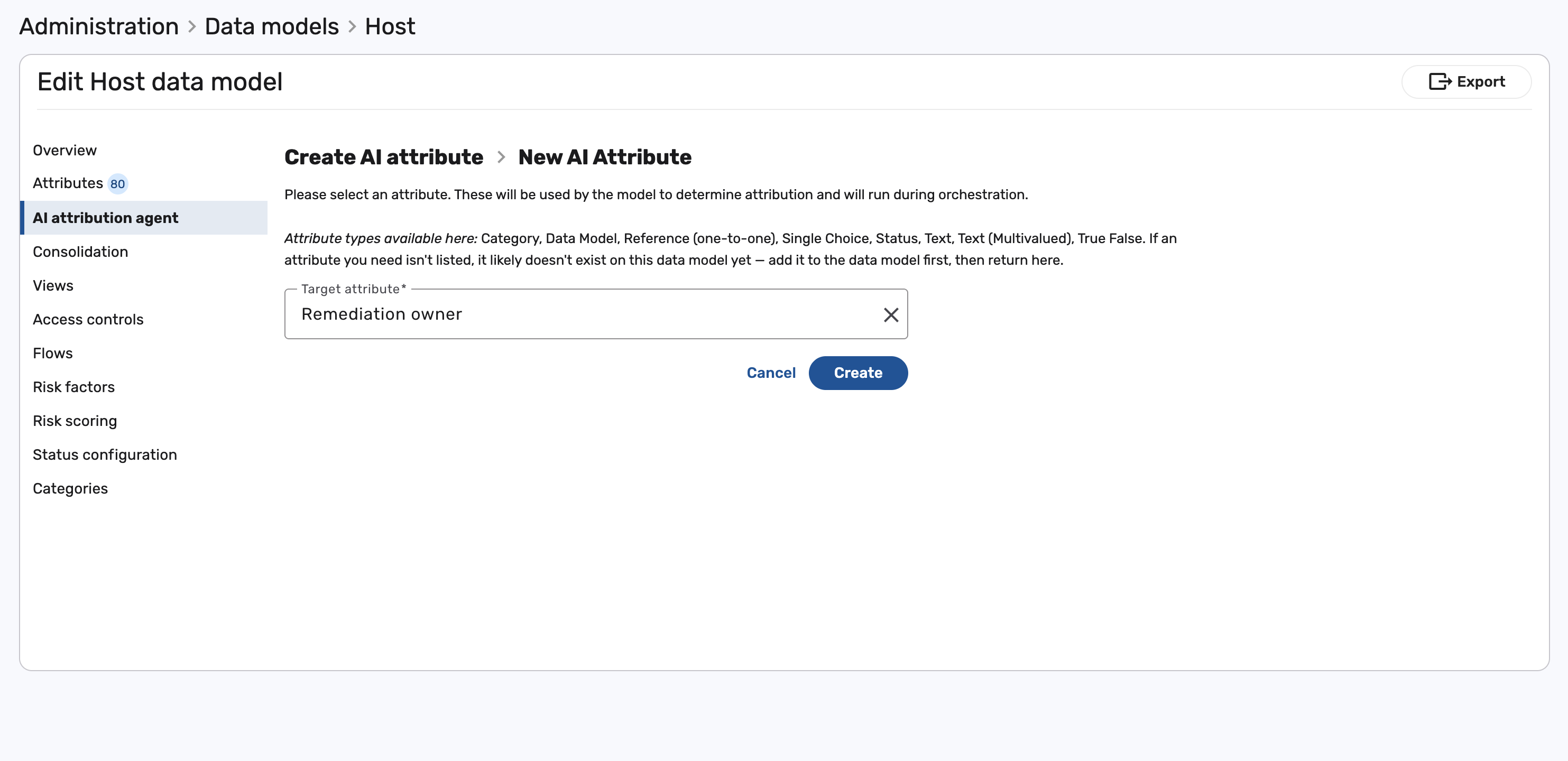
Select + to create a new AI attribute, then choose the target attribute you want the agent to predict — the attribute whose missing values you want filled, such as Remediation Owner.
-
On the attribute page, choose the source attributes the agent uses to make its prediction. Select Add attribute to pick them yourself, or Auto select attributes to let the agent choose the most useful ones for you. Use the Confidence levels control to set the score ranges for Low, Medium, and High.
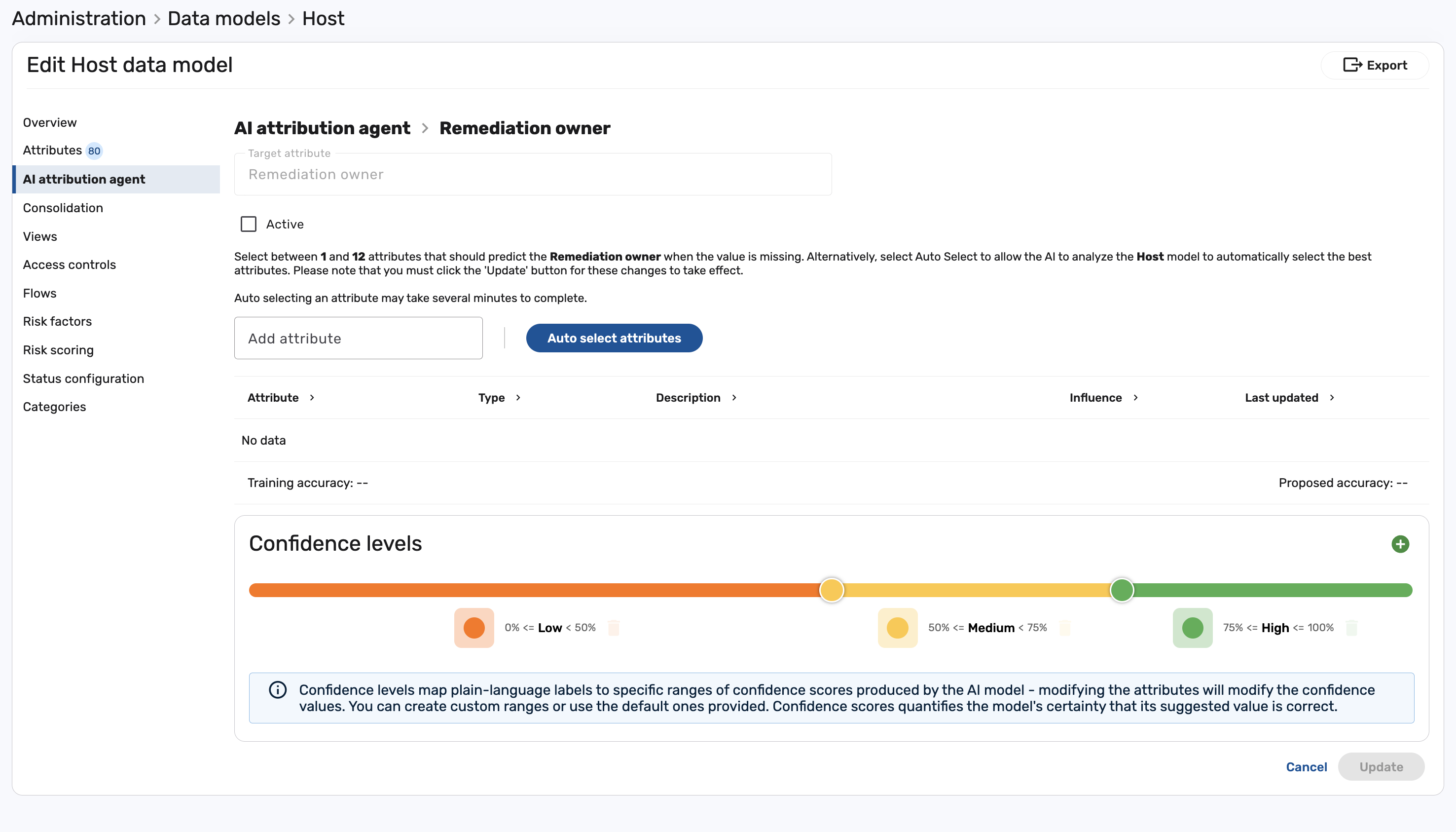
See confidence levels below for a detailed breakdown.
-
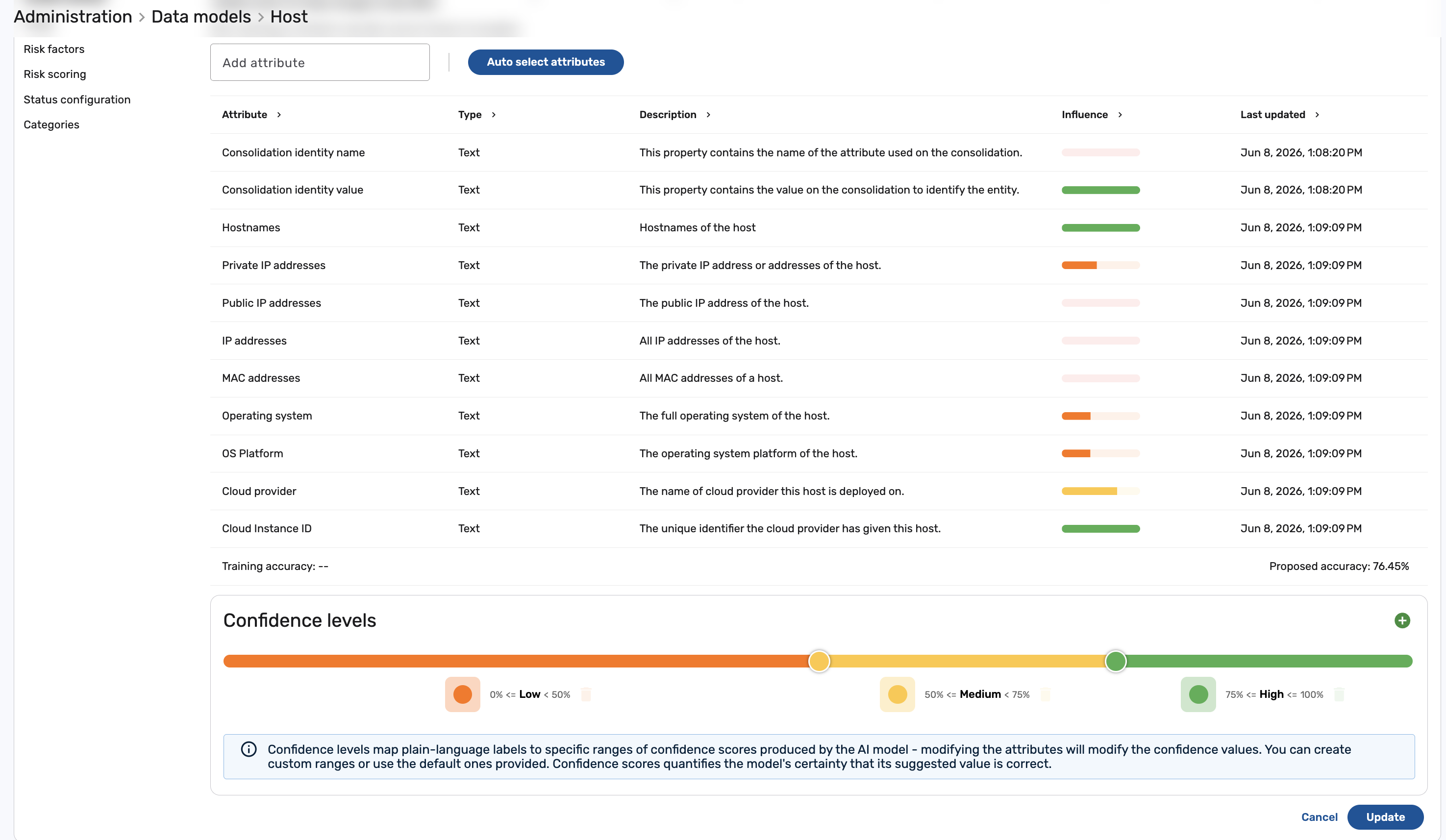
If you choose Auto select attributes, the agent reviews the data model and selects the attributes most useful for predicting the target. Each selected attribute shows its influence on the prediction, along with a proposed accuracy for the suggested set.
-
Set the attribute to Active and click Update to start training — only active attributes are trained. For a quick check first, select Test to evaluate accuracy on a smaller sample before committing to a full training run.
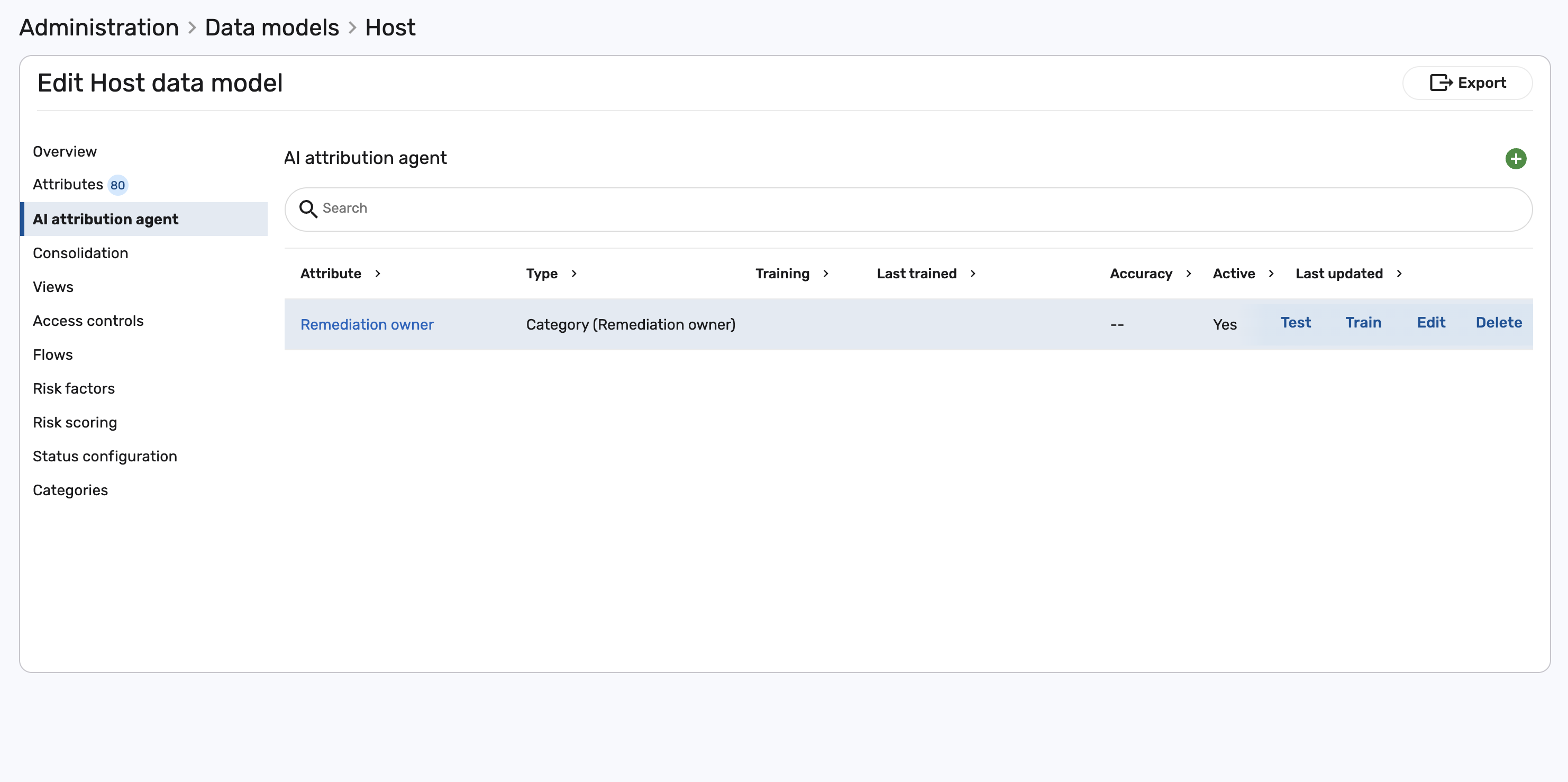
-
When training finishes, the attribute's Training status shows Complete and its Accuracy is displayed. The agent is now ready to contribute predictions on the next orchestration run.
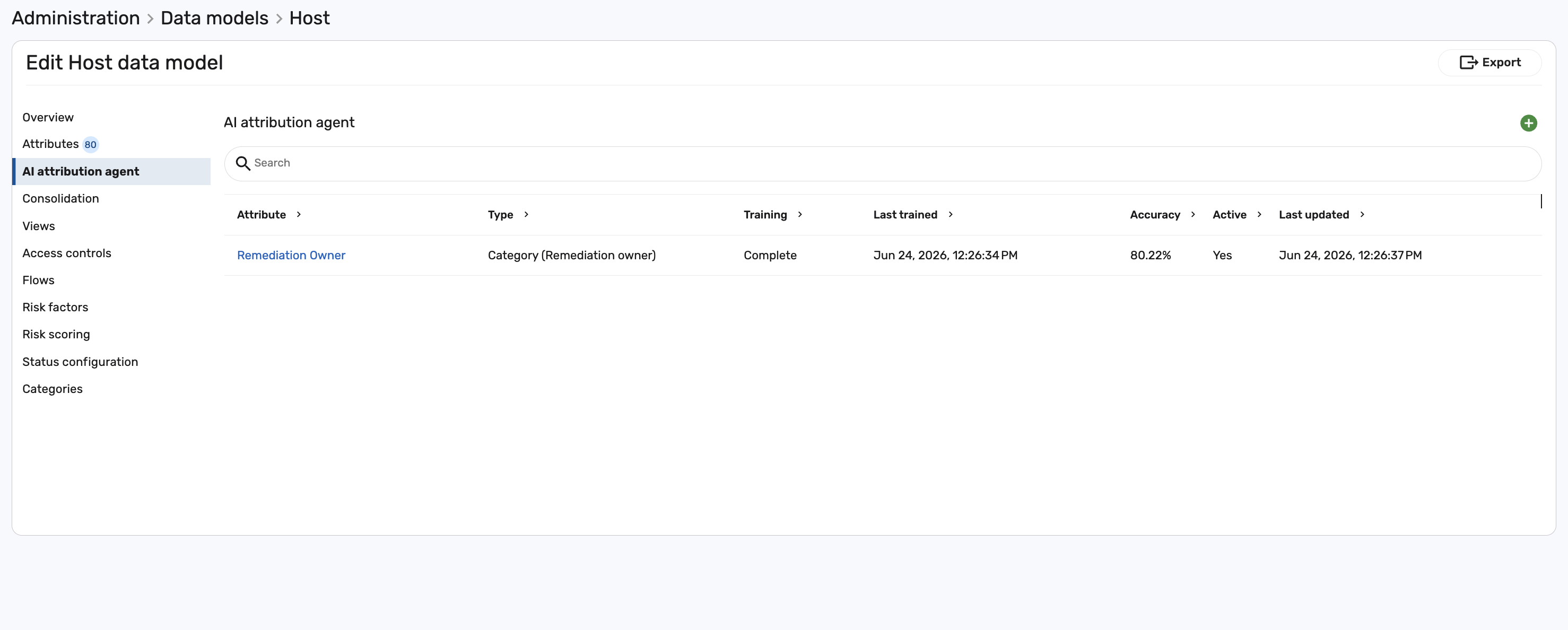
Confidence levels
The confidence score determines how the Attribution Agent behaves when no higher-precedence source has populated the attribute.
Table 1: Default confidence levels
| Level | Score range | Behavior |
|---|---|---|
| High | 75% – 100% | Auto-populate the attribute. Downstream automation can act on the value immediately. |
| Medium | 50% – 75% | Populate the attribute as Suggested. Requires user review or explicit acceptance before downstream automation acts on it. |
| Low | 0% – 50% | Do not populate. The attribute is left blank or marked as Unknown. |
These ranges are the defaults. You can adjust them — or create custom ranges — for each attribute using the Confidence levels control when you configure the AI attribute.
Inferring the remediation owner during consolidation
The Remediation Owner attribute is set by a cluster, which means it cannot be modified directly on the data model. To incorporate the Attribution Agent's prediction, route the predicted value through a text placeholder attribute, and then configure a cluster to read that placeholder and set Remediation Owner indirectly.
You set this path up once, in the model's Consolidation configuration:
-
Create a text attribute on the model called Remediation Owner Name. This placeholder holds the value predicted by the Attribution Agent.
-
Add the Attribution Agent's source data model — AI Attribution Agent Host — to the model's Consolidation Sources, and match it to your existing records using a shared identifier such as UID.
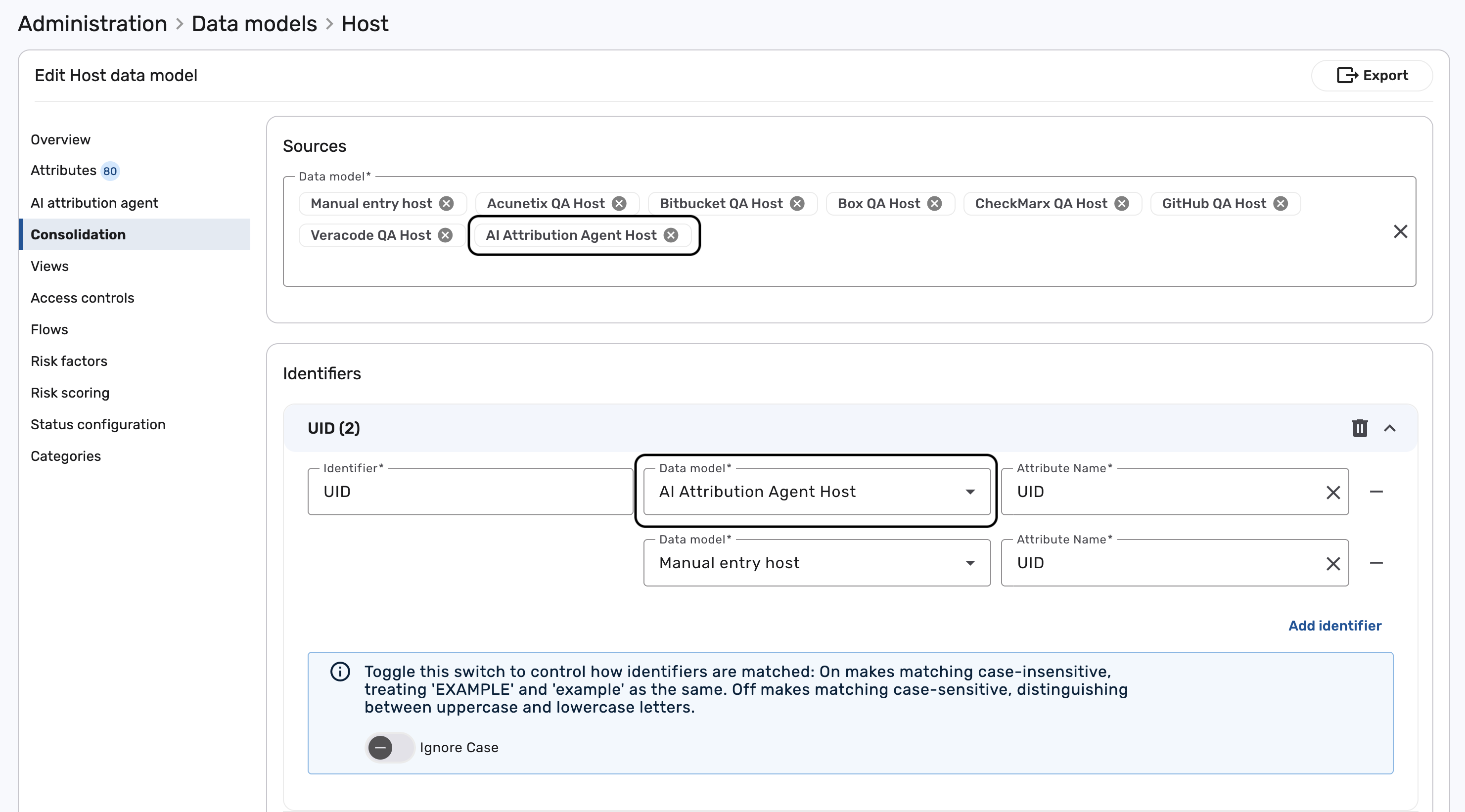
-
Map the Remediation Owner Name attribute to the
Remediation Ownervalue predicted by the Attribution Agent. The agent exposes a separate value for each confidence level — Remediation Owner (High), Remediation Owner (Medium), and Remediation Owner (Low) — which you can rank by precedence.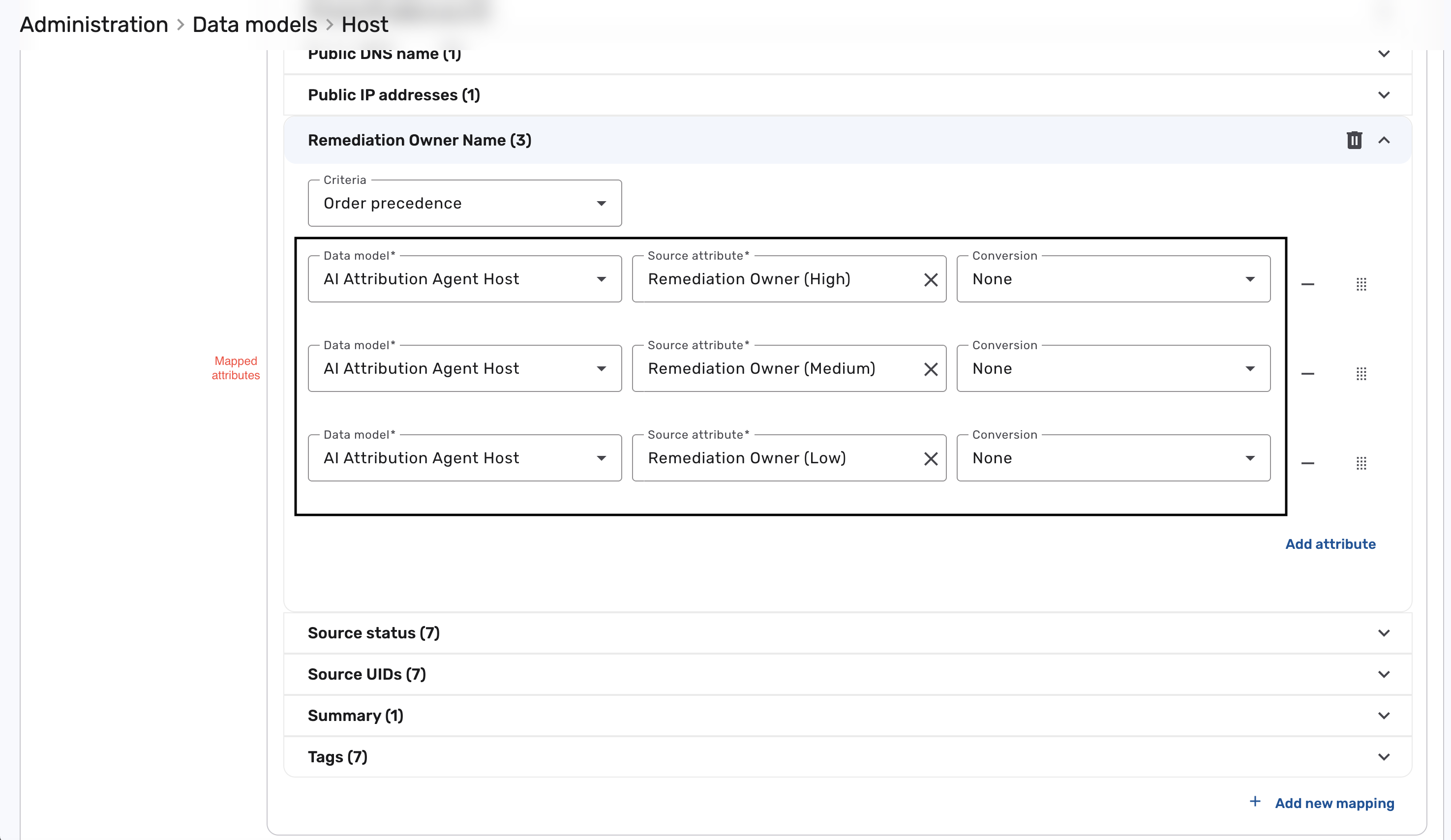
-
During orchestration, consolidation reads the
Remediation Ownervalue inferred by the Attribution Agent and writes it into the Remediation Owner Name text attribute on the consolidated record. -
Configure a cluster that uses the Remediation Owner Name value to set the
Remediation Ownerattribute on the record.
The result is an indirect attribution path: the Attribution Agent's prediction lands in the Remediation Owner Name text placeholder, and a downstream cluster translates that placeholder into the actual Remediation Owner assignment.
A common starting configuration is Manual entry → CMDB / ServiceNow → Attribution Agent. This ensures the agent fills gaps rather than overriding trusted sources.
What the Attribution Agent does not do
- It does not create or modify clusters. Existing cluster definitions continue to work exactly as before.
- It does not overwrite values from higher-precedence sources. Manual entry and authoritative integrations always win when ranked above the Attribution Agent.
- It does not eliminate the need for a source of truth. For customers with a well-curated CMDB or HRIS, the Attribution Agent fills gaps rather than replacing the primary source.
Viewing agent suggestions in the UI
When an attribute has been populated or suggested by the Attribution Agent, the field displays a confidence indicator alongside the value — for example, InfraOps Team · AI 92%. Hovering over the indicator reveals:
- The confidence score
- The model version that produced the prediction
- The top contributing attributes — for example, "Pattern matched with OS Owner group in 78% of similar cases"
From the attribute detail, you can:
- Accept the suggestion — the agent's predicted value is retained.
- Override the suggestion — enter a manual value. Manual entries always take precedence over agent values, regardless of consolidation ranking.
- Reject the suggestion — clear the value and optionally flag the record for data enrichment.
Downstream automation
Downstream automation can act on agent-populated attributes conditionally based on confidence. Common patterns:
- Auto-assign at high confidence:
if remediation_owner_confidence ≥ 0.75 → assign ticket to predicted owner - Route low-confidence values for review:
if remediation_owner_confidence < 0.75 → create a "Review needed" task
This lets automation scale without sacrificing accuracy — human review triggers only when the model is uncertain.
Auditability
Every agent-populated value records:
- Model version and timestamp
- Confidence score
- Top source features that contributed to the prediction
- User actions on the suggestion — auto-applied, accepted, overridden, or rejected
This metadata is available in audit logs and in the attribute detail view, supporting compliance, explainability, and debugging.
Example use cases
The examples below illustrate common patterns for deploying the Attribution Agent alongside existing data sources.
Fill gaps in an incomplete CMDB
Scenario: A ServiceNow CMDB covers ~70% of assets. The remaining 30% — typically cloud workloads spun up outside the formal provisioning process — have no Remediation Owner assigned.
Configuration: Manual entry → ServiceNow CMDB → Attribution Agent in the Remediation Owner consolidation hierarchy.
Outcome: CMDB-covered assets keep their authoritative owner. Uncovered assets receive an AI-predicted owner at whatever confidence the agent produces, routed to review or auto-applied according to the confidence level.
Auto-assign high-confidence remediation tickets
Scenario: Remediation tickets currently route to a shared triage queue, causing delays while an analyst manually identifies the correct owner team.
Configuration: Enable the Attribution Agent for Remediation Owner. In the automation rule, gate auto-assignment on remediation_owner_confidence ≥ 0.75. Findings with lower-confidence predictions continue to land in the triage queue.
Outcome: High-confidence findings route directly to the correct owner team. Low-confidence findings keep the existing manual-triage path until the model is certain.
Bootstrap ownership on a new data source
Scenario: A newly onboarded vulnerability scanner produces findings for assets that have never been ownership-tagged because they weren't in the CMDB.
Configuration: Rank the Attribution Agent just below Manual entry in the Business Owner and Application Owner consolidation hierarchies.
Outcome: Findings from the new source immediately carry predicted ownership attributes, enabling dashboards and routing rules to function while the CMDB onboarding catches up.
Related
- Data orchestration. How Brinqa runs consolidation, computation, and storage end to end.
- Data consolidation. How Brinqa merges values from multiple sources into one attribute.
- Attribute mapping. Mapping source-specific attributes into unified data model attributes.
- Clusters. The existing mechanism for modeling ownership relationships.