AI Deduplication
AI Deduplication is an AI-powered capability that groups near-identical vulnerability findings — the same underlying weakness reported by different scanners, or worded slightly differently across sources — into a single consolidated exposure. Instead of triaging the same issue many times because each scanner names and describes it its own way, your team works from one deduplicated view while every original finding is preserved beneath it for audit and lineage.
AI Deduplication is available on Brinqa 12.3.x and is hidden by default. Contact your Brinqa account team to enable it for your instance.
How it works
When enabled, the AI Deduplication agent runs automatically as part of each data orchestration, after your integration data has been brought in and stored. It compares vulnerability findings across the integration sources you select and identifies the ones that describe the same real-world issue.
Findings the agent recognizes as matches are grouped together into a single consolidated exposure. You interact with these consolidated exposures on the Intelligent Vulnerability and Intelligent Vulnerability Definition pages, which give you one deduplicated record in place of many near-duplicate ones.
The Intelligent Vulnerability and Intelligent Vulnerability Definition pages are a complete view of your vulnerability data — every integration is represented there, whether or not you selected it for deduplication.
Selecting a subset of integrations in Step 2 scopes which sources are compared against each other, not which sources appear in the results. Findings from integrations you did not select are carried through unchanged: each one becomes its own single-member consolidated exposure rather than being grouped with anything.
So seeing data from an unselected integration on these pages is expected behavior, not a configuration problem. Likewise, if you deselect most of your integrations, the total number of records on these pages stays roughly the same — what changes is how many of them are grouped.
Deduplication is non-destructive. Every original scanner finding is retained as a child of the consolidated exposure it belongs to, so you always keep a complete audit trail and full data lineage back to each source. Nothing is deleted or overwritten.
How aggressively the agent groups findings is entirely under your control through a single minimum confidence score. Raise it to group only the findings the AI is most certain about; lower it to group more broadly.
Configuration
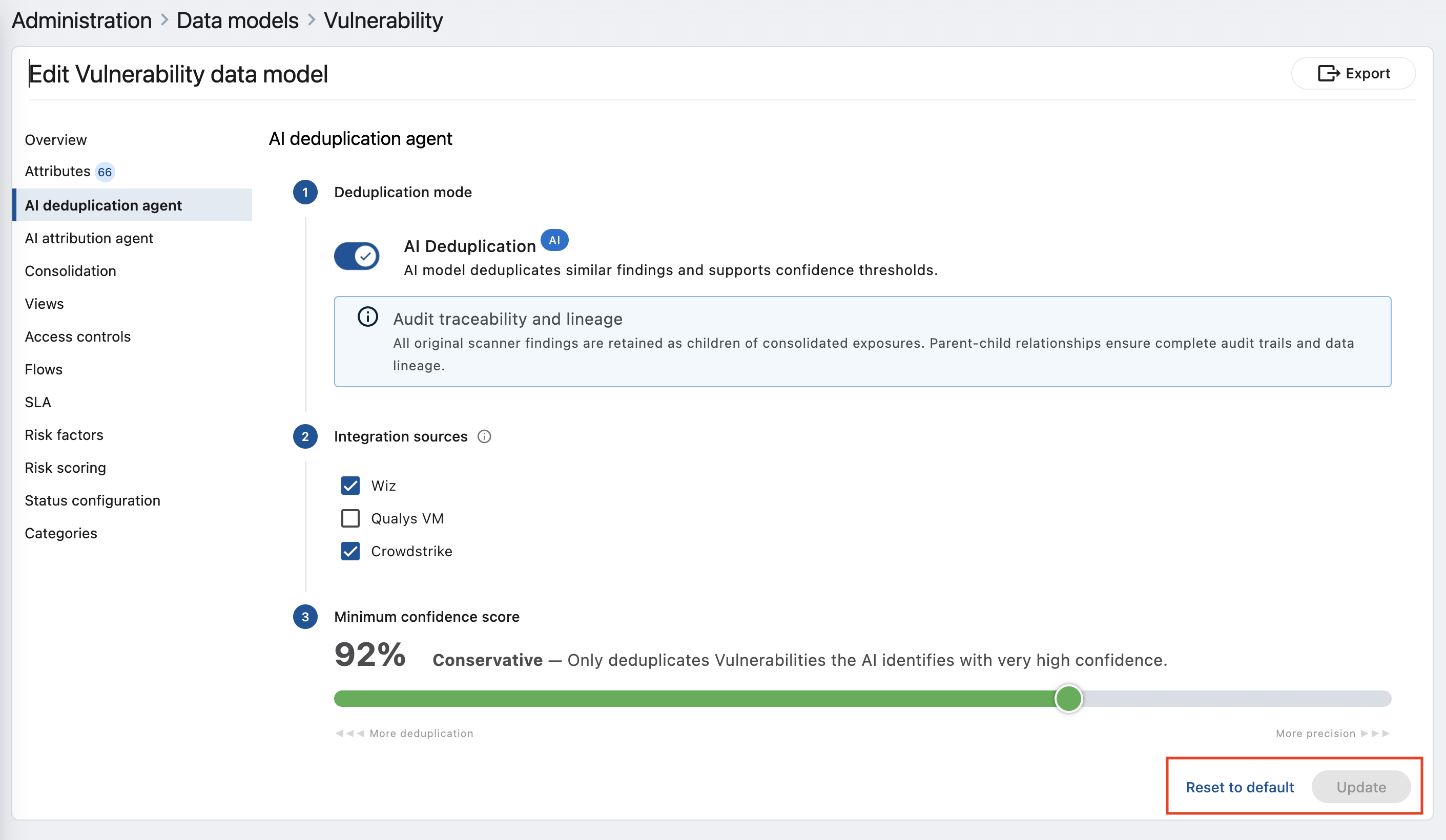
AI Deduplication is configured from the AI deduplication agent tab of a data model. You turn the agent on, choose which integration sources it looks at, and set how confident it must be before it groups findings.
The Vulnerability and Vulnerability Definition data models share a single AI Deduplication configuration. Opening the tab from either model edits the same settings, so you only need to configure it once — a change made on one is immediately in effect for the other.
-
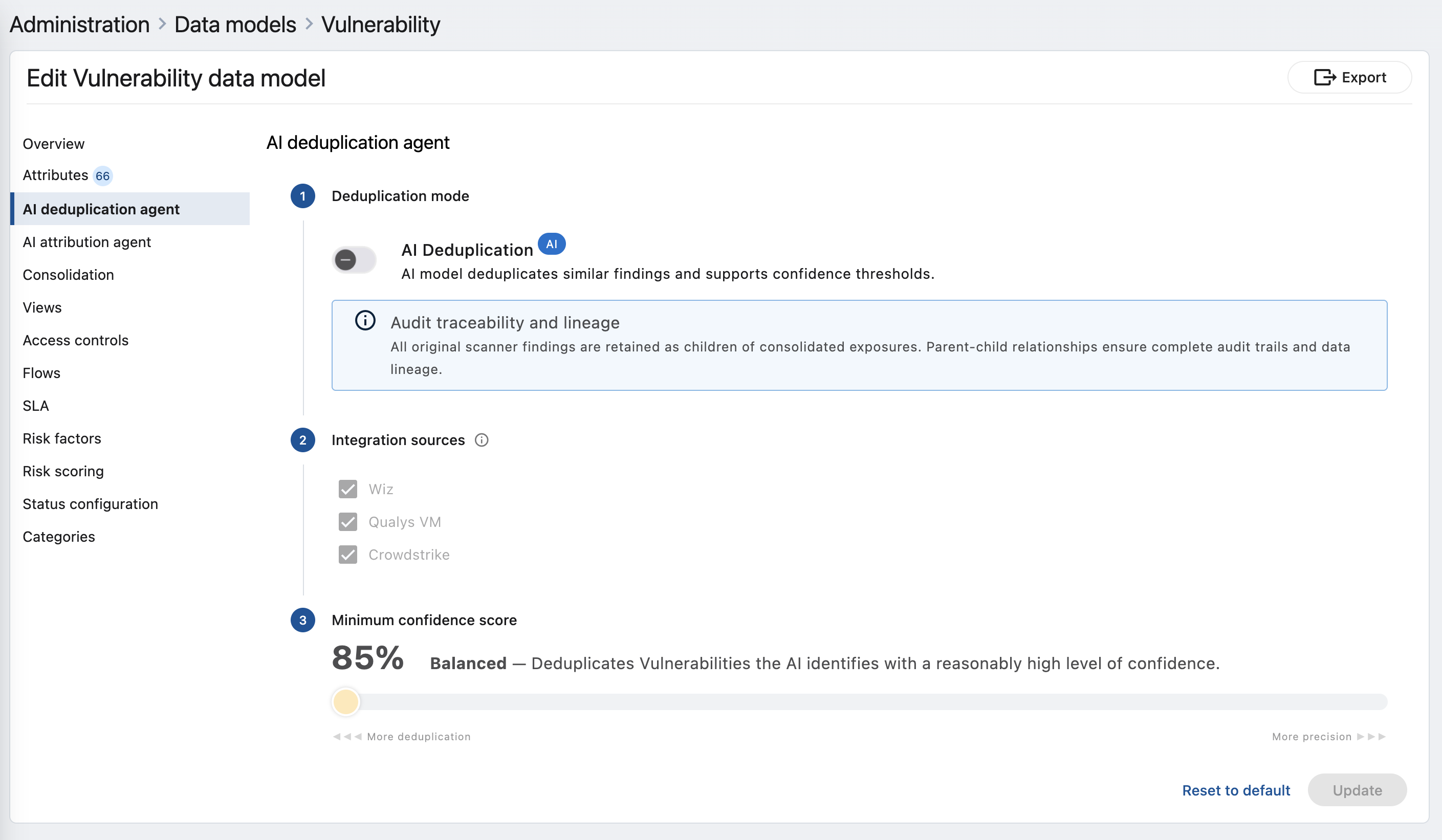
In Administration, open Data models and select the model you want to work with. Open the AI deduplication agent tab.
-
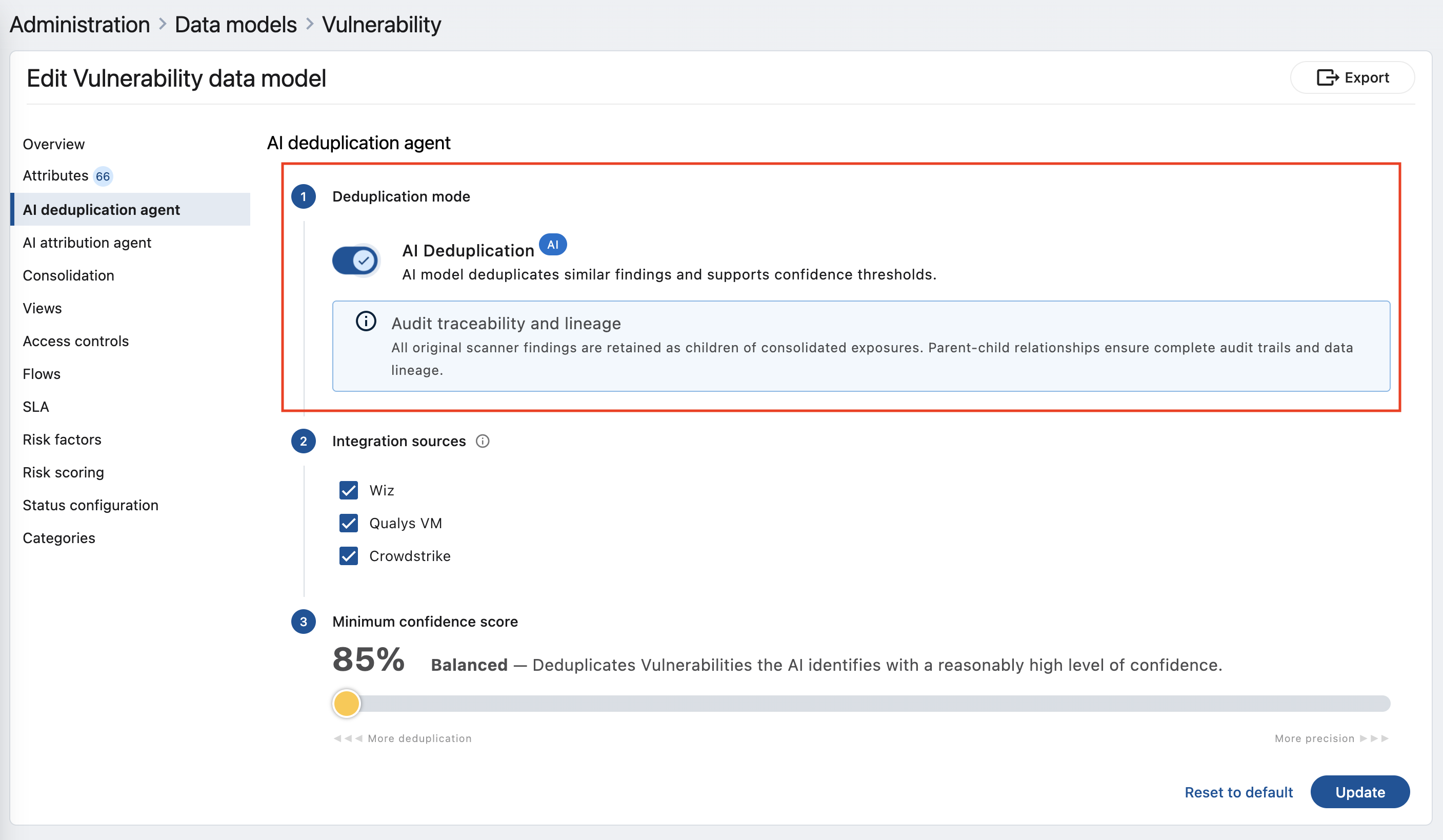
Step 1 — Deduplication mode. Turn on the AI Deduplication toggle to enable the agent. The panel below reminds you that all original scanner findings are retained as children of the consolidated exposures, preserving audit traceability and lineage.
The source list in Step 2 and the slider in Step 3 stay disabled until this toggle is on.
-
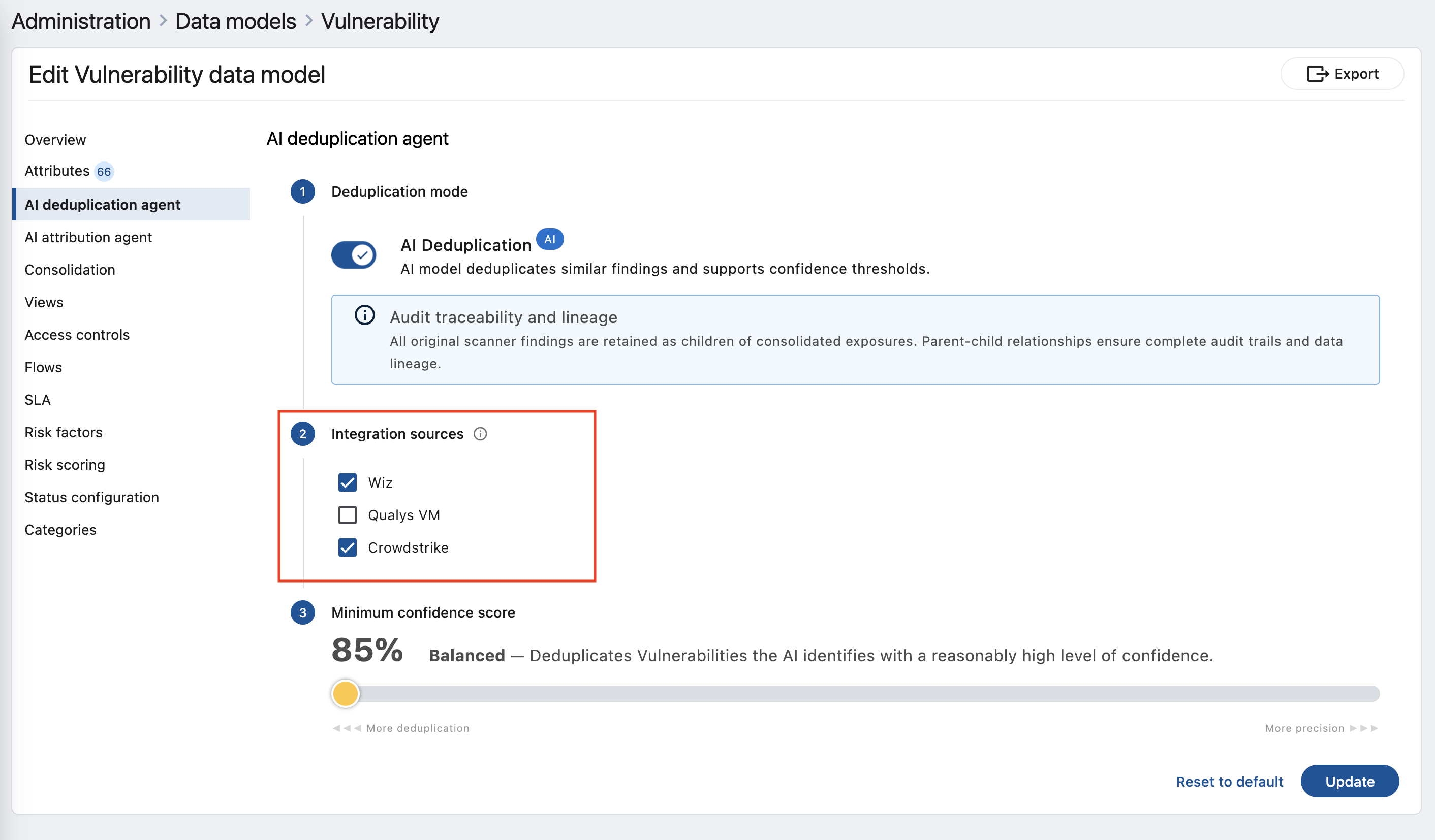
Step 2 — Integration sources. Select the integration sources whose findings the agent should compare against each other. At least two sources must be selected before you can save — deduplication needs more than one source to find matches across them.
This choice scopes the comparison, not the results. Findings from sources you leave unchecked are not compared with anything, but they still appear on the Intelligent Vulnerability and Intelligent Vulnerability Definition pages, each as its own single-member consolidated exposure. Unchecking a source removes it from grouping; it does not remove its data from the product.
Sources also have to still be part of the data model's consolidation definition. If a source you selected is later removed from consolidation and fewer than two remain, the next orchestration reports a deduplication failure rather than running against an incomplete set — so revisit this step after changing which integrations feed the model.
-
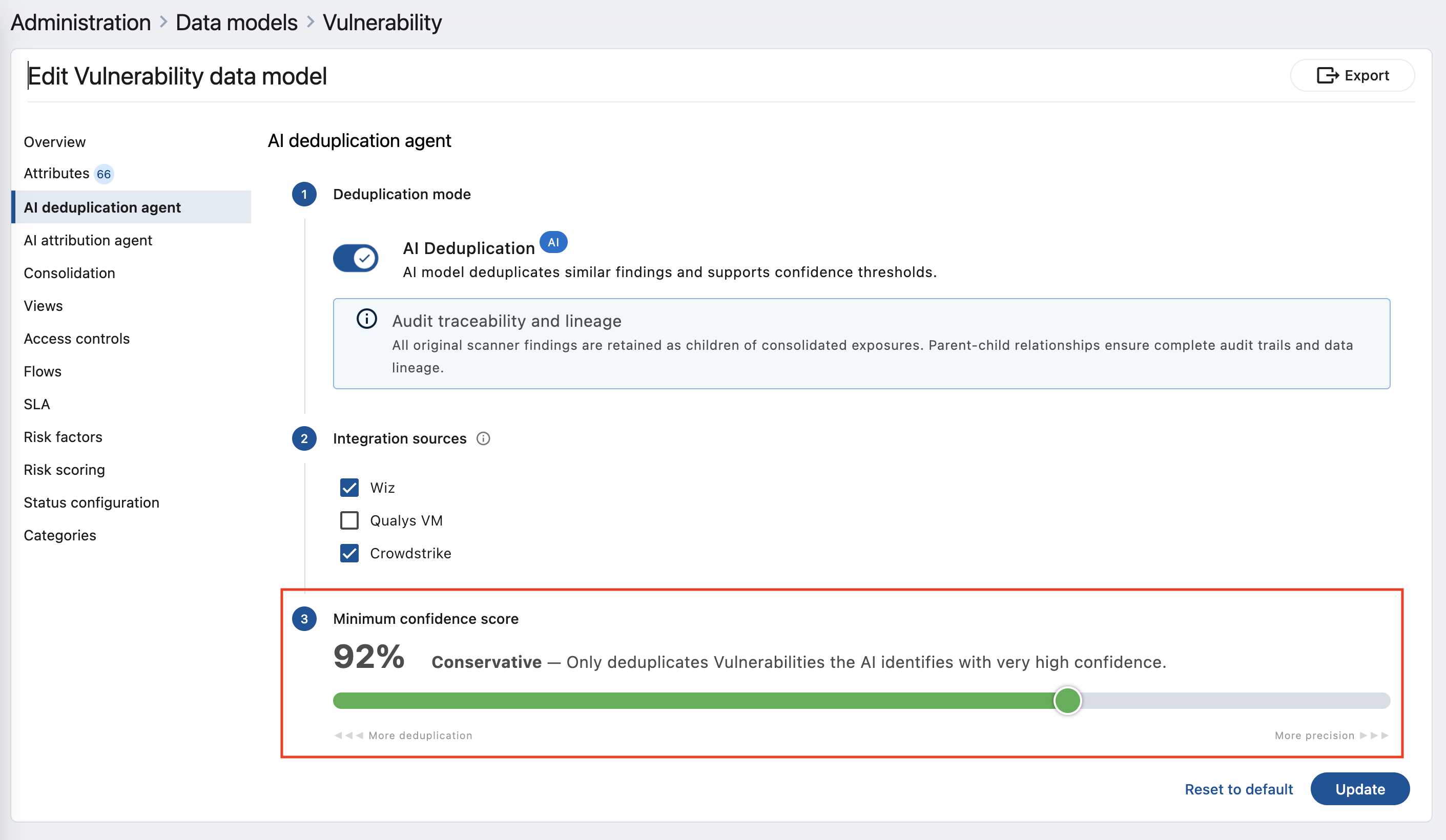
Step 3 — Minimum confidence score. Drag the slider to set how certain the AI must be before it groups two findings together. Sliding toward More deduplication (a lower score) groups findings more freely; sliding toward More precision (a higher score) groups only the closest matches. The current percentage and a description of what it means are shown above the slider, and both update as you move it.
The slider is bounded to 85–95%, and new configurations start at 85%. Scores below 85% group too loosely to be trustworthy at scale, so they are not offered.
-
Select Update to save. Reset to default returns every setting to its recommended starting point. If you change the confidence score on a configuration that has already run, Brinqa asks you to confirm re-processing — changing the score re-evaluates all records, so the change is applied on the next run.
Confidence tiers
The minimum confidence score maps to a named behavior. As you move the slider, the description updates to tell you which tier you are in and what it means for your data.
Table 1: Confidence tiers
| Tier | Score | Behavior |
|---|---|---|
| Balanced | 85–91% | Deduplicates vulnerabilities the AI identifies with a reasonably high level of confidence. A good general-purpose starting point, and the default. |
| Conservative | 92–95% | Only deduplicates vulnerabilities the AI identifies with very high confidence. Fewer findings are grouped, but each grouping is highly reliable. |
Start at the default 85%, review the consolidated exposures it produces, and adjust from there. Move toward More precision if you see groupings that shouldn't have been combined; move toward More deduplication if too many obvious duplicates remain separate.
When deduplicated data becomes available
Deduplication does not finish when orchestration finishes. It is a multi-stage pipeline that starts during orchestration and continues after it, and the Intelligent Vulnerability and Intelligent Vulnerability Definition pages only reflect the new results once the whole pipeline has completed.
The stages run in this order:
- Orchestration brings in and stores your data. Once the data-storage stage completes, the AI Deduplication agent is triggered. It runs alongside the rest of orchestration, so it never holds up the remaining stages.
- The AI model compares your findings. This is the longest stage and the one that varies most: how long it takes depends on how many findings and definitions are in scope, not on how long orchestration took. Orchestration will typically report complete while this stage is still running.
- Brinqa loads the results. Consolidated exposures are created, updated, and — where a previous grouping no longer holds — removed, and every original finding is re-linked to the exposure it now belongs to.
- Calculated fields are refreshed. Scores and other calculated attributes on the consolidated records are recomputed so they match the newly grouped data.
Two consequences worth planning around:
- A completed orchestration does not mean deduplicated data is ready. Treat the two as separate events. If you schedule reports, exports, or downstream automation off the end of orchestration, they may read consolidated exposures from the previous deduplication run.
- The consolidated view can be briefly out of sync with your raw findings. Between stages 1 and 4 the underlying findings are current while the consolidated exposures are still catching up, so counts and groupings on the Intelligent Vulnerability and Intelligent Vulnerability Definition pages may not yet reflect the newest data. This resolves on its own when the pipeline completes.
Changing the minimum confidence score re-evaluates every record, so the run that follows such a change is a full re-processing pass and takes correspondingly longer than an incremental one.
Knowing where things stand
The Intelligent Vulnerability and Intelligent Vulnerability Definition list pages tell you which state you are in, and refresh on their own — you do not need to reload the page.
While the pipeline is running, each page shows an informational banner naming the records it lists:
Intelligent Vulnerability Definition: Processing in progress. Some definitions and counts may be incomplete or out of date.
Intelligent Vulnerability: Processing in progress. Some vulnerabilities and counts may be incomplete or out of date.
Your data remains fully usable while this is shown — the notice simply indicates that the consolidated view is still being refreshed. The banner clears on its own once processing finishes.
If a page has no records yet, the table says No definitions to display or No vulnerabilities to display. While the pipeline is still running it adds Results will appear here shortly, so an empty page mid-run is distinguishable from an empty page at rest. That hint disappears along with the progress banner.
If a run completes without finding anything it could group, the pages show:
No vulnerabilities could be deduplicated.
That is an outcome, not an error. The most common causes are a confidence score set higher than any of your findings can meet, and too few — or too narrowly overlapping — integration sources selected in Step 2. Lowering the score toward More deduplication or adding sources is the usual remedy.
What AI Deduplication does not do
- It does not delete or overwrite your findings. Every original scanner finding is kept as a child of its consolidated exposure. You can always trace a consolidated record back to each source finding that contributed to it.
- It does not hide the sources you didn't select. Only the integration sources you check in Step 2 are compared against each other, but every source is still represented on the Intelligent Vulnerability and Intelligent Vulnerability Definition pages. Unselected sources pass through as single-member consolidated exposures.
- It does not run without at least two integration sources. Deduplication compares findings across sources, so a minimum of two selected sources is required.
- It does not require manual triggering. Once enabled, the agent runs automatically as part of each orchestration; you do not need to launch it by hand.
- It does not complete within orchestration. Deduplicated data becomes available after orchestration finishes — see When deduplicated data becomes available.
Related
- Data orchestration. How Brinqa runs consolidation, computation, and storage end to end.
- Data consolidation. How Brinqa merges values from multiple sources into one record.
- Attribute mapping. Mapping source-specific attributes into unified data model attributes.