JFrog Artifactory
Application Security- Overview
- Setup
- Data & mappings
- Operations & API
- Changelog
The JFrog Artifactory Connector integrates with the JFrog Artifactory repository management platform to synchronize organizational data including repositories, projects, users, and files. It connects to the Artifactory REST API and AQL (Artifactory Query Language) to fetch artifact management data.
Data retrieved from JFrog Artifactory
| Connector Object | Required | Maps to Data Model |
|---|---|---|
| Repository | Yes | Code Repository |
| Project | Yes | Code Project |
| User | Yes | — |
| File | Yes | — |
Model relationships
For detailed steps on how to view the data retrieved from JFrog Artifactory in the Brinqa Platform, see How to view your data.
Connection settings
When setting up a data integration, select JFrog Artifactory from the Connector dropdown and provide the following:
| Setting | Required | Default | Description |
|---|---|---|---|
| API url | Yes | — | JFrog api url |
| Access token | Yes | — | JFrog access token |
Authentication
The connector uses a JFrog Platform Access Token for authentication via bearer token.
Generating an Access Token
- Log in to your JFrog Platform instance
- Navigate to Administration → Identity and Access → Access Tokens
- Click Generate Token
- Select Scoped Token with
applied-permissions/adminscope - Copy the generated token
Usage
All API requests include the access token as a bearer token:
Authorization: Bearer <access-token>
Test Connection
| Method | URL |
|---|---|
GET | {url}/artifactory/api/repositories |
Request Headers
| Header | Value |
|---|---|
Authorization | Bearer <access-token> |
Accept | application/json |
Sample Response
[
  {
    "key": "example-repo-local",
    "type": "LOCAL",
    "url": "https://example.jfrog.io/artifactory/example-repo-local",
    "packageType": "Maven",
    "description": "Example local Maven repository"
  }
]
Response Fields
| Field | Description |
|---|---|
key | Repository key (unique identifier) |
type | Repository type (LOCAL, REMOTE, VIRTUAL, FEDERATED, etc.) |
url | Repository URL |
packageType | Package type (Maven, Docker, npm, etc.) |
description | Repository description |
A successful connection returns a 200 OK with a list of repositories. Authentication failures throw NonRetryableException.
The same Authorization: Bearer <access-token> header is sent on every subsequent API request (repositories, projects, users, and AQL file searches).
Sync Behavior
The connector supports incremental (delta) syncs. It maintains a sync token between runs and applies it as an incremental timestamp filter, so each run re-processes only the records that changed after the previous sync. The initial run retrieves the complete data set; later runs are incremental. The specific timestamp field applied to each object is documented under that object's Sync Duration Parameter.
How to obtain JFrog Artifactory credentials
Generate a JFrog access token
For the JFrog Artifactory connector to use the JFrog API, you must provide an access token. JFrog does not allow retrieving the access token for an existing user. To generate a new token, follow these steps:
-
Log in to your organization's JFrog portal as an administrator.
-
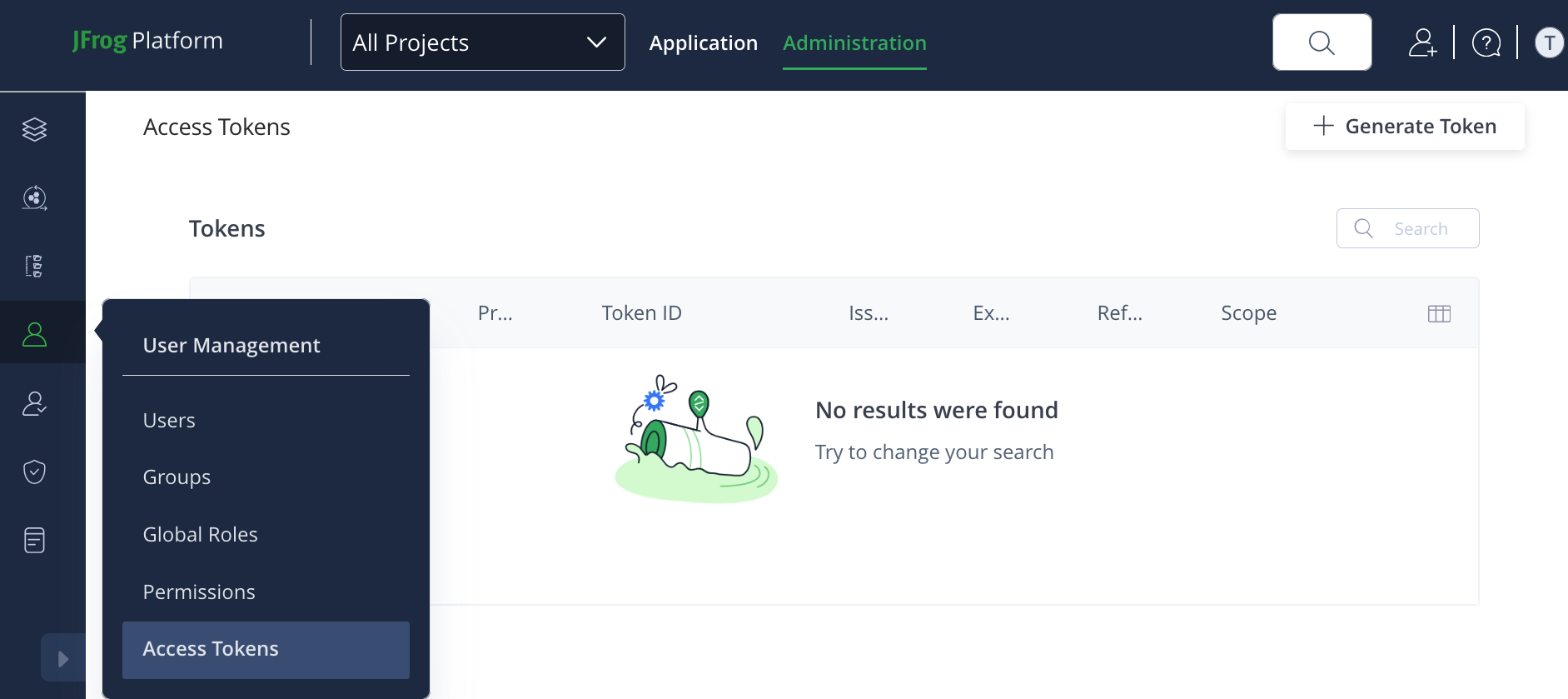
Navigate to User Management > Access Tokens.
-
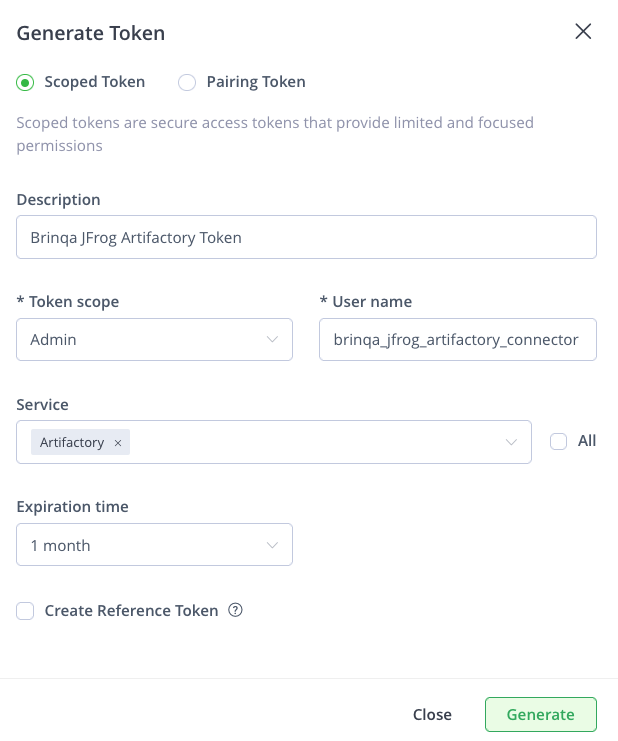
Click Generate Token, select Scoped Token, and then complete the following fields:
-
Description: Provide a description for the token.
-
Token scope: Click the dropdown and select the appropriate scope for your integration. You have three options:
-
Admin: Grants full administrative access. Use this option if retrieving your data requires complete control over all aspects of Artifactory. Proceed with caution, as this option provides extensive permissions.
-
User: Grants access based on a specific user's permissions. Use this option if retrieving your data requires performing actions that a typical user would require.
-
Group: Grants access based on a group of users' permissions. Use this option if retrieving your data needs permissions common to a specific group.
-
-
Note: While all three options can be used to authenticate API requests, Brinqa recommends that you use the User or Group scope, as these can provide more controlled access. Consult the JFrog documentation to better understand which scope may better suit your needs.
-
User name: Provide a user name for the token.
-
Service: Click the dropdown and select Artifactory.
-
Expiration time: If desired, click the dropdown and set an expiry for the token. Options include: Never, 1 day, 3 days, 1 week, 1 month, or a custom time.
-
Create reference token: Not checked by default. Leave as is.
-
Click Generate.
Your access token displays. You cannot view the token after this. Copy and save it to a secure location.
Note: If you do not have permissions to create an access token, contact your JFrog administrator. For additional information, see JFrog documentation.
Attribute mappings
Expand the sections below to view the mappings between the source and the Brinqa data model attributes:
Repository
| Source Field Name | SDM Attribute |
|---|---|
RepositoryResource.description | DESCRIPTION |
RepositoryResource.key | UID |
RepositoryResource.key | NAME |
RepositoryResource.packageType | PACKAGE_TYPE |
RepositoryResource.type | REPOSITORY_TYPE |
RepositoryResource.url | URL |
| — | CATEGORIES |
| — | STATUS |
| — | LAST_CAPTURED |
Project
| Source Field Name | SDM Attribute |
|---|---|
ProjectResource.description | DESCRIPTION |
ProjectResource.displayName | NAME |
ProjectResource.projectKey | UID |
ProjectResource.softLimit | SOFT_LIMIT |
ProjectResource.storageQuotaBytes | STORAGE_QUOTA_BYTES |
ProjectResource.storageQuotaEmailNotification | STORAGE_QUOTA_EMAIL_NOTIFICATION |
| — | CATEGORIES |
| — | STATUS |
| — | LAST_CAPTURED |
User
| Source Field Name | SDM Attribute |
|---|---|
UserResource.name | UID |
UserResource.name | NAME |
UserResource.realm | REALM |
UserResource.uri | URL |
| — | STATUS |
| — | LAST_CAPTURED |
File
| Source Field Name | SDM Attribute |
|---|---|
AqlFileResource.actualMd5 | CHECKSUMS_MD5 |
AqlFileResource.actualSha1 | CHECKSUMS_SHA1 |
AqlFileResource.created | SOURCE_CREATED_DATE |
AqlFileResource.createdBy | CREATED_BY |
AqlFileResource.depth | DEPTH |
AqlFileResource.modified | SOURCE_LAST_MODIFIED |
AqlFileResource.modifiedBy | MODIFIED_BY |
AqlFileResource.originalMd5 | ORIGINAL_CHECKSUMS_MD5 |
AqlFileResource.originalSha1 | ORIGINAL_CHECKSUMS_SHA1 |
AqlFileResource.repo | REPOSITORY |
AqlFileResource.sha256 | CHECKSUMS_SHA256 |
AqlFileResource.size | SIZE |
AqlFileResource.updated | LAST_UPDATED |
AqlFileResource.virtualRepos | VIRTUAL_REPOS |
| Constructed | URL |
| Constructed | DOWNLOAD_URI |
| path/name | UID |
| path/name | NAME |
| — | LAST_CAPTURED |
Operations & API
Expand each connector object to see its operation options, delta-sync behavior, and the API it uses. See connector operation options for how to apply operation options (keys and values are case-sensitive).
Repository
Operation options
This object does not support any operation options.
Delta sync
Supported.
API
- Type: REST · Endpoint:
GET /artifactory/api/repositories
Project
Operation options
This object does not support any operation options.
Delta sync
Supported.
API
- Type: REST · Endpoint:
GET /access/api/v1/projects
User
Operation options
This object does not support any operation options.
Delta sync
Supported.
API
- Type: REST · Endpoint:
GET /artifactory/api/security/users
File
Operation options
This object does not support any operation options.
Delta sync
Supported.
API
- Type: AQL query (Artifactory Query Language) over REST · Endpoint:
POST /artifactory/api/search/aql - Default filters: One query per non-virtual repository, filtered to
type: file
Changelog
The JFrog Artifactory connector has undergone the following changes:
| Version | Description | Migration Steps |
|---|---|---|
| 3.0.10 | No changes in this release. | N/A |
| 3.0.9 | New Features - Artifactory File sync enabled: The File object type is now registered with the Artifactory connector, so files stored in Artifactory repositories are synced as assets alongside Projects, Repositories, and Users. Improvements - Internal code-quality refactor in the Artifactory File model. No user-visible behavior change. | N/A |
| 3.0.8 | No changes in this release. | N/A |
| 3.0.7 | Improvements - Connector and platform errors now surface a clear, human-readable message (for example, the underlying JFrog error text) instead of a generic failure, making sync issues easier to diagnose. Dependency Upgrades - Upgraded the connector platform and several third-party libraries (JSON processing and supporting libraries) to current, supported versions. | N/A |
| 3.0.6 | No changes in this release. | N/A |
| 3.0.5 | New Features - Added an Exclude Repositories option that lets you provide a comma-separated list of repository keys to skip during sync, so unwanted or noisy repositories can be omitted from collection. | N/A |
| 3.0.4 | No changes in this release. | N/A |
| 3.0.3 | Improvements - Artifactory File collection has been temporarily disabled. The File object type is no longer synced in this release; Projects, Repositories, and Users continue to sync as before. (File sync is re-enabled in a later release.) | N/A |
| 3.0.2 | Improvements - File timestamp attributes (created, last modified, and last updated dates) are now emitted as proper date values rather than raw millisecond numbers, so they display and filter correctly as dates in the platform. | N/A |
| 3.0.1 | No changes in this release. | N/A |
| 3.0.0 | Overview The JFrog Artifactory connector integrates with JFrog Artifactory to synchronize repository, project, user, and stored-file inventory as assets. Category: Application Security Models | N/A |