
GitLab
Application Security- Overview
- Setup
- Data & mappings
- Operations & API
- Changelog
The GitLab connector integrates with the GitLab DevSecOps platform to synchronize security and asset data. It connects via the GitLab GraphQL API to fetch projects, repositories, packages, users, and vulnerability findings (SAST, DAST, dependency scanning, and secret detection).
Data retrieved from GitLab
| Connector Object | Required | Maps to Data Model |
|---|---|---|
| Code Project | Yes | Code Project |
| Code Repository | Yes | Code Repository |
| Package | Yes | Package |
| Person | Yes | Person |
| Static Code Finding | Yes | Static Code Finding |
| Static Code Finding Definition | Yes | Static Code Finding Definition |
| Secret Detection Finding | Yes | Static Code Finding |
| Secret Detection Finding Definition | Yes | Static Code Finding Definition |
| Open Source Finding | Yes | Open Source Finding |
| Open Source Finding Definition | Yes | Open Source Finding Definition |
| Dynamic Code Finding | Yes | Dynamic Code Finding |
| Dynamic Code Finding Definition | Yes | Dynamic Code Finding Definition |
Model relationships
For detailed steps on how to view the data retrieved from GitLab in the Brinqa Platform, see How to view your data.
This mapping is implemented once in BaseFinding and therefore applies identically to all four
finding types — Static Code Finding, Secret Detection Finding, Open Source Finding, and Dynamic
Code Finding.
Connection settings
When setting up a data integration, select GitLab from the Connector dropdown and provide the following:
| Setting | Required | Default | Description |
|---|---|---|---|
| API URL | No | https://gitlab.com | GitLab Api URL |
| Access token | Yes | — | GitLab personal access token |
| Page size | No | 100 | Maximum number of records to get per API request |
| Custom Headers | No | — | Custom HTTP headers to include with every request (format: HeaderName=HeaderValue) |
| Parallel requests | No | min(4, cores) | Maximum number of parallel API requests per model sync |
| Request timeout (secs) | No | 120 | The maximum seconds allotted before a request will time out. Maximum allowed value 1800 |
| Security attribute group path | No | — | Optional. Comma-separated full paths of top-level groups whose security attribute categories become selectable SECURITY_ATTRIBUTE_ columns on Code Repository (for example "macys-root,acme-root"). Leave blank to discover categories across all top-level groups the access token belongs to. Requires GitLab Ultimate; ignored on instances without security attributes. |
| SSL / TLS | No | false | Skip certificate verification |
Authentication
The connector authenticates using a Personal Access Token (PAT) with the GitLab API.
Endpoint
| Method | URL |
|---|---|
POST | https://gitlab.com/api/graphql |
Request Headers
| Header | Value |
|---|---|
Content-Type | application/json |
Authorization | Bearer <access_token> |
Request Body
The connector communicates with GitLab using the GraphQL API. Every request is a POST to /api/graphql with a JSON body containing a query and optional variables. The connection test issues the following minimal query:
{
  "query": "{ projects(first: 1) { nodes { id } } }",
  "variables": {}
}
Sample Response
{
  "data": {
    "projects": {
      "nodes": [
        {
          "id": "gid://gitlab/Project/12345678"
        }
      ]
    }
  }
}
Response Fields
| Field | Description |
|---|---|
data | Container for the requested GraphQL result set. A populated data object with no errors indicates a successful, authenticated request. |
errors | Present only when the query fails (e.g. invalid token or insufficient scope). Used by the connector to surface a connection error. |
Usage
All subsequent API requests include the personal access token as a Bearer token:
Authorization: Bearer <access_token>
The token requires the read_api scope at minimum. For vulnerability data, read_vulnerability is also required.
Sync Behavior
Each sync is a full sync. The connector does not maintain a sync token and does not apply an incremental since filter to its GraphQL queries, so every run re-fetches the complete set of records for each enabled model.
Every project-scoped model (Code Project, Code Repository, Package, Person, and the finding models) is driven by one shared project enumeration, described under Code Project. It is built by whichever of those models runs first and reused by the rest, so the projectFetchThreads option that tunes it applies no matter which model triggers it.
Version-Gated Attributes (additionalAttribute)
A handful of attributes read GitLab fields that only exist on recent GitLab versions or higher tiers. They are gated behind a single additionalAttribute operation option (Boolean, default false), which affects Code Project, the SAST/secret/dependency finding models (Static Code Finding, Secret Detection Finding, Open Source Finding), and their Finding Definitions. It has no effect on Dynamic Code Finding / Dynamic Code Finding Definition — DAST findings carry none of these gated fields, so the option is not offered on those models — nor on Code Repository, Package, or Person.
Why one switch, off by default: these fields are requested inline in the shared project and vulnerability GraphQL queries, and GitLab fails the entire query with a validation error if it names a field that is absent from that instance's schema — which would break the whole project enumeration (and every project-scoped model that rides on it) or the whole findings sync on any instance that does not define the field. Rather than one option per field, they are grouped under one switch: an operator either knows their instance is recent and licensed enough for all of them or leaves them all off. When the option is off, the queries do not name the fields and the columns are simply absent or empty; when it is on, the extra selections are appended to the query. Enable it only when the target instance is known to support these fields (verified against GitLab Ultimate SaaS, EE 19.3.0-pre).
| Gated attribute | Model(s) | GitLab field | Minimum version |
|---|---|---|---|
SECRET_PUSH_PROTECTION_ENABLED | Code Project | secretPushProtectionEnabled | GitLab 17.1+ |
CVSS_OVERALL_SCORES, CVSS_VECTORS | Static Code & Open Source Finding Definition | cvss | GitLab 17.7+ |
EPSS_SCORE | Static Code & Open Source Finding Definition | cveEnrichment.epssScore | GitLab 17.7+ |
KNOWN_EXPLOITED | Static Code & Open Source Finding Definition | cveEnrichment.isKnownExploit | GitLab 17.7+ |
SECRET_TOKEN_STATUS | Secret Detection Finding | findingTokenStatus | GitLab 18.1+; requires Secret Detection validity checks for values |
The Secret Detection Finding Definition requests findingTokenStatus in its query when the option is on but publishes no column from it — it shares one raw vulnerability store with the Secret Detection Finding, so its query must stay a superset of what the finding maps.
How to obtain GitLab credentials
Obtain a GitLab access token
For the GitLab connector to access the GitLab API, you must provide a project access token. To obtain an access token, follow these steps:
-
Log in to your organization's GitLab portal as an administrator.
-
Navigate to the GitLab project that you want to integrate into the Brinqa Platform.
-
Navigate to Settings > Access Tokens.
-
Click Add new token.
Complete the following fields:
-
Token name: Provide a name for the token.
-
Token description: Provide a description for the token.
-
Expiration date: Set an expiry date for the token.
-
Select a role: Click the dropdown and select the Developer role, as this is the minimum level of access required to retrieve data from the GitLab API.
-
Select scopes: Select the following scopes, as these are the minimum scopes required to retrieve data from the GitLab API:
- read_api
- read_registry
- read_repository
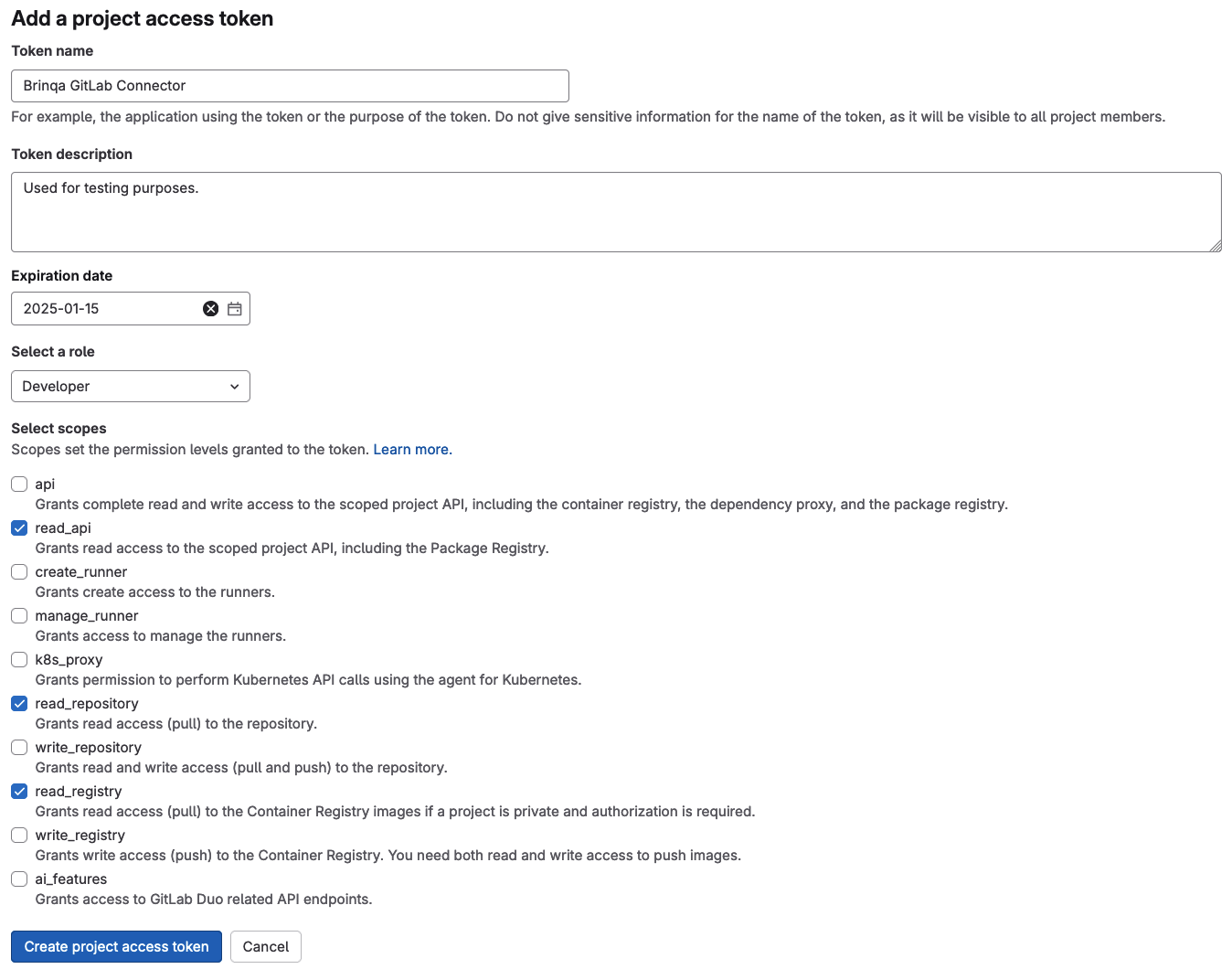
-
-
Click Create project access token.
Your new access token displays. You can not view the token again. Copy and save it to a safe and secure location.
Note: If you do not have permissions to create an access token, contact your GitLab administrator. For additional information, see GitLab documentation on Access Tokens, Projects, and Permissions and Roles.
Attribute mappings
Expand the sections below to view the mappings between the source and the Brinqa data model attributes:
Code Project
| Source Field Name | SDM Attribute |
|---|---|
allowMergeOnSkippedPipeline | ALLOW_MERGE_ON_SKIPPED_PIPELINE |
archived | ARCHIVED |
autocloseReferencedIssues | AUTO_CLOSE_REFERENCED_ISSUES |
avatarUrl | AVATAR_URL |
ciCdSettings.groupRunnersEnabled | GROUP_RUNNERS_ENABLED |
ciCdSettings.jobTokenScopeEnabled | CI_JOB_TOKEN_SCOPE_ENABLED |
ciCdSettings.keepLatestArtifact | KEEP_LATEST_ARTIFACT |
ciConfigPathOrDefault | CI_CONFIG_PATH |
containerRegistryEnabled | CONTAINER_REGISTRY_ENABLED |
createdAt | SOURCE_CREATED_DATE |
| Derived | CATEGORIES |
description | DESCRIPTION |
forkingAccessLevel.stringValue | FORKING_ACCESS_LEVEL |
forksCount | FORKS_COUNT |
fullPath | PATH_WITH_NAMESPACE |
| Hardcoded | SOURCE_STATUS |
hasJiraVulnerabilityIssueCreationEnabled | JIRA_VULNERABILITY_ISSUE_CREATION_ENABLED |
httpUrlToRepo | HTTP_URL |
id | UID |
importStatus | IMPORT_STATUS |
issuesAccessLevel.stringValue | ISSUES_ACCESS_LEVEL |
issuesEnabled | ISSUES_ENABLED |
jobsEnabled | JOBS_ENABLED |
labels | LABELS |
lastActivityAt | LAST_SEEN |
lfsEnabled | LFS_ENABLED |
mergeCommitTemplate | MERGE_COMMIT_TEMPLATE |
mergeRequestsAccessLevel.stringValue | MERGE_REQUESTS_ACCESS_LEVEL |
mergeRequestsEnabled | MERGE_REQUESTS_ENABLED |
name | NAME |
namespace | NAMESPACE |
namespace.rootNamespace.fullPath | TOP_LEVEL_GROUP_FULL_PATH |
namespace.rootNamespace.id | TOP_LEVEL_GROUP_ID |
namespace.rootNamespace.name | TOP_LEVEL_GROUP_NAME |
namespace.rootNamespace.webUrl | TOP_LEVEL_GROUP_WEB_URL |
nameWithNamespace | NAME_WITH_NAMESPACE |
onlyAllowMergeIfAllDiscussionsAreResolved | ONLY_ALLOW_MERGE_IF_ALL_DISCUSSIONS_ARE_RESOLVED |
onlyAllowMergeIfPipelineSucceeds | ONLY_ALLOW_MERGE_IF_PIPELINE_SUCCEEDS |
openIssuesCount | OPEN_ISSUES_COUNT |
path | PATH |
printingMergeRequestLinkEnabled | PRINTING_MERGE_REQUEST_LINK_ENABLED |
publicJobs | PUBLIC_JOBS |
removeSourceBranchAfterMerge | REMOVE_SOURCE_BRANCH_AFTER_MERGE |
repository.rootRef | DEFAULT_BRANCH |
requestAccessEnabled | REQUEST_ACCESS_ENABLED |
secretPushProtectionEnabled | SECRET_PUSH_PROTECTION_ENABLED |
securityAttributes[] | SECURITY_ATTRIBUTE_{CATEGORY} |
serviceDeskEnabled | SERVICE_DESK_ENABLED |
sharedRunnersEnabled | SHARED_RUNNERS_ENABLED |
snippetsEnabled | SNIPPETS_ENABLED |
squashCommitTemplate | SQUASH_COMMIT_TEMPLATE |
sshUrlToRepo | SSH_URL |
starCount | STAR_COUNT |
suggestionCommitMessage | SUGGESTION_COMMIT_MESSAGE |
| Sync timestamp | LAST_CAPTURED |
topics | TAGS |
topics | TOPICS |
updatedAt | SOURCE_LAST_MODIFIED |
visibility | VISIBILITY |
webUrl | URL |
webUrl | WEB_URL |
wikiEnabled | WIKI_ENABLED |
Code Repository
| Source Field Name | SDM Attribute |
|---|---|
| Default | STATUS |
| Derived | CATEGORIES |
id | UID |
mode | MODE |
name | NAME |
path | PATH |
| Sync timestamp | LAST_CAPTURED |
type | REPO_TYPE |
Package
| Source Field Name | SDM Attribute |
|---|---|
_links.webPath | LINKS_WEB_PATH |
createdAt | SOURCE_CREATED_DATE |
id | UID |
name | NAME |
normalizeAssetStatus(status) | SOURCE_STATUS |
packageType | CATEGORIES |
pipeline.createdAt | PIPELINE_CREATED_AT |
pipeline.iid | PIPELINE_IID |
pipeline.projectId | PIPELINE_PROJECT_ID |
pipeline.ref | PIPELINE_REF |
pipeline.sha | PIPELINE_SHA |
pipeline.source | PIPELINE_SOURCE |
pipeline.status | PIPELINE_STATUS |
pipeline.user.username | PIPELINE_USERNAME |
pipelines | PIPELINES |
pipelines.id | PIPELINE_ID |
pipelines.updatedAt | PIPELINE_UPDATED_AT |
pipelines.user.id | PIPELINE_USER_ID |
status | PACKAGE_STATUS |
| Sync timestamp | LAST_CAPTURED |
tags | TAGS |
updatedAt | SOURCE_LAST_MODIFIED |
version | LATEST_VERSION |
Person
| Source Field Name | SDM Attribute |
|---|---|
accessLevel.integerValue | ACCESS_LEVEL |
createdAt | SOURCE_CREATED_DATE |
createdBy.id | CREATED_BY |
createdBy.username | OWNER |
expiresAt | EXPIRES_AT |
membershipState | MEMBERSHIP_STATE |
| Sync timestamp | LAST_CAPTURED |
user.active | ACTIVE |
user.avatarUrl | AVATAR_URL |
user.id | UID |
user.lastActivityOn | LAST_ACTIVITY_DATE |
user.name | NAME |
user.publicEmail | |
user.state | STATE |
user.type | USER_TYPE |
user.username | USERNAME |
user.webUrl | WEB_URL |
Static Code Finding
| Source Field Name | SDM Attribute |
|---|---|
detectedAt | FIRST_FOUND |
dismissalReason | DISMISSAL_REASON |
dismissedAt | DISMISSED_AT |
dismissedBy.id | DISMISSED_BY |
falsePositive | FALSE_POSITIVE |
hasRemediations | REMEDIATION_AVAILABLE |
id | UID |
location.file | PATH |
location.startLine | LOCATION_START_LINE |
location.vulnerableClass | LOCATION_CLASS |
location.vulnerableMethod | LOCATION_METHOD |
| MD5 of title + CVE/CWE identifiers | TYPE |
project.id | TARGETS |
resolvedAt | RESOLVED_AT |
resolvedBy.id | RESOLVED_BY |
scanner.externalId | SCANNER_EXTERNAL_ID |
scanner.name | SCANNER_NAME |
scanner.vendor | SCANNER_VENDOR |
state | PROVIDER_STATUS |
| state + dismissalReason | SOURCE_STATUS |
| Sync timestamp | LAST_CAPTURED |
updatedAt | SOURCE_LAST_MODIFIED |
Static Code Finding Definition
| Source Field Name | SDM Attribute |
|---|---|
cveEnrichment.epssScore | EPSS_SCORE |
cveEnrichment.isKnownExploit | KNOWN_EXPLOITED |
cvss[].overallScore | CVSS_OVERALL_SCORES |
cvss[].vector | CVSS_VECTORS |
description | DESCRIPTION |
getFindingSeverityScore(severity) | SEVERITY_SCORE |
identifiers[].externalId (where externalType=cve) | CVE_IDS |
identifiers[].externalId (where externalType=cwe) | CWE_IDS |
identifiers[].url | REFERENCES |
| MD5 of title + CVE/CWE identifiers | UID |
normalizeFindingSeverity(severity) | SEVERITY |
reportType | CATEGORIES |
| Same as CVE_IDS | CVE_RECORDS |
| Same as CWE_IDS | WEAKNESSES |
severity | SOURCE_SEVERITY |
solution | RECOMMENDATION |
| Sync timestamp | LAST_CAPTURED |
title | NAME |
Secret Detection Finding
| Source Field Name | SDM Attribute |
|---|---|
detectedAt | FIRST_FOUND |
dismissalReason | DISMISSAL_REASON |
dismissedAt | DISMISSED_AT |
dismissedBy.id | DISMISSED_BY |
falsePositive | FALSE_POSITIVE |
findingTokenStatus | SECRET_TOKEN_STATUS |
hasRemediations | REMEDIATION_AVAILABLE |
id | UID |
location.file | PATH |
location.startLine | LOCATION_START_LINE |
| MD5 of title + CVE/CWE identifiers | TYPE |
project.id | TARGETS |
resolvedAt | RESOLVED_AT |
resolvedBy.id | RESOLVED_BY |
scanner.externalId | SCANNER_EXTERNAL_ID |
scanner.name | SCANNER_NAME |
scanner.vendor | SCANNER_VENDOR |
state | PROVIDER_STATUS |
| state + dismissalReason | SOURCE_STATUS |
| Sync timestamp | LAST_CAPTURED |
updatedAt | SOURCE_LAST_MODIFIED |
Secret Detection Finding Definition
| Source Field Name | SDM Attribute |
|---|---|
description | DESCRIPTION |
getFindingSeverityScore(severity) | SEVERITY_SCORE |
identifiers[].externalId (where externalType=cve) | CVE_IDS |
identifiers[].externalId (where externalType=cwe) | CWE_IDS |
identifiers[].url | REFERENCES |
| MD5 of title + CVE/CWE identifiers | UID |
normalizeFindingSeverity(severity) | SEVERITY |
reportType | CATEGORIES |
| Same as CVE_IDS | CVE_RECORDS |
| Same as CWE_IDS | WEAKNESSES |
severity | SOURCE_SEVERITY |
solution | RECOMMENDATION |
| Sync timestamp | LAST_CAPTURED |
title | NAME |
Open Source Finding
| Source Field Name | SDM Attribute |
|---|---|
detectedAt | FIRST_FOUND |
dismissalReason | DISMISSAL_REASON |
dismissedAt | DISMISSED_AT |
dismissedBy.id | DISMISSED_BY |
falsePositive | FALSE_POSITIVE |
hasRemediations | REMEDIATION_AVAILABLE |
id | UID |
location.file | PATH |
| MD5 of title + CVE/CWE identifiers | TYPE |
project.id | TARGETS |
resolvedAt | RESOLVED_AT |
resolvedBy.id | RESOLVED_BY |
scanner.externalId | SCANNER_EXTERNAL_ID |
scanner.name | SCANNER_NAME |
scanner.vendor | SCANNER_VENDOR |
state | PROVIDER_STATUS |
| state + dismissalReason | SOURCE_STATUS |
| Sync timestamp | LAST_CAPTURED |
updatedAt | SOURCE_LAST_MODIFIED |
Open Source Finding Definition
| Source Field Name | SDM Attribute |
|---|---|
cveEnrichment.epssScore | EPSS_SCORE |
cveEnrichment.isKnownExploit | KNOWN_EXPLOITED |
cvss[].overallScore | CVSS_OVERALL_SCORES |
cvss[].vector | CVSS_VECTORS |
description | DESCRIPTION |
getFindingSeverityScore(severity) | SEVERITY_SCORE |
identifiers[].externalId (where externalType=cve) | CVE_IDS |
identifiers[].externalId (where externalType=cwe) | CWE_IDS |
identifiers[].url | REFERENCES |
| MD5 of title + CVE/CWE identifiers | UID |
normalizeFindingSeverity(severity) | SEVERITY |
reportType | CATEGORIES |
| Same as CVE_IDS | CVE_RECORDS |
| Same as CWE_IDS | WEAKNESSES |
severity | SOURCE_SEVERITY |
solution | RECOMMENDATION |
| Sync timestamp | LAST_CAPTURED |
title | NAME |
Dynamic Code Finding
| Source Field Name | SDM Attribute |
|---|---|
location.hostname | LOCATION_HOSTNAME |
location.param | LOCATION_PARAM |
location.path | LOCATION_URL_PATH |
location.requestMethod | LOCATION_REQUEST_METHOD |
The location attributes are declared once in BaseFinding, so all four finding models share a single
attribute schema. LOCATION_URL_PATH, LOCATION_HOSTNAME, LOCATION_PARAM, and LOCATION_REQUEST_METHOD are therefore selectable on
Static Code Finding, Secret Detection Finding, and Open Source Finding as well, where they are always
empty — GitLab only reports URL-shaped locations for DAST. The reverse holds for the file-based
location attributes on Dynamic Code Finding.
Dynamic Code Finding Definition
| Source Field Name | SDM Attribute |
|---|---|
cveEnrichment.epssScore | EPSS_SCORE |
cveEnrichment.isKnownExploit | KNOWN_EXPLOITED |
cvss[].overallScore | CVSS_OVERALL_SCORES |
cvss[].vector | CVSS_VECTORS |
description | DESCRIPTION |
getFindingSeverityScore(severity) | SEVERITY_SCORE |
identifiers[].externalId (where externalType=cve) | CVE_IDS |
identifiers[].externalId (where externalType=cwe) | CWE_IDS |
identifiers[].url | REFERENCES |
| MD5 of title + CVE/CWE identifiers | UID |
normalizeFindingSeverity(severity) | SEVERITY |
reportType | CATEGORIES |
| Same as CVE_IDS | CVE_RECORDS |
| Same as CWE_IDS | WEAKNESSES |
severity | SOURCE_SEVERITY |
solution | RECOMMENDATION |
| Sync timestamp | LAST_CAPTURED |
title | NAME |
Operations & API
Expand each connector object to see its operation options, delta-sync behavior, and the API it uses. See connector operation options for how to apply operation options (keys and values are case-sensitive).
Code Project
Operation options
| Option | Type | Default | Description |
|---|---|---|---|
visibility | String | — | Filter by visibility (public, internal, private) |
projectFetchThreads | Integer | 4 | Number of project batches hydrated concurrently during the shared project enumeration. Read by whichever model triggers that enumeration, so it applies to Code Repository, Package, Person and the finding models too. Separate from parallelismLevel, which governs those models' per-project fan-out — hydrating project detail is the heaviest query the connector issues, so it is tuned on its own. |
additionalAttribute | Boolean | false | Request the version-gated project field secretPushProtectionEnabled (GitLab 17.1+). Off by default because GitLab fails the whole query if the field is absent from the instance schema. See Version-Gated Attributes. |
Delta sync
Not supported. The connector performs a full sync of Code Project on every run and applies no incremental date filter.
API
- Type: GraphQL query · Endpoint:
POST /api/graphql - Default filters:
membership: true
query($first: Int!, $after: String, $membership: Boolean, $visibilityLevel: VisibilityLevelsEnum) {
  page: projects(first: $first, after: $after, membership: $membership, visibilityLevel: $visibilityLevel) {
    pageInfo { endCursor hasNextPage }
    nodes { id }
  }
}
Code Repository
Operation options
| Option | Type | Default | Description |
|---|---|---|---|
ref | String | — | Git ref (branch/tag) |
path | String | — | Path within repository |
recursive | Boolean | — | Recurse into subdirectories |
Delta sync
Not supported. The connector performs a full sync of Code Repository on every run and applies no incremental date filter.
API
- Type: GraphQL query (two queries per project: trees + blobs) · Endpoint:
POST /api/graphql
query($fullPath: ID!, $first: Int!, $after: String, $ref: String, $path: String, $recursive: Boolean) {
  project(fullPath: $fullPath) {
    repository {
      tree(ref: $ref, path: $path, recursive: $recursive) {
        page: trees(first: $first, after: $after) {
          pageInfo { endCursor hasNextPage }
          nodes { id name path type flatPath }
        }
      }
    }
  }
}
Package
Operation options
| Option | Type | Default | Description |
|---|---|---|---|
status | String | — | Filter by status (DEFAULT, HIDDEN, PROCESSING, ERROR, PENDING_DESTRUCTION) |
Delta sync
Not supported. The connector performs a full sync of Package on every run and applies no incremental date filter.
API
- Type: GraphQL query · Endpoint:
POST /api/graphql
query($fullPath: ID!, $first: Int!, $after: String, $status: PackageStatus) {
  project(fullPath: $fullPath) {
    page: packages(first: $first, after: $after, status: $status) {
      pageInfo { endCursor hasNextPage }
      nodes {
        id name version packageType status
        createdAt updatedAt
        _links { webPath }
        tags { nodes { name } }
        pipelines {
          nodes {
            id iid sha ref status source createdAt updatedAt
            project { id }
            user { id username }
          }
        }
      }
    }
  }
}
Person
Operation options
This object does not support any operation options.
Delta sync
Not supported. The connector performs a full sync of Person on every run and applies no incremental date filter.
API
- Type: GraphQL query · Endpoint:
POST /api/graphql
query($fullPath: ID!, $first: Int!, $after: String) {
  project(fullPath: $fullPath) {
    page: projectMembers(first: $first, after: $after) {
      pageInfo { endCursor hasNextPage }
      nodes {
        id accessLevel { integerValue stringValue }
        createdAt expiresAt
        user { id name username state webUrl avatarUrl
               type publicEmail active lastActivityOn }
        createdBy { id username }
      }
    }
  }
}
Static Code Finding
Operation options
| Option | Type | Default | Description |
|---|---|---|---|
severity | String | — | Filter by severity (INFO, UNKNOWN, LOW, MEDIUM, HIGH, CRITICAL) |
projectFullPath | String | — | Comma-separated list of GitLab project full paths (e.g., my-group/my-project, my-group/other-project). When set, finding sync is scoped to only the specified projects, bypassing full project enumeration. |
additionalAttribute | Boolean | false | Request the version-gated vulnerability fields GitLab exposes only on recent versions or higher tiers. See Version-Gated Attributes. |
Delta sync
Not supported. The connector performs a full sync of Static Code Finding on every run and applies no incremental date filter.
API
- Type: GraphQL query · Endpoint:
POST /api/graphql - Default filters:
reportType: [SAST]
query($fullPath: ID!, $first: Int!, $after: String, $reportType: [VulnerabilityReportType!], $severity: [VulnerabilitySeverity!]) {
  project(fullPath: $fullPath) {
    page: vulnerabilities(first: $first, after: $after, reportType: $reportType, severity: $severity) {
      pageInfo { endCursor hasNextPage }
      nodes {
        id title state dismissalReason severity reportType
        detectedAt updatedAt
        resolvedAt resolvedBy { id }
        dismissedAt dismissedBy { id }
        hasRemediations
        scanner { externalId name vendor }
        identifiers { name url externalId externalType }
        project { id name fullPath }
        location {
          ... on VulnerabilityLocationDast {
            hostname param path requestMethod
          }
          ... on VulnerabilityLocationSast {
            file startLine vulnerableClass vulnerableMethod
          }
          ... on VulnerabilityLocationDependencyScanning {
            file dependency { package { name } version }
          }
          ... on VulnerabilityLocationSecretDetection {
            file startLine
          }
        }
        description solution falsePositive
        # When `additionalAttribute` is on, model-specific version-gated fields are appended here:
        #   findingTokenStatus                              (Secret Detection Finding)
        #   cvss { overallScore vector version }            (Static Code / Open Source Finding Definition)
        #   cveEnrichment { epssScore isKnownExploit }      (Static Code / Open Source Finding Definition)
      }
    }
  }
}
Static Code Finding Definition
Operation options
| Option | Type | Default | Description |
|---|---|---|---|
severity | String | — | Filter by severity |
projectFullPath | String | — | Comma-separated list of GitLab project full paths. When set, scopes finding definition sync to only the specified projects. |
additionalAttribute | Boolean | false | Request the version-gated vulnerability fields GitLab exposes only on recent versions or higher tiers. See Version-Gated Attributes. |
Delta sync
Not supported. The connector performs a full sync of Static Code Finding Definition on every run and applies no incremental date filter.
API
- Type: GraphQL query (reuses Static Code Finding vulnerability data, de-duplicated by title plus CVE/CWE identifiers) · Endpoint:
POST /api/graphql - Default filters:
reportType: [SAST]
query($fullPath: ID!, $first: Int!, $after: String, $reportType: [VulnerabilityReportType!], $severity: [VulnerabilitySeverity!]) {
  project(fullPath: $fullPath) {
    page: vulnerabilities(first: $first, after: $after, reportType: $reportType, severity: $severity) {
      pageInfo { endCursor hasNextPage }
      nodes {
        id title state dismissalReason severity reportType
        detectedAt updatedAt
        resolvedAt resolvedBy { id }
        dismissedAt dismissedBy { id }
        hasRemediations
        scanner { externalId name vendor }
        identifiers { name url externalId externalType }
        project { id name fullPath }
        location {
          ... on VulnerabilityLocationSast {
            file startLine vulnerableClass vulnerableMethod
          }
          ... on VulnerabilityLocationDependencyScanning {
            file dependency { package { name } version }
          }
          ... on VulnerabilityLocationSecretDetection {
            file startLine
          }
        }
        description solution falsePositive
        # When `additionalAttribute` is on, model-specific version-gated fields are appended here:
        #   findingTokenStatus                              (Secret Detection Finding)
        #   cvss { overallScore vector version }            (Static Code / Open Source Finding Definition)
        #   cveEnrichment { epssScore isKnownExploit }      (Static Code / Open Source Finding Definition)
      }
    }
  }
}
De-duplication is last-write-wins: when several vulnerabilities resolve to the same definition key, the one processed last supplies the definition's DESCRIPTION, SEVERITY, SOURCE_SEVERITY,
SEVERITY_SCORE, RECOMMENDATION, and REFERENCES. Project syncs are fanned out in parallel, so if GitLab reports differing values for records sharing a key, which one lands is not guaranteed to be stable from one sync to the next. NAME and CATEGORIES are unaffected — the title is part of the key and the report type is fixed per model. REFERENCES is worth calling out: it is drawn from every identifier GitLab attaches to the record, not just the canonical CVE/CWE identifiers that form the key, so two records sharing a key can still carry different reference links.
Secret Detection Finding
Operation options
| Option | Type | Default | Description |
|---|---|---|---|
severity | String | — | Filter by severity (INFO, UNKNOWN, LOW, MEDIUM, HIGH, CRITICAL) |
projectFullPath | String | — | Comma-separated list of GitLab project full paths (e.g., my-group/my-project, my-group/other-project). When set, finding sync is scoped to only the specified projects, bypassing full project enumeration. |
additionalAttribute | Boolean | false | Request the version-gated vulnerability fields GitLab exposes only on recent versions or higher tiers. See Version-Gated Attributes. |
Delta sync
Not supported. The connector performs a full sync of Secret Detection Finding on every run and applies no incremental date filter.
API
- Type: GraphQL query · Endpoint:
POST /api/graphql - Default filters:
reportType: [SECRET_DETECTION]
query($fullPath: ID!, $first: Int!, $after: String, $reportType: [VulnerabilityReportType!], $severity: [VulnerabilitySeverity!]) {
  project(fullPath: $fullPath) {
    page: vulnerabilities(first: $first, after: $after, reportType: $reportType, severity: $severity) {
      pageInfo { endCursor hasNextPage }
      nodes {
        id title state dismissalReason severity reportType
        detectedAt updatedAt
        resolvedAt resolvedBy { id }
        dismissedAt dismissedBy { id }
        hasRemediations
        scanner { externalId name vendor }
        identifiers { name url externalId externalType }
        project { id name fullPath }
        location {
          ... on VulnerabilityLocationSast {
            file startLine vulnerableClass vulnerableMethod
          }
          ... on VulnerabilityLocationDependencyScanning {
            file dependency { package { name } version }
          }
          ... on VulnerabilityLocationSecretDetection {
            file startLine
          }
        }
        description solution falsePositive
        # When `additionalAttribute` is on, model-specific version-gated fields are appended here:
        #   findingTokenStatus                              (Secret Detection Finding)
        #   cvss { overallScore vector version }            (Static Code / Open Source Finding Definition)
        #   cveEnrichment { epssScore isKnownExploit }      (Static Code / Open Source Finding Definition)
      }
    }
  }
}
LOCATION_CLASS and LOCATION_METHOD are not populated for this model. The connector's query requests only file and startLine on the VulnerabilityLocationSecretDetection fragment (see the query below), so the two class/method attributes — populated for
Static Code Finding, whose fragment does request them — are left unset here.
Secret Detection Finding Definition
Operation options
| Option | Type | Default | Description |
|---|---|---|---|
severity | String | — | Filter by severity |
projectFullPath | String | — | Comma-separated list of GitLab project full paths. When set, scopes finding definition sync to only the specified projects. |
additionalAttribute | Boolean | false | Request the version-gated vulnerability fields GitLab exposes only on recent versions or higher tiers. See Version-Gated Attributes. |
Delta sync
Not supported. The connector performs a full sync of Secret Detection Finding Definition on every run and applies no incremental date filter.
API
- Type: GraphQL query (reuses Secret Detection Finding vulnerability data, de-duplicated by title plus CVE/CWE identifiers) · Endpoint:
POST /api/graphql - Default filters:
reportType: [SECRET_DETECTION]
query($fullPath: ID!, $first: Int!, $after: String, $reportType: [VulnerabilityReportType!], $severity: [VulnerabilitySeverity!]) {
  project(fullPath: $fullPath) {
    page: vulnerabilities(first: $first, after: $after, reportType: $reportType, severity: $severity) {
      pageInfo { endCursor hasNextPage }
      nodes {
        id title state dismissalReason severity reportType
        detectedAt updatedAt
        resolvedAt resolvedBy { id }
        dismissedAt dismissedBy { id }
        hasRemediations
        scanner { externalId name vendor }
        identifiers { name url externalId externalType }
        project { id name fullPath }
        location {
          ... on VulnerabilityLocationSast {
            file startLine vulnerableClass vulnerableMethod
          }
          ... on VulnerabilityLocationDependencyScanning {
            file dependency { package { name } version }
          }
          ... on VulnerabilityLocationSecretDetection {
            file startLine
          }
        }
        description solution falsePositive
        # When `additionalAttribute` is on, model-specific version-gated fields are appended here:
        #   findingTokenStatus                              (Secret Detection Finding)
        #   cvss { overallScore vector version }            (Static Code / Open Source Finding Definition)
        #   cveEnrichment { epssScore isKnownExploit }      (Static Code / Open Source Finding Definition)
      }
    }
  }
}
Secret detection vulnerabilities rarely carry CVE or CWE identifiers, so CVE_IDS, CVE_RECORDS,
CWE_IDS, WEAKNESSES, and REFERENCES are frequently absent on this model. When no identifiers are returned, the definition key is the hash of the title alone — which means secret detection findings sharing a title collapse into a single definition more often than the other finding types.
This model does not publish the CVSS / CVE-enrichment columns (CVSS_OVERALL_SCORES, CVSS_VECTORS, EPSS_SCORE, KNOWN_EXPLOITED) — secret detection findings carry no CVE/CVSS data. When the additionalAttribute option is on, its query still requests findingTokenStatus, but only because it shares one raw vulnerability store with the Secret Detection Finding; no column is mapped from it here.
De-duplication is last-write-wins: when several vulnerabilities resolve to the same definition key, the one processed last supplies the definition's DESCRIPTION, SEVERITY, SOURCE_SEVERITY,
SEVERITY_SCORE, RECOMMENDATION, and REFERENCES. Project syncs are fanned out in parallel, so if GitLab reports differing values for records sharing a key, which one lands is not guaranteed to be stable from one sync to the next. NAME and CATEGORIES are unaffected — the title is part of the key and the report type is fixed per model. REFERENCES is worth calling out: it is drawn from every identifier GitLab attaches to the record, not just the canonical CVE/CWE identifiers that form the key, so two records sharing a key can still carry different reference links.
Open Source Finding
Operation options
| Option | Type | Default | Description |
|---|---|---|---|
severity | String | — | Filter by severity (INFO, UNKNOWN, LOW, MEDIUM, HIGH, CRITICAL) |
projectFullPath | String | — | Comma-separated list of GitLab project full paths (e.g., my-group/my-project, my-group/other-project). When set, finding sync is scoped to only the specified projects, bypassing full project enumeration. |
additionalAttribute | Boolean | false | Request the version-gated vulnerability fields GitLab exposes only on recent versions or higher tiers. See Version-Gated Attributes. |
Delta sync
Not supported. The connector performs a full sync of Open Source Finding on every run and applies no incremental date filter.
API
- Type: GraphQL query · Endpoint:
POST /api/graphql - Default filters:
reportType: [DEPENDENCY_SCANNING]
query($fullPath: ID!, $first: Int!, $after: String, $reportType: [VulnerabilityReportType!], $severity: [VulnerabilitySeverity!]) {
  project(fullPath: $fullPath) {
    page: vulnerabilities(first: $first, after: $after, reportType: $reportType, severity: $severity) {
      pageInfo { endCursor hasNextPage }
      nodes {
        id title state dismissalReason severity reportType
        detectedAt updatedAt
        resolvedAt resolvedBy { id }
        dismissedAt dismissedBy { id }
        hasRemediations
        scanner { externalId name vendor }
        identifiers { name url externalId externalType }
        project { id name fullPath }
        location {
          ... on VulnerabilityLocationDast {
            hostname param path requestMethod
          }
          ... on VulnerabilityLocationSast {
            file startLine vulnerableClass vulnerableMethod
          }
          ... on VulnerabilityLocationDependencyScanning {
            file dependency { package { name } version }
          }
          ... on VulnerabilityLocationSecretDetection {
            file startLine
          }
        }
        description solution falsePositive
        # When `additionalAttribute` is on, model-specific version-gated fields are appended here:
        #   findingTokenStatus                              (Secret Detection Finding)
        #   cvss { overallScore vector version }            (Static Code / Open Source Finding Definition)
        #   cveEnrichment { epssScore isKnownExploit }      (Static Code / Open Source Finding Definition)
      }
    }
  }
}
LOCATION_START_LINE, LOCATION_CLASS, and LOCATION_METHOD are not populated for this model. GitLab's VulnerabilityLocationDependencyScanning fragment describes the affected dependency rather than source coordinates, and the connector's query requests file and the dependency object from it (see the query below), so only PATH is derived from the location.
Open Source Finding Definition
Operation options
| Option | Type | Default | Description |
|---|---|---|---|
severity | String | — | Filter by severity |
projectFullPath | String | — | Comma-separated list of GitLab project full paths. When set, scopes finding definition sync to only the specified projects. |
additionalAttribute | Boolean | false | Request the version-gated vulnerability fields GitLab exposes only on recent versions or higher tiers. See Version-Gated Attributes. |
Delta sync
Not supported. The connector performs a full sync of Open Source Finding Definition on every run and applies no incremental date filter.
API
- Type: GraphQL query (reuses Open Source Finding vulnerability data, de-duplicated by title plus CVE/CWE identifiers) · Endpoint:
POST /api/graphql - Default filters:
reportType: [DEPENDENCY_SCANNING]
query($fullPath: ID!, $first: Int!, $after: String, $reportType: [VulnerabilityReportType!], $severity: [VulnerabilitySeverity!]) {
  project(fullPath: $fullPath) {
    page: vulnerabilities(first: $first, after: $after, reportType: $reportType, severity: $severity) {
      pageInfo { endCursor hasNextPage }
      nodes {
        id title state dismissalReason severity reportType
        detectedAt updatedAt
        resolvedAt resolvedBy { id }
        dismissedAt dismissedBy { id }
        hasRemediations
        scanner { externalId name vendor }
        identifiers { name url externalId externalType }
        project { id name fullPath }
        location {
          ... on VulnerabilityLocationSast {
            file startLine vulnerableClass vulnerableMethod
          }
          ... on VulnerabilityLocationDependencyScanning {
            file dependency { package { name } version }
          }
          ... on VulnerabilityLocationSecretDetection {
            file startLine
          }
        }
        description solution falsePositive
        # When `additionalAttribute` is on, model-specific version-gated fields are appended here:
        #   findingTokenStatus                              (Secret Detection Finding)
        #   cvss { overallScore vector version }            (Static Code / Open Source Finding Definition)
        #   cveEnrichment { epssScore isKnownExploit }      (Static Code / Open Source Finding Definition)
      }
    }
  }
}
Dependency scanning findings are the richest source of CVE and CWE identifiers, so this model is where CVE_IDS / CVE_RECORDS / CWE_IDS / WEAKNESSES are most consistently populated. Because GitLab reuses one generic advisory title across many CVEs, a single title commonly yields several distinct definition records here — one per CVE/CWE combination.
De-duplication is last-write-wins: when several vulnerabilities resolve to the same definition key, the one processed last supplies the definition's DESCRIPTION, SEVERITY, SOURCE_SEVERITY,
SEVERITY_SCORE, RECOMMENDATION, and REFERENCES. Project syncs are fanned out in parallel, so if GitLab reports differing values for records sharing a key, which one lands is not guaranteed to be stable from one sync to the next. NAME and CATEGORIES are unaffected — the title is part of the key and the report type is fixed per model. REFERENCES is worth calling out: it is drawn from every identifier GitLab attaches to the record, not just the canonical CVE/CWE identifiers that form the key, so two records sharing a key can still carry different reference links.
Dynamic Code Finding
Operation options
| Option | Type | Default | Description |
|---|---|---|---|
severity | String | — | Filter by severity (INFO, UNKNOWN, LOW, MEDIUM, HIGH, CRITICAL) |
projectFullPath | String | — | Comma-separated list of GitLab project full paths (e.g., my-group/my-project, my-group/other-project). When set, finding sync is scoped to only the specified projects, bypassing full project enumeration. |
Delta sync
Not supported. The connector performs a full sync of Dynamic Code Finding on every run and applies no incremental date filter.
API
- Type: GraphQL query · Endpoint:
POST /api/graphql - Default filters:
reportType: [DAST] - Query: Same as Static Code Finding.
Dynamic Code Finding Definition
Operation options
| Option | Type | Default | Description |
|---|---|---|---|
severity | String | — | Filter by severity |
projectFullPath | String | — | Comma-separated list of GitLab project full paths. When set, scopes finding definition sync to only the specified projects. |
Delta sync
Not supported. The connector performs a full sync of Dynamic Code Finding Definition on every run and applies no incremental date filter.
API
- Type: GraphQL query (reuses Dynamic Code Finding vulnerability data, de-duplicated by name) · Endpoint:
POST /api/graphql - Default filters:
reportType: [DAST] - Query: Same as Dynamic Code Finding, de-duplicated by name.
Changelog
The GitLab connector has undergone the following changes:
| Version | Description | Migration Steps |
|---|---|---|
| 3.1.8 | New Features - Person now carries four additional attributes read from the GitLab user: User Type ( type), Email (publicEmail), Active (active), and Last Activity Date (lastActivityOn). Public email and last-activity date are populated only where the user has exposed them. - Code Project now carries Jira Vulnerability Issue Creation Enabled ( hasJiraVulnerabilityIssueCreationEnabled) and Secret Push Protection Enabled (secretPushProtectionEnabled). Jira issue creation is a long-standing field, requested unconditionally. Secret push protection is gated — see the note on additionalAttribute below. - Package now carries Source Last Modified ( updatedAt), the package's last-updated timestamp. - All three finding models (Static Code, Secret Detection, Open Source) now carry lifecycle fields: First Found ( detectedAt), Source Last Modified (updatedAt), Resolved At/ Resolved By (resolvedAt/resolvedBy), Dismissed At/ Dismissed By (dismissedAt/dismissedBy), and Remediation Available (hasRemediations). - Secret Detection Finding additionally carries Secret Token Status ( findingTokenStatus), the status of the leaked secret's token. This field is gated — see the note on additionalAttribute below. - Open Source and Static Code Finding Definitions now carry CVSS Overall Scores ( cvss[].overallScore), CVSS Vectors (cvss[].vector), EPSS Score (cveEnrichment.epssScore), and Known Exploited (cveEnrichment.isKnownExploit). These are omitted from Secret Detection Finding Definitions, which carry no CVE/CVSS data. These fields are gated — see the note on additionalAttribute below. - A single additionalAttribute operation option (Boolean, default false) gates the fields that GitLab only exposes on recent versions or higher tiers: the project field secretPushProtectionEnabled and the finding fields findingTokenStatus, cvss, and cveEnrichment. Why it is gated and off by default: these fields are requested inline in the shared project and vulnerability GraphQL queries, and GitLab fails the entire query with a validation error if it names a field that is absent from that instance's schema — which would break the whole project enumeration (and every project-scoped model that rides on it) or the whole findings sync on any instance that does not define the field. Rather than one option per field, they are grouped under one switch — an operator either knows their instance is recent/licensed enough for all of them or leaves them all off. When off, the queries do not name the fields and the columns are simply absent; when on, the partial selection is appended to the query. Enable it only when the target instance is known to support these fields (verified against GitLab Ultimate SaaS, EE 19.3.0-pre). Minimum GitLab version per gated field: Models it applies to: the option is exposed on Code Project and on all three finding syncs (Static Code Finding, Secret Detection Finding, Open Source Finding) and their Finding Definition syncs (Static Code Finding Definition, Secret Detection Finding Definition, Open Source Finding Definition) — every model that requests a gated field in its shared query. It surfaces SECRET_PUSH_PROTECTION_ENABLED on Code Project, the CVSS/CVE-enrichment attributes (CVSS_OVERALL_SCORES, CVSS_VECTORS, EPSS_SCORE, KNOWN_EXPLOITED) on the Static Code and Open Source Finding Definitions, and SECRET_TOKEN_STATUS on Secret Detection Finding. It has no effect on Code Repository, Package, or Person. (The Secret Detection Finding Definition requests findingTokenStatus in its query but publishes no column from it: it shares one raw vulnerability store with the Secret Detection Finding, so its query must stay a superset of what the finding maps.) | N/A |
| 3.1.7 | New Features DAST Findings Added support for DAST (Dynamic Application Security Testing) findings. The connector can now synchronize GitLab DAST vulnerabilities — those found by scanning a running application — as two new models, Dynamic Code Finding and Dynamic Code Finding Definition. Because they are separate models, DAST data can be selectively included in or excluded from a sync configuration. Both filter GitLab's vulnerability query on reportType: [DAST] and otherwise share the attribute set and operation options ( severity, projectFullPath) of the existing finding models. The new models are not enabled automatically — select them in the integration's sync configuration to begin collecting DAST data. DAST Location Attributes on Findings Findings gained four attributes describing where a DAST vulnerability was found. Unlike SAST and dependency findings, which point at a file and line, DAST findings point at a URL: Vulnerability Status on DAST Findings The dismissal-reason status mapping introduced in 3.1.4 applies to Dynamic Code Finding as well, so a dismissed DAST vulnerability is reported as "False positive" or "Risk accepted" rather than "Fixed", on the same terms as the other finding types. SSL / TLS Certificate Verification A new SSL / TLS setting can skip certificate verification when connecting to GitLab, for development and testing against instances with self-signed or otherwise untrusted certificates. It is off by default. | N/A |
| 3.1.6 | Bug Fixes Code Project Sync No Longer Lost to a Dropped Connection A single interrupted response from GitLab ended the entire Code Project sync. Project details are fetched in batches of up to a hundred, and when GitLab started sending one of those batches and then dropped the connection part-way through, that batch failed and took the whole sync down with it — discarding, on a large instance, twenty minutes of work and every project already collected. Other sources in the same run finished normally, so this showed up as Code Project alone refusing to complete. The connector now asks again when a response is cut short. If the batch keeps being dropped, it fetches the same projects in progressively smaller groups until they come through, so a response too large for GitLab to finish sending no longer costs a run. A project that genuinely cannot be fetched still fails the sync rather than being quietly omitted — a project missing from a sync reads downstream as a deletion — but the failure now names that one project, instead of the hundred it happened to be batched with. | N/A |
| 3.1.5 | New Features - A new Request timeout (secs) setting controls how long the connector waits for a GitLab response before giving up, up to a maximum of 1800 seconds. The wait was previously fixed at 60 seconds with no way to extend it, so on large instances the heaviest queries could exceed it and fail with a read timeout. The default is now 120 seconds. Improvements Faster Code Project Sync On an instance with roughly 25,000 projects, Code Project sync took 45–50 minutes. It issued about 250 requests for the full project record — every field, every label, every security attribute — strictly one after another, and each one took GitLab several seconds to answer. The sync now works in two steps. It first walks the project list asking only for project identifiers, which GitLab returns quickly, then fetches the full details for those projects in batches, several batches at a time. Both steps read the same projects under the same filters, so a sync covers exactly the same projects and attributes as before — only the expensive half now runs concurrently. The project list is built once per sync and shared, so Code Repository, Package, Person, and the finding models all start sooner as well. A new projectFetchThreads operation option sets how many batches are fetched at once, defaulting to 4. It is deliberately separate from the Parallel requests setting, which continues to govern the per-project work of the other models: fetching full project detail is the heaviest request the connector makes, so it is tuned on its own rather than inheriting a value chosen for lighter work. A batch that still cannot be fetched after retries fails the sync instead of being skipped, so a run never quietly omits projects. Two fields that were requested on every project but never used — a label's color, and whether a project's repository exists — are no longer requested. | N/A |
| 3.1.4 | New Features - Findings now carry a Dismissal Reason attribute — the reason GitLab recorded when a vulnerability was dismissed, present only on dismissed findings. Together with Provider Status, it makes visible exactly which GitLab values produced a given Brinqa status. - Finding Definitions now include a References attribute carrying the reference links GitLab supplies with each identifier (NVD, MITRE, and advisory pages). These links were previously fetched but discarded. Only http and https links are published, since these render as clickable links. Improvements - CVE and CWE identifiers are now accepted only in their canonical formats ( CVE-2021-44228, CWE-89). Malformed values returned by GitLab are dropped instead of being published as identifiers. - Person sync now processes projects in parallel and honors the connector's Parallel requests setting, matching the other project-scoped object types. Previously it fetched project members one project at a time on a single thread no matter how concurrency was configured, so on large GitLab instances Person was by far the slowest object type — on an instance with roughly 25,000 projects a single Person sync ran for hours and had to be cancelled before it could finish. Bug Fixes - A project whose members cannot be read no longer ends the entire Person sync. The failure is logged, that project is skipped, and members from every other project are still collected. Dismissed Vulnerabilities No Longer Reported as Fixed Dismissed vulnerabilities were reported as "Fixed". GitLab has four vulnerability states, but only two Source Status values were reachable before, so a vulnerability a team had dismissed — still present in the code, just accepted, mitigated, or judged a false positive — looked identical to one that had actually been remediated. The connector now reads GitLab's dismissal reason alongside the state and maps it to the appropriate status: Detected, Confirmed, and Resolved findings keep the status they had before; only dismissed findings change. This affects all three finding types — Static Code Finding, Secret Detection Finding, and Open Source Finding. Statuses are corrected on the next sync, with no action required. Any dashboards, filters, or risk rules that relied on dismissed GitLab findings appearing as "Fixed" should be updated to account for the "False positive" and "Risk accepted" statuses. Finding Definitions No Longer Collapse Distinct Vulnerabilities Finding Definitions were identified by the vulnerability title alone. GitLab reuses a single generic title across vulnerabilities that carry different CVE and CWE identifiers (for example, "Unsafe Deserialization in jackson-databind" spans six distinct CVEs), so every vulnerability sharing a title collapsed into one Definition record and only one arbitrary CVE/CWE combination survived — which is why CVE and CWE information appeared missing on Definitions. A Definition is now identified by a generated key derived from its title together with the CVE and CWE identifiers of the vulnerability, so each distinct combination gets its own record with its own identifiers. The title remains the Definition's displayed name. Findings pick up the new key during the same re-sync that rebuilds the Definitions — both sides derive it from the same formula, so no separate finding-side step is needed. Provider Status Visible on Findings Provider Status now appears on all three finding models. The attribute was populated on every finding but missing from the object schema, so GitLab's raw, unmodified vulnerability state was not visible in the UI and could not be compared against the normalized Source Status. Security Attribute Columns No Longer Break Data Warehouse Snapshots GitLab Security Attribute category names are free text, and two distinct categories could produce Code Project columns that the Data Warehouse treated as one. This happened either when punctuation and spacing normalized to the same name ( App Type and App-Type both became SECURITY_ATTRIBUTE_APP_TYPE), or when the names differed only in where a word boundary fell — the Data Warehouse converts a column name to camelCase and then compares case-insensitively, which erases the boundary an underscore carried, so App ID and AppId collided. The duplicate aborted the Data Warehouse snapshot for the entire Code Project model, not just the affected column, and nothing in the connector's own sync reported a problem. The only workaround was renaming the category in GitLab. The connector now checks each generated column name against the same rule the Data Warehouse applies and disambiguates collisions by appending the GitLab category ID: the first colliding category alphabetically keeps its existing column name, and each further one becomes, for example, SECURITY_ATTRIBUTE_APPID_1043 — where 1043 is that category's ID in GitLab, so it is clear which category the column belongs to. Every category syncs under its own column, the collision is recorded in the connector log, and Data Warehouse snapshots complete. Columns for categories that do not collide are unchanged, so existing attribute mappings keep working. Instances that do have colliding categories need the one-time attention described under Migration Required. | • Static Code Finding Definition, Secret Detection Finding Definition, Open Source Finding Definition: the record identifier changes from the vulnerability title to a generated key derived from the title plus its CVE/CWE identifiers. On the first sync after upgrading, Definition records are created under the new identifiers and the previous title-keyed records go stale. Findings pick up the new key in that same sync, so there is no separate finding-side step — Action: re-sync the connector, then purge the stale Finding Definition records for the three models above. Purging is a platform data-management operation on the model, not a connector setting; if it is not available to your account, raise a support request to have the title-keyed records removed. Until the purge runs, both the old and new Definition records are present, so Definition counts read roughly double and reports grouped by Definition show each vulnerability twice. Two things to check before the re-sync. Anything that filters or joins on a Definition's identifier — risk rules, dashboard filters, saved queries, API clients — is holding an old title-keyed value and goes empty the moment the new records land; re-point it at the Definition name, which still carries the vulnerability title unchanged. And if a sync is interrupted partway, the Definition store holds a mix of title-keyed and generated-key records; re-running the sync to completion, then purging, resolves it — no manual cleanup of the partial state is needed. To roll back, downgrade to 3.1.3 and re-sync: the connector returns to keying Definitions by title and rebuilds the title-keyed records. Purge the generated-key records left behind by 3.1.4, and be aware that the collapsing behavior this fix addresses returns with them. • Code Project: only on instances whose GitLab Security Attribute categories collide (see the security-attribute fix above). The later category of a colliding pair now syncs under a column suffixed with its GitLab category ID — a category that previously produced SECURITY_ATTRIBUTE_APPID becomes SECURITY_ATTRIBUTE_APPID_1043, and a pair that previously shared one column now produces two. Data stops flowing to the old column name, so a mapping bound to it goes empty — Action: refresh the Code Project schema (edit the connection and click Next), then map the suffixed column and re-point any attribute mapping that used the old name. Instances with no colliding categories are unaffected and need no action. |
| 3.1.3 | Security Attributes on Code Project Added support for GitLab Security Attributes. The connector discovers security attribute categories (e.g., Application Type, Leader) and syncs each as a multi-valued SECURITY_ATTRIBUTE_<CATEGORY> column on Code Project, where every value is a JSON object pairing the attribute's id and name. Categories are discovered at the top-level group rather than by scanning every project, so schema discovery stays fast on large instances. Requires GitLab Ultimate; on other tiers no columns are added and the sync runs normally. Security Attribute Group Path Setting Added an optional connector setting that scopes security-attribute discovery to one or more comma-separated top-level group paths. Left blank, the connector discovers categories across all top-level groups the access token belongs to. Reading a group's categories requires an appropriate role (Owner, Maintainer, or Security Manager) on that group; groups the token cannot read are skipped without failing the sync. Top-Level Group on Code Project Code Project now includes TOP_LEVEL_GROUP_ID, TOP_LEVEL_GROUP_NAME, TOP_LEVEL_GROUP_FULL_PATH, and TOP_LEVEL_GROUP_WEB_URL, identifying each project's top-level group — which also ties a project back to the group that owns its security attributes. Bug Fixes - Project labels are no longer dropped from Code Project on incremental (cache-served) syncs; they were previously lost when a project was read from the local cache instead of being freshly fetched. | N/A |
| 3.1.2 | Improvements - Custom attributes on the Code Project and Package models now register with the correct cross-connector consolidation priority (via the shared attribute helper), so connector-sourced values are consolidated consistently rather than treated as independent. Bug Fixes - Corrected the Package model's pipeline ID attributes ("Pipeline ID", "Pipeline project ID", "Pipeline user id") from numbers to text. GitLab returns these IDs as strings, so writing them into numeric attributes caused the Package sync to fail with an attribute type mismatch whenever a package had an associated pipeline. ("Pipeline IID" is genuinely numeric and is unchanged.) | • Package: the "Pipeline ID", "Pipeline project ID", and "Pipeline user id" attributes changed from numbers to text. Re-sync the GitLab connector to repopulate packages with the corrected type. |
| 3.1.1 | New Features - Added support for Secret Detection findings. The connector can now independently synchronize GitLab secret detection vulnerabilities (e.g., exposed API keys, tokens, and credentials) as separate Secret Detection Finding and Secret Detection Finding Definition models, enabling customers to selectively include or exclude secret scanning data from their sync configuration. Improvements - Added STATUS attribute to Code Repository model, defaulting to "active". | N/A |
| 3.1.0 | New Features - The connector now retrieves GitLab data through the GitLab GraphQL API, using cursor-based pagination for more reliable and efficient synchronization of projects, repositories, packages, users, and vulnerability findings. - Added a Custom Headers configuration option, letting you attach custom HTTP headers (for example, to satisfy a proxy or gateway) to every request the connector makes to GitLab. Improvements - The Code Project model's attribute set was modernized to align with the data available from the GraphQL API. A number of legacy attributes were dropped and replaced with current GitLab project fields, so project records now reflect GitLab's present-day schema. - The Parallel requests setting now controls the maximum number of parallel API requests per model sync, giving more predictable throughput when several models sync at once. | • Code Project: the project attribute set changed as part of the GraphQL migration, with several legacy attributes removed and replaced. Re-sync the GitLab connector so Code Project records are rebuilt with the current set of attributes and any stale attributes are cleared. |
| 3.0.2 | New Features - Added a Labels attribute to the Code Project model, capturing the labels defined on each GitLab project so they are available for filtering and reporting. | N/A |
| 3.0.1 | Bug Fixes - Corrected the Person model's "Created by" attribute from a number to text. GitLab can return this value in a form that does not fit a numeric attribute, which caused the Person sync to fail with an attribute type mismatch. | • Person: the "Created by" attribute changed from a number to text. Re-sync the GitLab connector to repopulate people with the corrected type. |
| 3.0.0 | Overview The GitLab connector integrates with GitLab to synchronize code projects, repositories, packages, users, and security findings from static code analysis (SAST) and open-source dependency scanning. Category: Application Security Models | N/A |