Data Backup Policies
This article describes how Brinqa backs up your data, ensuring that your valuable information remains safe and accessible.
Brinqa solution cloud architecture
Before diving into backup policies, let's first explore the architecture and components of Brinqa solution. The following diagram outlines how data flows into the Brinqa Platform, gets processed by the Cyber Risk app, and is then stored in one of two database types: Online Transaction Processing (OLTP) or Online Analytical Processing (OLAP):
-
OLTP: The primary data store that ingests and processes data through orchestration.
-
OLAP: Designed for delivering analytic datasets at speed and scale. The platform takes a complete snapshot of the data from OLTP and stores the results for use in analytics and dashboards.
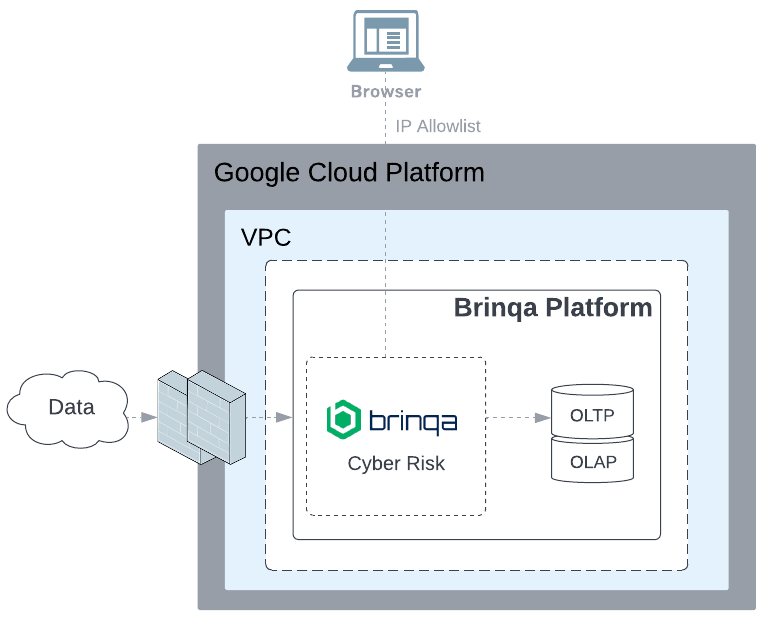
Figure 1. Brinqa solution cloud architecture diagram.
Backup policies
What data do we back up?
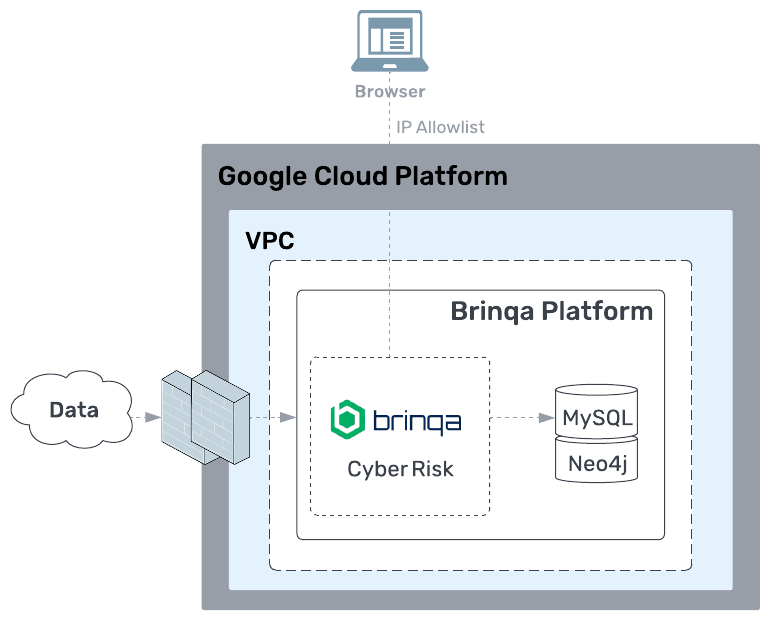
When it comes to backups, it's important to know exactly what data is being protected. Here's a breakdown of the types of data being backed up and their frequency:
How are the backups configured?
Backing up data involves various methods and strategies to ensure that critical information is securely stored and can be easily restored when needed. Here's a detailed look at how data is backed up, including the tools and techniques:
-
Full system snapshots are initiated by a snapshot policy set in Google Cloud Platform (GCP). The policy is configured to run every hour and retain snapshots for one week.
-
MySQL data backup is managed through a script that is executed by
cron. -
Neo4j data backup is managed through a script that is executed by
cron.
Where are the backups stored?
Brinqa stores all backups in GCP Cloud Storage, which provides a reliable, secure, and scalable solution that aligns with our data management strategy.
What is the retention period for all backup-related files?
The retention period refers to the length of time that backup data is kept before it is deleted or overwritten. Different types of data and business needs dictate how long each type of backup is stored:
-
Full system snapshots are kept for seven days.
-
MySQL data backup is stored indefinitely.
-
Neo4j data backup is stored indefinitely.